日本語
日本語  English
  简体中文
简体中文  Deutsch
  Español
  Français
  Italiano
  한국어
한국어  Polski
  Português
  Русский
  Türkçe
  Nederlands
  Tiếng Việt
  ไทย
ไทย 
Most sign makers specify static COB strips for channel letters. When a client asks for movement, specifically the running water or flowing water effect — the specification changes: strip IC type, controller compatibility, pixel count, and diffuser opacity all determine whether the effect actually works at installation. Getting one element wrong means the strip lights up white, flows only partially, or shows visible dots instead of smooth movement.
This guide covers strip selection, letter type compatibility, controller and color choice, power sizing, installation steps, and the mistakes that break the effect.
What Is a Running Water COB LED Strip?
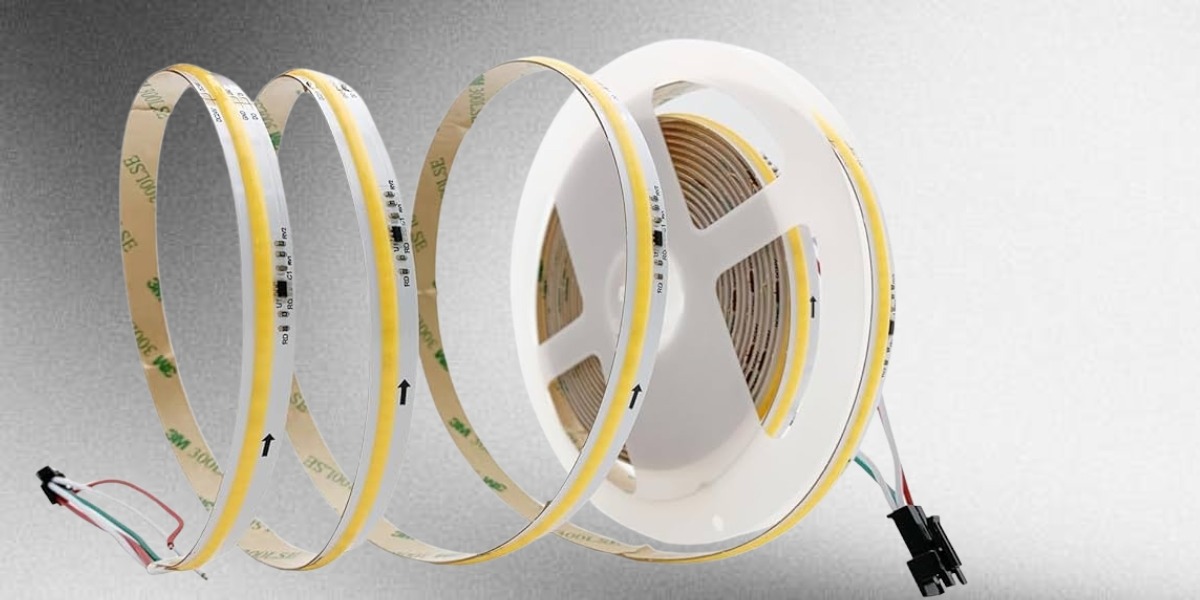
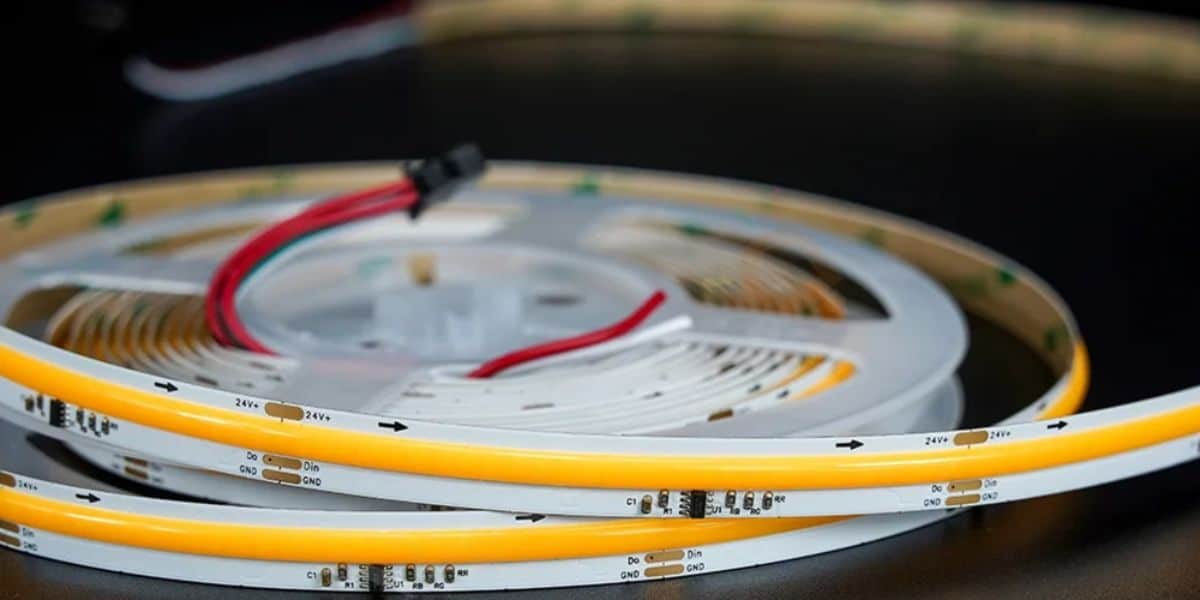
A running water COB LEDストリップ uses WS2811 integrated circuits to sequence brightness across multiple pixel groups, creating a directional movement effect that resembles flowing light inside a sign channel. The strip itself does not physically move. The effect is fully generated by a controller that sends timed data signals through the strip.
COB (Chip-on-Board) construction matters because it places LEDs densely across the PCB surface, creating a smooth, dotless output. At 320–576 LEDs per meter, this density prevents visible hotspots inside narrow letter channels and helps the motion read as one continuous flow instead of separate points of light.
Standard water flow LED strips produce the same flowing effect using simple brightness sequencing without IC chips — white light only, no addressable control. Running water COB LED strip uses WS2811 IC for pixel-level control, which produces a smoother effect at higher LED density and adds the option of dream color RGBIC variants. Both create the flowing water visual — the COB version gives sign makers greater output quality and color flexibility for letter sign applications.
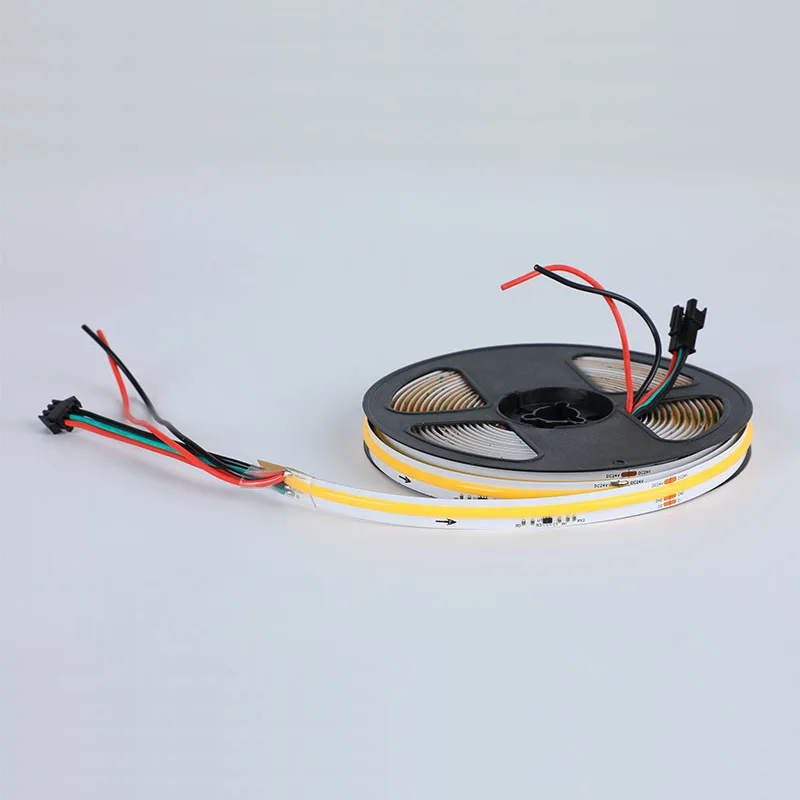
流水流動穂軸 LED ストリップ ライト
- メインモデル: FYA10T360C アドレス指定可能
- 1メートルあたりのLEDチップ数量: 360 チップ、576 チップ (サナン)
- ICタイプ: WS2811
- クリ: >90
- PCB幅: 10mm
- 色温度: 3000k/4000k/6000k/デュアルカラー(2700k & 6500k)
- 入力電圧: DC24V
- メートルあたりの電力: 360 チップ – 11W、576 チップ – 10W + 10W
- 切断可能な長さ: 360 チップ – 83.33 ミリメートル、576 チップ – 41.66 ミリメートル
- IP等級: IP20/IP54/IP65/IP67/IP68
- 保証: 3年
For a broader overview of flowing light strip types and how the effect is generated across different products, see our guide to the best LED lights for creating flowing light effects.
流水の穂軸はあなたの文字のサインで機能しますか? (決定ガイド)
すべての 3D 照らされた文字記号が流水の穂軸ストリップの恩恵を受けるわけではありません。 効果は、文字幅、チャネルの深さ、表示距離、文字の種類によって異なります。 指定する前に決定する方法は次のとおりです。
| Letter Type | Verdict | Min Channel Depth | Effect Quality | Key Condition |
| Front-Lit Channel Letters | Best Match | 20mm | Smooth directional glow through diffuser face | Letter height 100mm minimum — below this the effect is not readable at normal viewing distance |
| Acrylic Block Letters (Fully Illuminated) | Works Well | 20mm | Even COB fill across full face with clean motion | Milky white acrylic only — clear acrylic makes the effect visually chaotic |
| Halo-Lit / Backlit Letters | Not Recommended | — ね | Directional movement lost in wall diffusion | Strip faces backward — viewer sees only static glow regardless of speed setting |
| Open-Face / Exposed Strip Letters | Conditional | — ね | Raw chase effect visible directly | Entertainment and nightlife only — not suitable for retail or corporate signage |
Once you confirm the letter type works, the next decision is hardware — voltage, color temperature, controller type, and IP rating. This quick reference covers all four before you specify.
クイック選択ガイド
| Decision Point | Option A | Option B | Choose Based On |
| 電圧 | DC 12V | DC24V | Always choose 24V for letter signs — lower voltage drop over longer runs |
| カラー | Warm White 2700K–3000K | Cool White 6000K | Hospitality/restaurant → warm. Retail/corporate/gym → cool |
| Color (neutral) | Natural White 4000K | — ね | Best all-purpose commercial choice — works day and night, no warm or cool bias |
| コントローラー | RF Touch Panel | SPI Pixel Controller | Single letter or small sign → RF. Multi-letter or facade → SPI |
| IP等級 | IP20 | IP65/IP67 | Indoor letters → IP20. Outdoor or semi-outdoor → IP65 minimum |
| PCB幅 | 10mm | 12mm | White effect → 10mm. Dream color RGBIC → 12mm |
How the Flowing Water Effect Is Generated
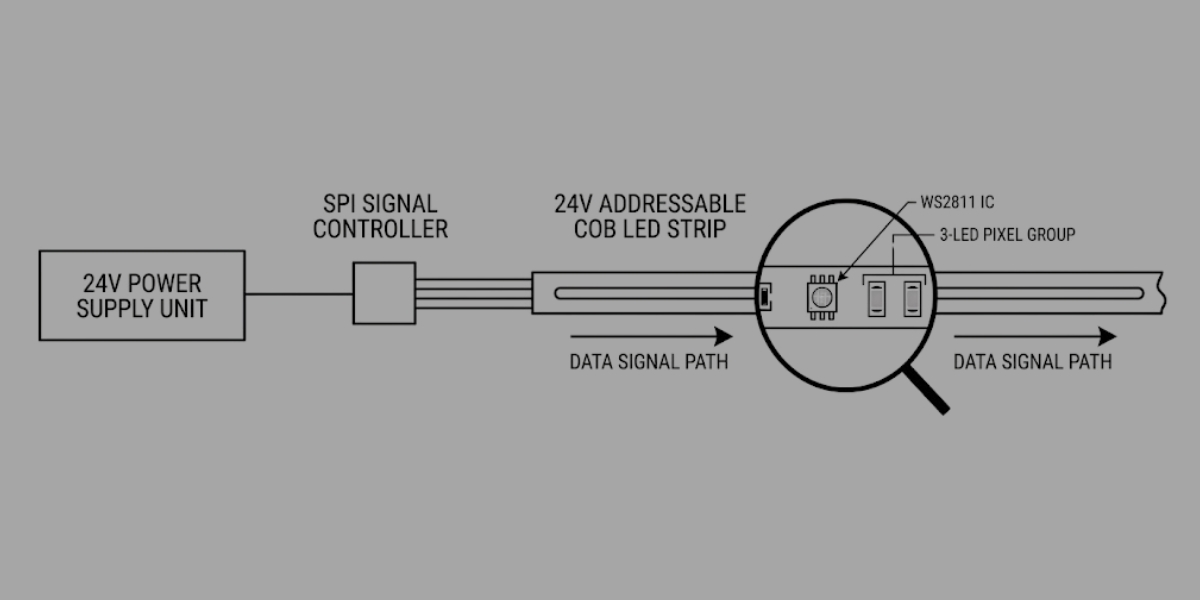
The strip is passive — it does nothing without a controller. The flowing water effect is entirely created by the SPI controller sending timed data signals to each WS2811 IC along the strip. Understanding this prevents the most common installation mistake: buying the correct strip but pairing it with an incompatible controller.
How the Effect Works — Step by Step
- Power supply converts AC mains to DC 24V and feeds the strip via the power wire — stable voltage keeps brightness and effect consistency uniform across the full sign length.
- SPI controller sends timed data signals down the separate data wire — this signal controls sequence timing, brightness level, speed, and movement direction for every IC group independently.
- WS2811 IC receives the signal and adjusts brightness of its 3-LED group — each IC responds separately, which is what creates controlled movement rather than a static, uniform illumination.
- Each IC group brightens and dims in sequence along the strip length — this ordered progression from one end to the other is what creates the directional flow illusion.
- Speed setting on the controller determines how fast the sequence travels — 20–30% speed produces a calm, water-like appearance suited to hospitality and retail environments; 70–100% produces a fast chase effect suited to entertainment and nightlife.
- Direction reversal is adjustable on most SPI controllers — useful when multiple letter sets need to flow toward a central focal point rather than all flowing in the same direction across a facade.
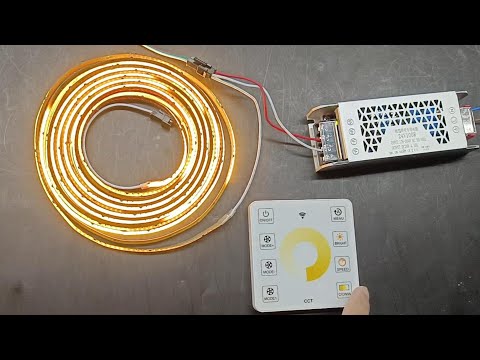
Controller Comparison
| Controller Type | IC Compatible | Effect Modes | Max Pixels | Cable Signal Limit | 最高のアプリケーション |
| RF Touch Panel | WS2811 | 376 modes | 2,048 | 10m | Single letter, small sign sets |
| SPI Pixel Controller | WS2811/WS2812B | Full programmable | 2,048+ | 10m | Multi-letter facade installations |
| DMX512 Decoder | All addressable | Professional scene control | Unlimited with decoders | 30m+ | Large commercial signage systems |
SPI data signal degrades beyond 10 meters on a single run. Any letter sign installation where total strip run exceeds 10m requires an SPI signal amplifier at the 8–10m point on the data line. Failure to add one results in flickering or frozen effect in the last letters of the run.
Color Temperature Selection for Letter Sign Applications
Color temperature affects how the flowing effect reads at viewing distance and how it integrates with the surrounding environment. It also changes perceived motion speed. Cooler tones make movement appear faster and sharper, while warmer tones soften transitions and make the same speed setting feel slower.
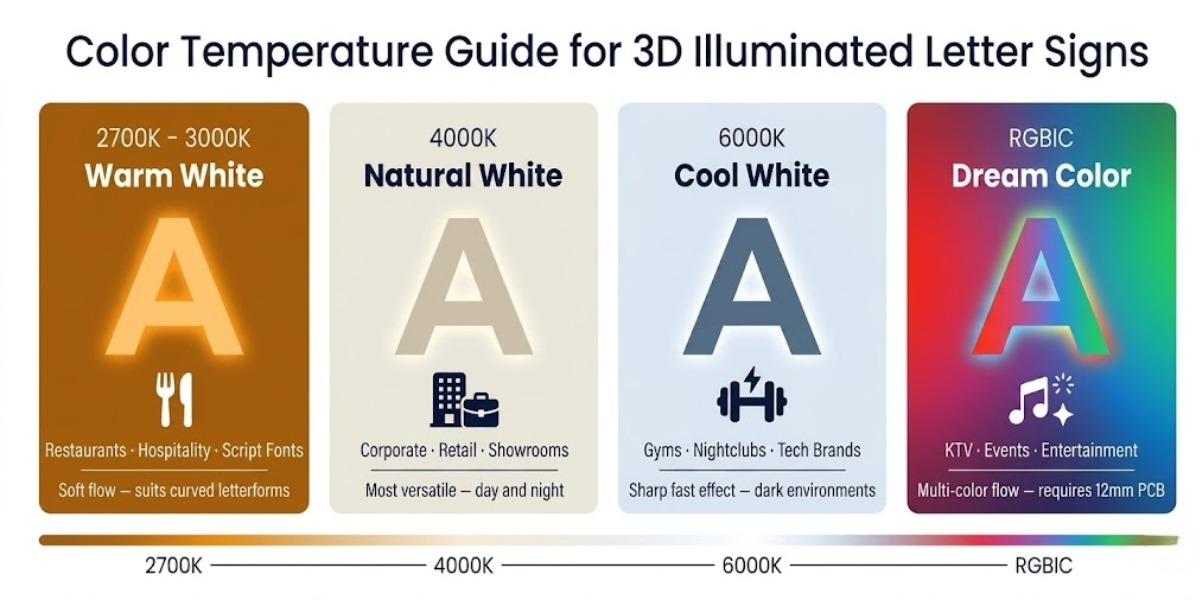
Warm White — 2700K to 3000K
Best for restaurants, hospitality, boutique retail, and script letterforms. Avoid on south-facing outdoor signs with strong ambient daylight — the flowing effect becomes difficult to read at typical street viewing distances.
Natural White — 4000K
Most versatile commercial choice — neutral across both day and night conditions. Best when brand has no strict color identity and the sign must read well in varied lighting.
Cool White — 6000K
Strongest visual impact in dark environments — effect appears sharp and fast. Avoid in warm interior settings where it reads clinical and disconnected.
Dream Color — RGBIC
Multiple colors flow through different letter sections simultaneously. Requires 12mm PCB and RGBIC-compatible SPI controller — not interchangeable with white variant setup.
Calculating Strip Length and Driver Size
Undersizing the driver is one of the main reasons the effect dims, stutters, or drops out during operation. Start by estimating strip length based on letter height, then apply the 1.2× safety rule before selecting the final driver size.
Power Calculation Guide
| Letter Height | Strip Length per Letter | Power Draw per Letter | Minimum Driver Size |
| 100mm | 0.4m | 4.4W | 30W driver covers up to 4 letters |
| 150mm | 0.6m | 6.6W | 30W driver covers up to 3 letters |
| 300mm | 1.2m | 13.2W | 60W driver covers up to 3 letters |
| 500mm | 2.0m | 22W | 60W per 2 letters |
| 800mm | 3.2m | 35.2W | 100W driver per letter |
A 5-letter restaurant name with each letter measuring 300mm tall for an outdoor covered patio installation. Total strip length equals 5 letters × 1.2m, giving 6m total. Using the 360 LEDs/m variant at 11W/m — total wattage becomes 6m × 11W = 66W. Applying the 1.2× safety rule gives a minimum of 79W — specify an 80W or 100W DC 24V driver. Controller: SPI pixel controller. Pixel count: 6m × 120 pixel groups/m = 720 pixels. Installation is covered outdoor — IP65 minimum. Strip run is under 10m — no signal amplifier required.
Rule 1: Total strip wattage × 1.2 = minimum driver wattage. Never run a driver at 100% rated load continuously because lifespan drops significantly under constant full-load operation.
Rule 2: For letter signs taller than 500mm, use one dedicated driver per letter. Shared drivers across oversized letters often create brightness imbalance and inconsistent motion between letters.
Installation Inside 3D Letter Channels: Step by Step
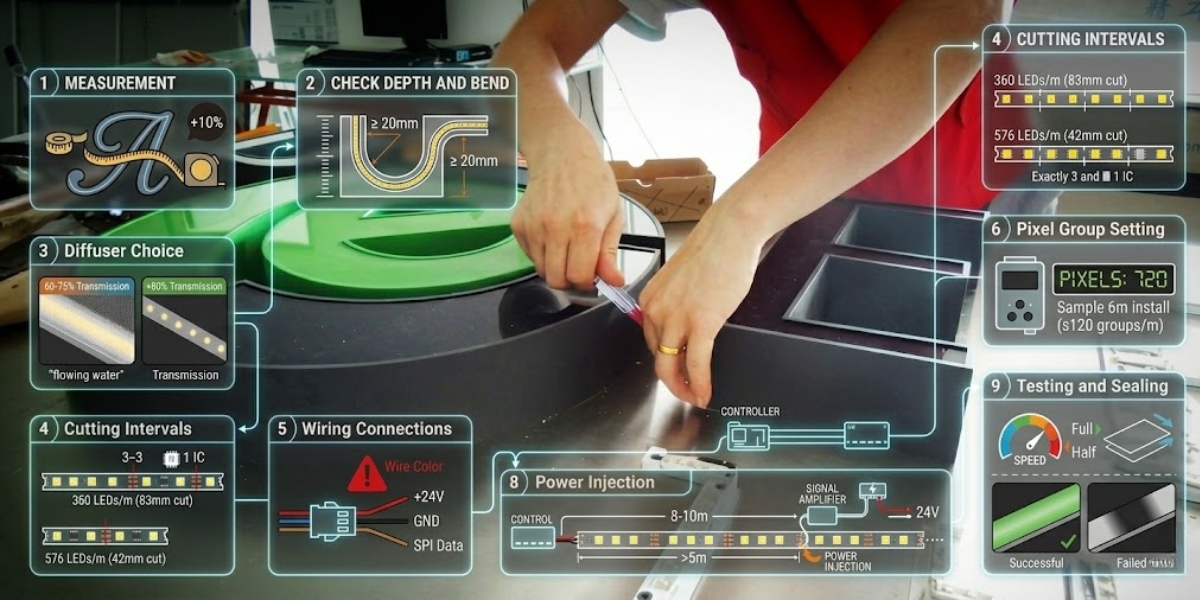
- Measure strip length through each letter channel following all curves — use a flexible tape inside the real channel profile and add 10% for connection overlaps and linking cables. Curved script fonts always require more strip than the letter height alone suggests.
- Verify channel depth is at least 20mm — shallow channels expose strip texture through the diffuser face. Script and cursive letterforms with tight curves also require at least 20mm depth to route the strip without exceeding the minimum 20mm bend radius.
- Fit a milky white frosted acrylic diffuser face at 60–75% light transmission — this diffusion level blends COB output completely and makes the flowing effect read as a single smooth movement at viewing distance. Clear acrylic above 80% transmission makes the effect look like moving dots — not flowing water.
- Cut strip only at marked cut intervals — 83mm for 360 LEDs/m variant, 42mm for 576 LEDs/m variant. Each segment contains exactly 3 LEDs and 1 WS2811 IC group. Cutting between marks severs the IC connection and creates a permanently dark segment that breaks the flow sequence at that point.
- Connect wires according to the labels on your strip’s JST connector — typically: positive DC24V, negative GND, and SPI data signal. Never assume wire color coding — always check the printed label on the PCB near the connector. Reversed data and ground wires cause the strip to illuminate white with no effect response.
- Set pixel count on controller before testing — WS2811 at 360 LEDs/m equals 120 pixel groups per meter. A 6m installation requires 720 pixel groups entered in controller settings before power-up. Incorrect pixel count causes the effect to run on partial strip only while the remainder stays static.
- Install SPI signal amplifier if total data run exceeds 10m — connect the amplifier between the controller output and the strip input at the 8–10m point. Power the amplifier from the same 24V supply as the strip.
- Inject power at 5m intervals on runs longer than 5m — connect a second 24V feed directly to the strip power pads at the 5m point, not through the controller. Without power injection, voltage drops toward the far end of the run and brightness becomes uneven across letters — the flowing effect appears noticeably weaker in the last letters than the first.
- Test all effect modes before sealing the letter face — run full speed, half speed, and direction reverse. Check that the flowing effect is uniform across every letter and no segment shows a dead zone or brightness drop. Close the diffuser face only after the full effect test passes.
For general flow lighting installation reference outside of letter sign applications, see our flow lighting installation guide.
Mistakes That Break the Running Water Effect
Standard RGB Controller Used Instead of SPI Strip lights white or stays dark — no movement effect at all. → Replace with SPI-compatible controller verified for WS2811 IC.
Pixel Count Entered Incorrectly Effect runs only on part of the strip — rest stays static or off. → Calculate total IC groups (LEDs ÷ 3) and enter exact numbers in controller settings.
Channel Depth Under 20mm or Bend Tighter Than 20mm Radius Visible strip texture shows through diffuser — movement looks dotted not flowing. → Increase channel return depth or redesign curves with wider bend radius.
Driver Undersized for Total Strip Wattage Effect dims or stutters at medium-to-high speed settings. → Recalculate using total wattage × 1.2 — dedicate one driver per letter above 500mm.
Data Wire Run Over 10m Without Signal Amplifier Last letters flicker, freeze, or lose sync completely. → Install SPI signal amplifiers at 8–10m points on the data line.
Strip Cut Between Marked Cut Intervals Permanent dead segment breaks the flow sequence at cut point. → Always cut at marked intervals only. Measure before trimming.
Clear or High-Transmission Acrylic Used as Diffuser Face Effect shows as visible moving dots — not smooth flowing water. → Replace with milky white acrylic at 60–75% light transmission.
Frosted Film Used Instead of Milky Acrylic Film appears correct at installation but degrades under LED heat within 6–12 months — effect becomes uneven and patchy. → Use only cast milky white acrylic sheet — not adhesive frosted film as a substitute.
For complete electrical and handling safety guidance for flowing LED installations, see our safety tips for using flowing LED lights.
結論
For sign makers specifying channel letter projects with motion effects, running water COB strip is the correct specification when channel depth is at least 20mm, the diffuser face is milky white acrylic, and the controller is SPI-compatible with WS2811 IC. Outside those three conditions, the effect either fails to appear or does not read cleanly at normal viewing distance. Driver sizing and pixel count settings are the two most commonly incorrect variables at installation — both are straightforward to calculate before the sign ships. Get those right, and the strip delivers consistent, maintainable motion that static illumination cannot replicate. SignliteLED’s running water COB strip range covers all color temperatures and IP ratings referenced in this guide.
FAQ
関連記事