ไทย
ไทย  English
  简体中文
简体中文  Deutsch
  Español
  Français
  Italiano
  日本語
日本語  한국어
한국어  Polski
  Português
  Русский
  Türkçe
  Nederlands
  Tiếng Việt
There is no single LED module spacing that fits every sign.
Spacing comes from your module’s own layout chart. Nowhere else. One 3 inch (76 mm) letter may take 2 modules per foot. Another takes 4. It depends on which module you bought.
That is a two to one spread at the same depth. A single number cannot cover it.
This guide shows you how to find your number. You will learn what sets spacing and how to read a real chart. You will also count modules for letters and boxes, then size the driver. SignliteLED makes โมดูล LED and custom illuminated letters for sign companies worldwide. Our published sign modules run on DC24V.
คำตอบอย่างรวดเร็ว
| Your sign | Count it by | Then confirm |
| Channel letter | Row length × modules per foot | Max stroke width for one row |
| Light box | Columns × rows from the grid | Edge offsets and corners |
| Shallow build | Highest density, widest optics | Hot spots on a lit test |
| Dark or colored face | More output first, then tighter spacing | Brightness through that exact face |
| Any sign | Your module’s own layout chart | A lit sample with production materials |
What Determines LED Module Spacing?
Six inputs set your spacing. Depth and stroke width matter most.
Measure all six before you ask anyone for a layout. Miss one and the answer changes.
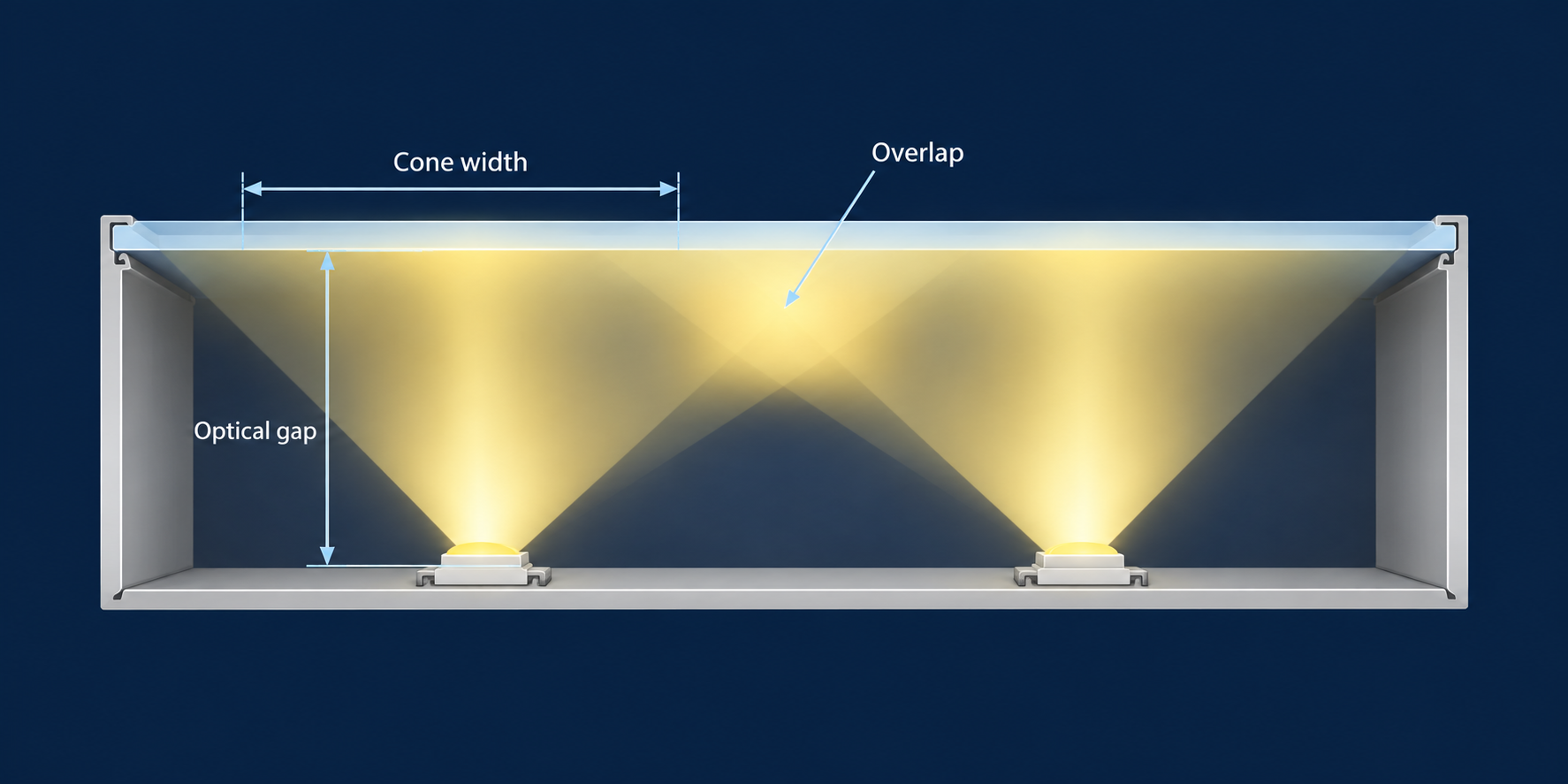
Sign depth, measured as the optical gap
Measure from the module’s emitting surface to the inside of the face. That distance is your optical gap. Record it before you ask for a layout.
It is not the letter’s outside depth. Module height, mounting tape and face thickness all sit inside that number. A 3 inch (76 mm) return is not a 3 inch light path. SignliteLED builds letters from 1.2″ to 5.9″ (30 to 150 mm) deep. Confirm the gap on your drawing.
Light leaves a module in a cone. The deeper the gap, the wider that cone spreads before it reaches the face:
Cone width = 2 × optical gap × tan(beam angle ÷ 2)
A 170 degree beam gives a cone roughly 22.9 times the gap.
Now the part most guides skip. A beam angle tells you how far light reaches. It does not promise an evenly bright disk. Cone edges fall off toward the rim. So neighboring cones need to overlap. Treat the formula as a reach check, not a layout.
Module spacing is the distance between the centers of two neighboring modules.
Stroke width and letter shape
Measure the narrowest and widest illuminated stroke on your artwork. Mark every junction, curve and closed counter.
Then run two separate checks. Does the module physically fit the stroke? And does one row optically cover it?
Those are different questions. SignliteLED’s published modules measure 68 × 68 × 5.5 mm. That is about 2.68 inches square. That footprint alone rules them out of narrow script strokes, whatever the optics do.
Max stroke width is the widest stroke one row can cover.
Module beam angle
Wide optics help shallow builds. They do not license wider spacing without limit.
A wider spread is also a thinner spread. Do not read 160 degrees as permission to double your pitch.
Ask your supplier for the beam angle in degrees. SignliteLED’s module page describes ultra wide optics. Request the figure for your exact model.
Module output and LED count
Compare lumens and rated watts for the exact variant you will buy. LED count per module tells you very little.
SignliteLED publishes efficiency between 80 and 150 lumens per watt. CRI runs Ra90 and above. Ask for the lumen figure for your model. Never pair one model’s efficiency with another model’s wattage.
Acrylic face transmission
This is the variable most guides skip. It moves the answer more than beam angle does.
| วัสดุใบหน้า | Grade | Transmission at 0.12″ (3 mm) |
| Clear acrylic | Standard cast | about 92% |
| White opal | Perspex Opal 030 | 67% |
| White opal | Perspex Opal 040 | 46% |
| White opal | Perspex Opal 050 | 36% |
| White opal | Perspex Opal 028 | 25% |
| White opal, dense | Perspex Opal 069 | 9% |
| Translucent yellow | Perspex 2T07 | 75% |
| Translucent orange | Perspex 3T17 | 33% |
| Translucent red | Perspex 4T50 | 17% |
| Translucent blue | Perspex 7T28 | 8% |
Three facts follow from that table.
“Opal” is not one number. The white grades above run from 9% to 67%. Naming a grade matters more than naming a color.
Thickness lowers it further. Acrylite publishes about 31% for sign white 7328 at 0.125″ (3.2 mm). The same grade passes about 17% at 0.25″ (6.35 mm).
A blue face passes roughly a ninth of what a yellow face passes. Less transmission means less delivered light. Choose output, pitch and diffusion together, then test that exact face.
One more distinction. High transmission is not the same as good diffusion. Clear acrylic passes the most light and hides the least. SignliteLED offers clear, opal and colored acrylic faces. Name the grade on your order. The same logic drives how brand colors behave once a sign is lit.
See the Perspex design guide for published grade data.
Interior reflectivity
Record the back and return finish before you plan positions.
White returns bounce light back toward the face. Bare aluminum reflects differently. Black absorbs. Specify the finish on the drawing, not on site. Our guide to สร้างตัวอักษรช่องแสง covers return interiors.
Modules are not the only source. For tight curves and very shallow letters, see what goes inside an illuminated letter.
Typical LED Module Spacing by Sign Depth
Deeper signs allow wider spacing. Shallow signs need modules closer together.
That rule is simple. Applying it is not, because every module publishes different numbers.
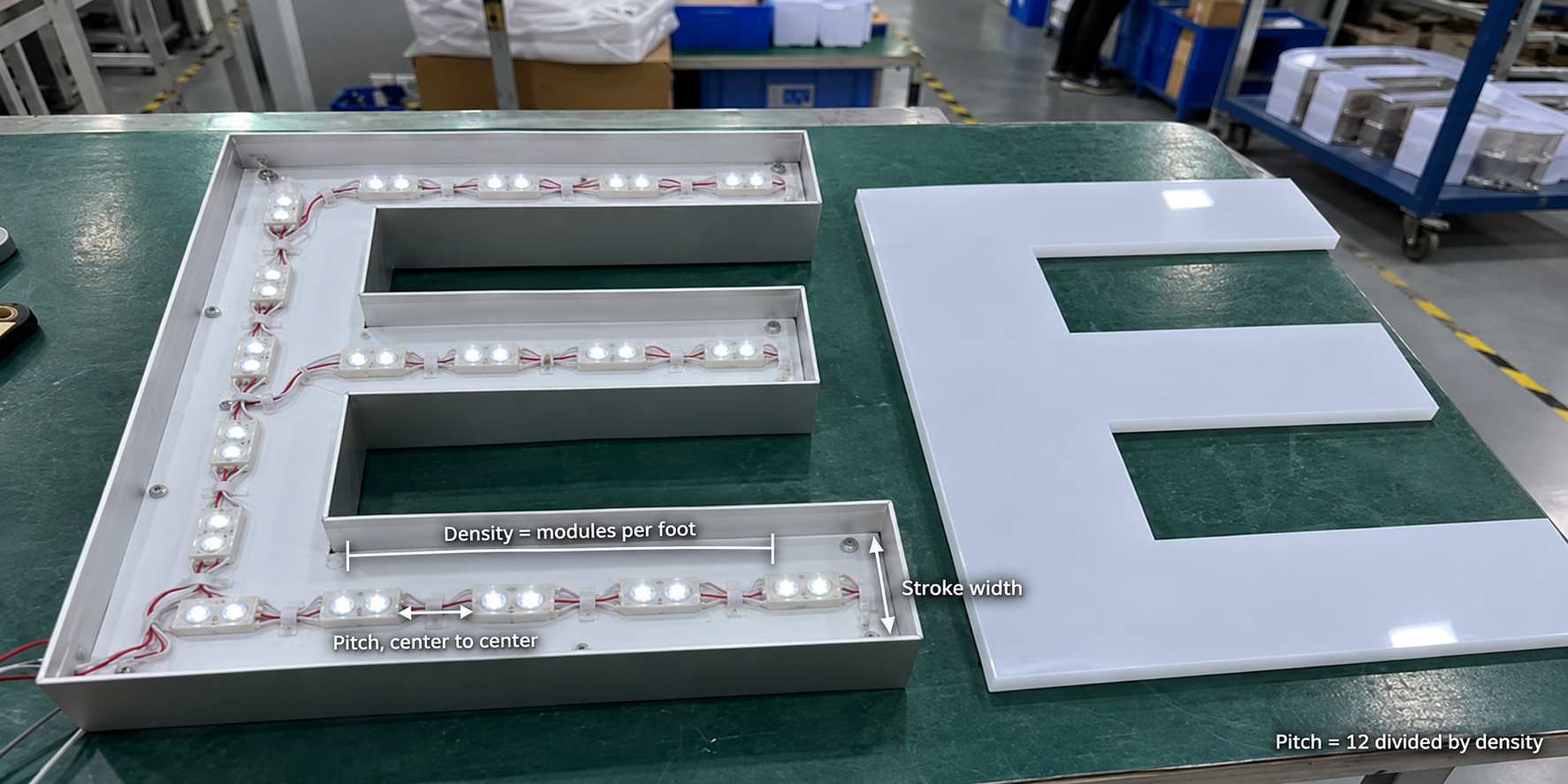
Read density, pitch and stroke coverage together
A channel letter chart does not give you one spacing number. It gives you two things for each can depth.
ความหนา is modules per foot along the row. Max stroke is the widest stroke one row covers. Charts split max stroke into single row and multiple rows. Multiple row coverage is always narrower. A wide letter loses help from its side returns.
Most fabricators think in pitch, not density. Convert it:
Pitch in inches = 12 ÷ modules per foot Pitch in millimeters = 304.8 ÷ modules per foot
So 3 modules per foot is a 4 inch (102 mm) pitch. Six per foot is a 2 inch (51 mm) pitch.
How spacing changes with depth
Here is one product family across its published depths. Current’s Tetra miniMAX, in white.
| Can depth | ความหนา | Pitch | Max stroke, single row | Max stroke, multiple rows |
| 1.5″ (38 mm) | 4 per foot | 3″ (76 mm) | 4″ (102 mm) | 3″ (76 mm) |
| 2″ (51 mm) | 3 per foot | 4″ (102 mm) | 5″ (127 mm) | 4″ (102 mm) |
| 3″ (76 mm) | 2.5 per foot | 4.8″ (122 mm) | 8″ (203 mm) | 7″ (178 mm) |
| 4″ (102 mm) | 2 per foot | 6″ (152 mm) | 11″ (279 mm) | 10″ (254 mm) |
| 5″ (127 mm) and deeper | 1.5 per foot | 8″ (203 mm) | 14″ (356 mm) | 13″ (330 mm) |
Read it across, not down. Deeper cans take fewer modules per foot. They also carry a wider stroke on one row.
Notice the last two columns. Multiple row coverage runs about an inch narrower at every depth. That is not a mistake. A wide letter loses the help its side returns give a narrow one.
Why one number cannot be standard
Now hold the depth still and change the product. All five rows are Current Tetra families at 3 inch (76 mm) depth.
| Tetra family at 3″ depth | ความหนา | Max stroke, single row |
| MS | 4 per foot | 8″ (203 mm) |
| miniMAX | 2.5 per foot | 8″ (203 mm) |
| MAX | 2 per foot | 8″ (203 mm) |
| LT Shallow | 2.5 per foot | 7″ (178 mm) |
| LT Medium | 2 per foot | 7″ (178 mm) |
Same depth. Same manufacturer. Density still runs from 2 to 4 per foot.
That is a two to one spread before you compare brands. Anyone quoting a single universal spacing is quoting one product.
ที่ Current Tetra spacing guidelines publish the full set.
What the charts assume
Published figures come with conditions. Read them before you trust a number.
Current states its Tetra figures are design or typical values measured under laboratory conditions.
SloanLED goes further in its own channel letter density guidelines. It names the test face: 0.1875 inch (5 mm) sign grade 7328 acrylic. It calls its figures approximations. It recommends testing density in a sample letter first.
Two scoped rules from that same document are worth knowing.
SloanLED sets a floor for shallow single rows. At 3 inch (76 mm) depth or less, it calls for four per foot. That note covers shallow cans and perforated vinyl faces. It is a floor for those conditions, not a general density.
For multiple rows, SloanLED says start 3 inches (76 mm) from the return. That is the clearance figure most charts assume but do not print.
Starting points for light boxes
Boxes are simpler, because they take a regular grid. SignliteLED publishes these starting ranges.
| แอปพลิเคชัน | Starting square pitch | Modules per sq ft | Modules per m² |
| Shallow light box | 3.15″ to 3.94″ (80 to 100 mm) | 9.3 to 14.5 | 100 to 156 |
| Standard to deep box | 3.94″ to 4.72″ (100 to 120 mm) | 6.5 to 9.3 | 69 to 100 |
These values are starting points, not universal installation limits.
Modules differ in lumens, lens design and light decay. Confirm against the chart for the exact module you buy.
One honest note on those densities. They are planning ratios. You cannot buy a fraction of a module. Your real count comes from drawn positions.
ของเรา light box and ceiling module guide covers choosing between module types. Selection lives there. Layout and counting live here.
How Many LED Modules Do I Need?
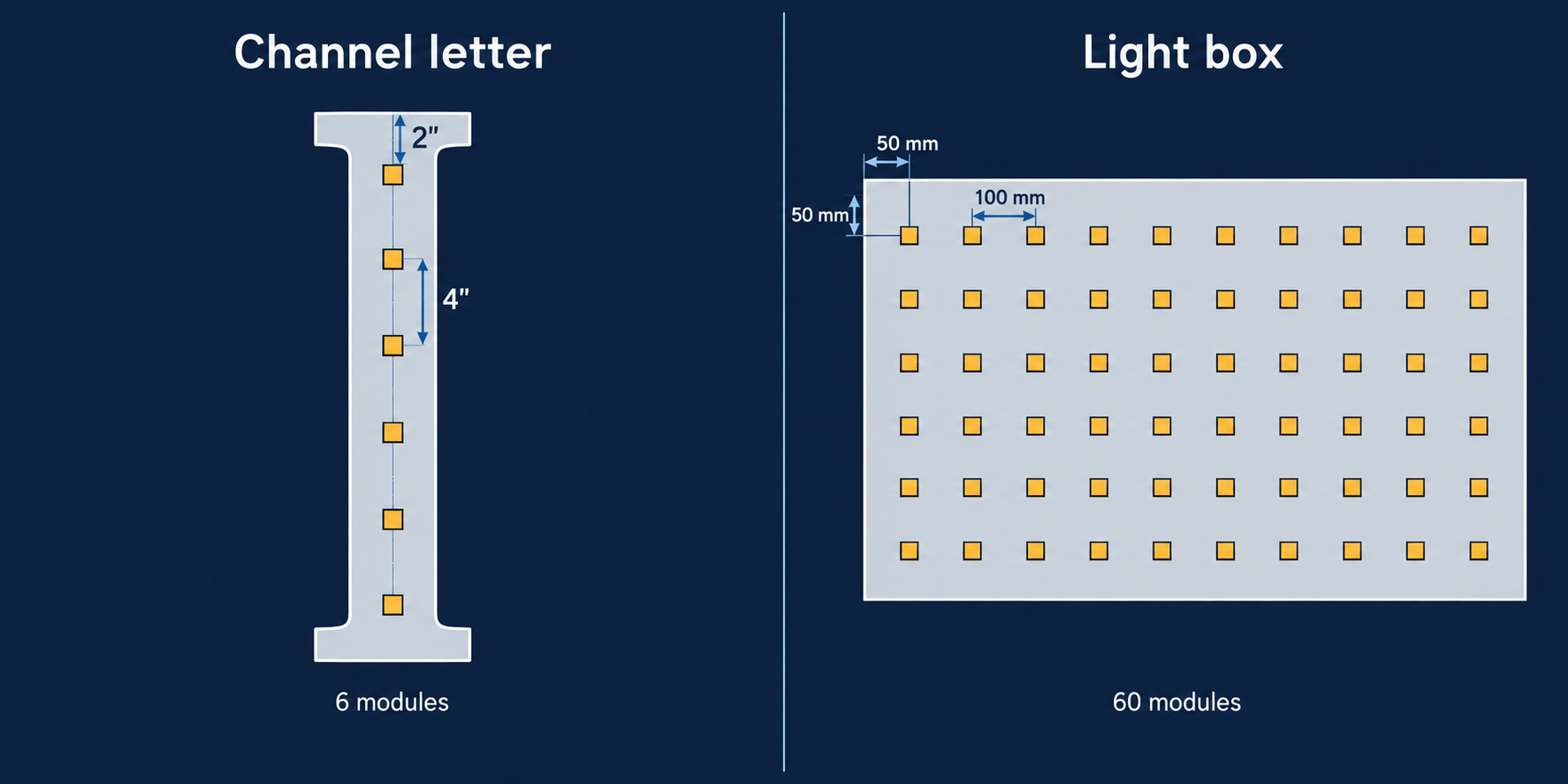
Count letters along their rows. Count boxes across their grid.
Those are two different methods. Area math on a letter gives you a number you cannot build.
Method 1: channel letters
Letters are not rectangles, so area math fails. Follow this sequence.
- Measure each illuminated stroke from scaled artwork.
- Check the module physically fits your narrowest stroke.
- Check stroke width against single row coverage for your depth.
- Measure every planned row along its centerline, following curves.
- Multiply each row length by the density for your depth.
- Draw the positions, including ends, corners and counters.
- Count every physical position once.
Preliminary count = sum of (row length × density)
Four traps catch people here.
A shared junction, where two strokes meet, is one position. Not two.
Closed counters stay dark. Those are the holes in A, O, P and R. Count the strokes around them.
Corners need a position near the turn. Skip it and the corner reads dim.
A bounding rectangle is not the illuminated area. Never count from it.
How many rows does your stroke need?
Stroke width decides row count. NEPCO’s install guide for one 12V module family gives this breakdown.
| Stroke width | Rows |
| Up to 4″ (102 mm) | 1 row |
| Over 4″ to 6″ (102 to 152 mm) | 2 rows |
| Over 6″ to 8″ (152 to 203 mm) | 3 rows |
| Over 8″ to 10″ (203 to 254 mm) | 4 rows |
That breakdown belongs to one module family. Your own chart’s max stroke column is the real answer.
Worked example 1: a front-lit letter
| เรื่อง | ประเมินค่า | Working |
| Illuminated stroke length | 24″ (610 mm) | 2 ft |
| Stroke width | 4″ (102 mm) | Within single row coverage |
| Can depth | 4″ (102 mm) | Measure optical gap separately |
| Rows | 1 | From the stroke width table |
| ความหนา | 3 modules per foot | SignliteLED’s published planning figure |
| Pitch | 4″ (102 mm) | 12 ÷ 3 |
| Module positions | 2″, 6″, 10″, 14″, 18″, 22″ | Measured from one end |
| End offset | 2″ (51 mm) each end | Half the pitch |
| Count | 6 modules | 2 ft × 3 per foot |
| Watts per module | 4W | SignliteLED’s published low power value |
| Connected load | 24W | 6 × 4W |
| Minimum supply | 30W | 24 ÷ 0.8 |
This example shows the method, using SignliteLED’s published planning figures. Check density, stroke coverage and end offset against your own chart. Do that before cutting metal.
Method 2: light boxes
Boxes are rectangles, so area math works. SignliteLED publishes this formula.
Estimated count = area ÷ (horizontal pitch × vertical pitch)
Area math gives you a budget number. It does not place modules. For that, use the offset formula.
Columns = ((width − left offset − right offset) ÷ pitch) + 1 Rows = ((height − top offset − bottom offset) ÷ pitch) + 1 Final count = columns × rows
Keep every dimension in the same unit. The first row sits in from the edge, or your corners go dark. Horizontal and vertical pitch can differ on a narrow box.
Those formulas rarely divide evenly. Round the column and row counts up to whole numbers. Then divide the span again to get your real pitch.
Worked example 2: a rectangular box
| เรื่อง | ประเมินค่า | Working |
| Face width | 39.4″ (1000 mm) | |
| Face height | 23.6″ (600 mm) | |
| Optical gap | 2.95″ (75 mm) | Module face to inside of face |
| Pitch, both directions | 3.94″ (100 mm) | From the shallow box range |
| Edge offset | 1.97″ (50 mm) all four sides | Half the pitch |
| Face area | 6.46 sq ft (0.60 m²) | |
| Columns | 10 | (1000 − 100) ÷ 100 + 1 |
| Rows | 6 | (600 − 100) ÷ 100 + 1 |
| Count | 60 modules | 10 × 6 |
| Area cross check | 60 | 0.60 ÷ (0.1 × 0.1) |
| Connected load | 240W | 60 × 4W |
| Minimum supply | 300W | 240 ÷ 0.8 |
Both methods agree here. That happens because these offsets fit the pitch exactly. Change the offsets and they stop agreeing. The drawn count always wins.
How many modules per square meter?
| Square pitch | Modules per sq ft | Modules per m² |
| 3.15″ (80 mm) | 14.5 | 156 |
| 3.94″ (100 mm) | 9.3 | 100 |
| 4.72″ (120 mm) | 6.5 | 69 |
The working is simple. At 100 mm pitch, 1 ÷ (0.1 × 0.1) = 100 per square meter.
Order spares. One dead module on a finished face means opening the sign again. Add them to the order while the batch is still running.
Single-Row vs Double-Row LED Module Layout
Add a second row when your stroke is wider than one row covers.
That sounds obvious. Three details decide whether it works.
| สถาน | เค้าโครง | Watch for |
| Narrow stroke | One row, centered | Modules too close to the return |
| Stroke over single row max | Two rows | A dark band down the middle |
| Wide block capitals | Two rows, center fill only if testing shows need | Over lit center, under lit ends |
| Rounded corners | Follow the curve | Dim outer corner |
| Closed counters | Modules in the surrounding stroke | Counters missed at drawing stage |
| Lowercase and script | Strip often beats modules | Modules will not follow tight curves |
| Complex logos | Mixed layout | No single rule, needs a drawing |
Two rows do not double your coverage. Read any chart again. The multiple row figure is narrower than the single row figure. Read the number. Do not multiply it.
Return clearance is a real dimension. Too close and the return glows hot. Too far and the stroke edge goes dim. SloanLED tells installers to start multiple rows 3 inches (76 mm) from the return. Ask your supplier for the clearance their chart assumes.
Row separation is not module pitch. Pitch runs along the row. Row separation runs across the stroke. They are different numbers and charts publish them separately.
For script and tight curves, S-type strips usually beat modules.
LED Module Spacing for Channel Letters
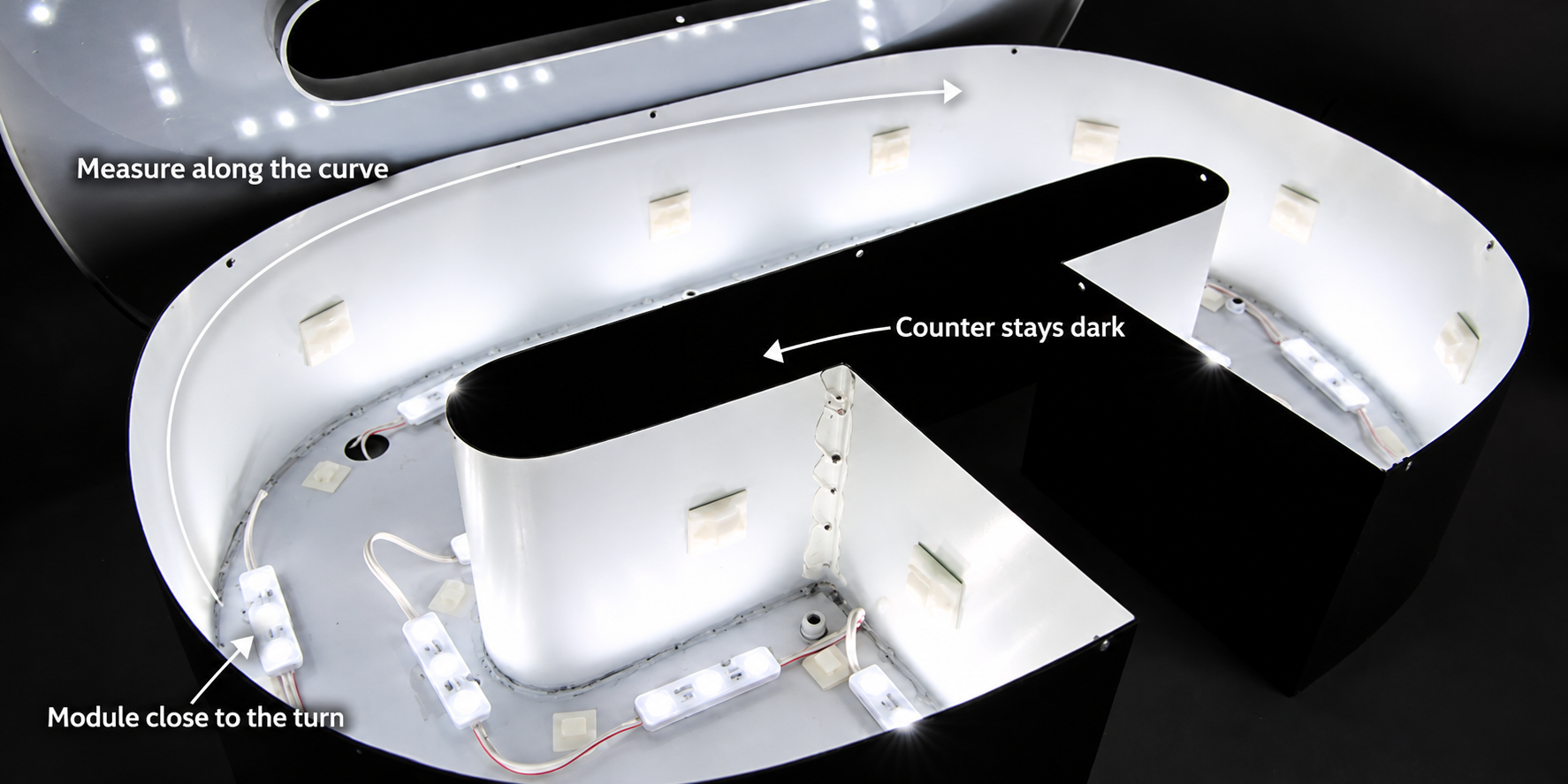
Letter shape decides where modules go. Size only decides how many.
Density holds steady when depth, face and stroke width hold steady. Shape still changes every position.
| Letter feature | Placement note |
| Straight strokes | Even pitch, first and last position a half pitch from each end |
| Corners | A position close to the turn on both legs |
| Curves | Measure along the arc, never across the chord |
| Wide characters | Check against the multiple row coverage figure |
| Narrow script | Strip usually beats modules |
| Closed counters | Light the surrounding stroke, leave the counter dark |
| สว่าง | The face is the target |
| ที่มีแสงวาบ | The wall is the target |
Halo-lit letters change the goal. You are lighting a wall through a standoff gap, not a face. Even pitch matters more there, because the wall shows every gap. Standoff distance becomes a second variable alongside depth.
Keep halo work out of front-lit calculations. The measurement target is different. Our comparison of front-lit and halo-lit letters covers that difference.
SignliteLED builds ตัวอักษรเรืองแสง LED in six types. LED options run 2700K to 6500K, plus RGB and RGBW.
LED Module Spacing for Light Boxes
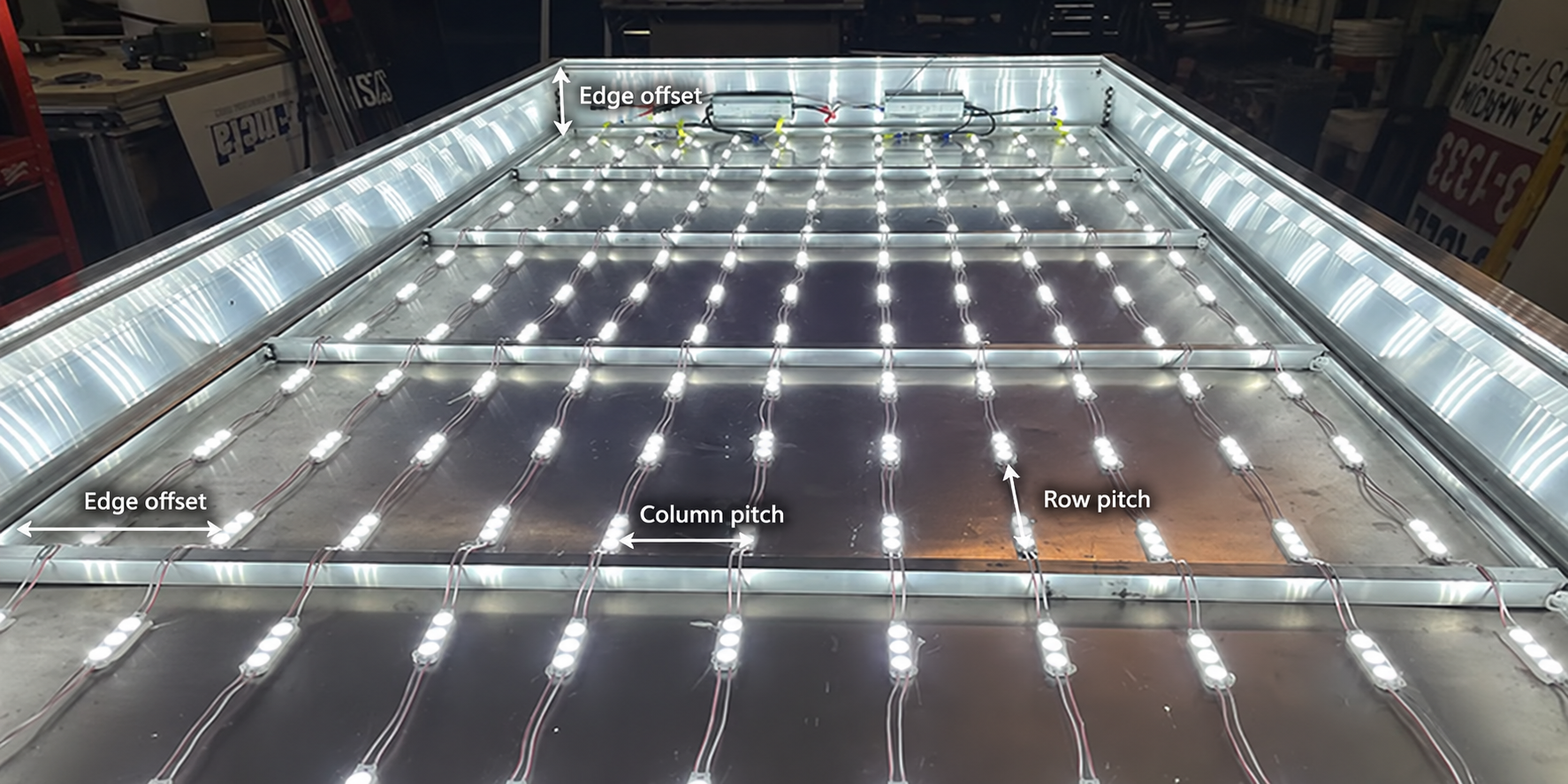
Light boxes use a grid, so the math is area based, not stroke based.
Four things still differ from a letter.
Edges decide your corners. Measure each offset separately. A grid that ignores edges leaves four dark corners.
Pitches can differ by axis. A narrow box may need tighter spacing one way. Row pitch and along row pitch are two numbers.
Double-sided boxes need a double-sided plan. Either two grids facing out, or modules built to emit both ways. A single-sided grid will not light the far face.
Depth has a floor. Below a certain optical gap, modules cannot spread far enough. The face shows dots however tight the grid gets.
| สถาน | Better source |
| Very shallow cavity | LED sheet or edge-lit build |
| Tight curves inside a shaped box | Flexible strip |
| Even wash over a large flat area | Sheet, for density |
| Deep box, large area | Modules stay correct |
For shallow builds, see our guide to ไฟ LED แผ่น. For the build time difference, see sheets compared with modules on labor.
Cabinet modules publish their own charts, the same way letter modules do. Principal Sloan’s SignBOX 3 datasheet is one example. It lists 12 inch (305 mm) on center at 5 inch (127 mm) depth. It names the face it assumes, 7328 white acrylic. It warns that depth and product vary with face material and brightness.
That is what a chart you can trust looks like. It tells you its conditions.
How to Calculate LED Module Power and Driver Size
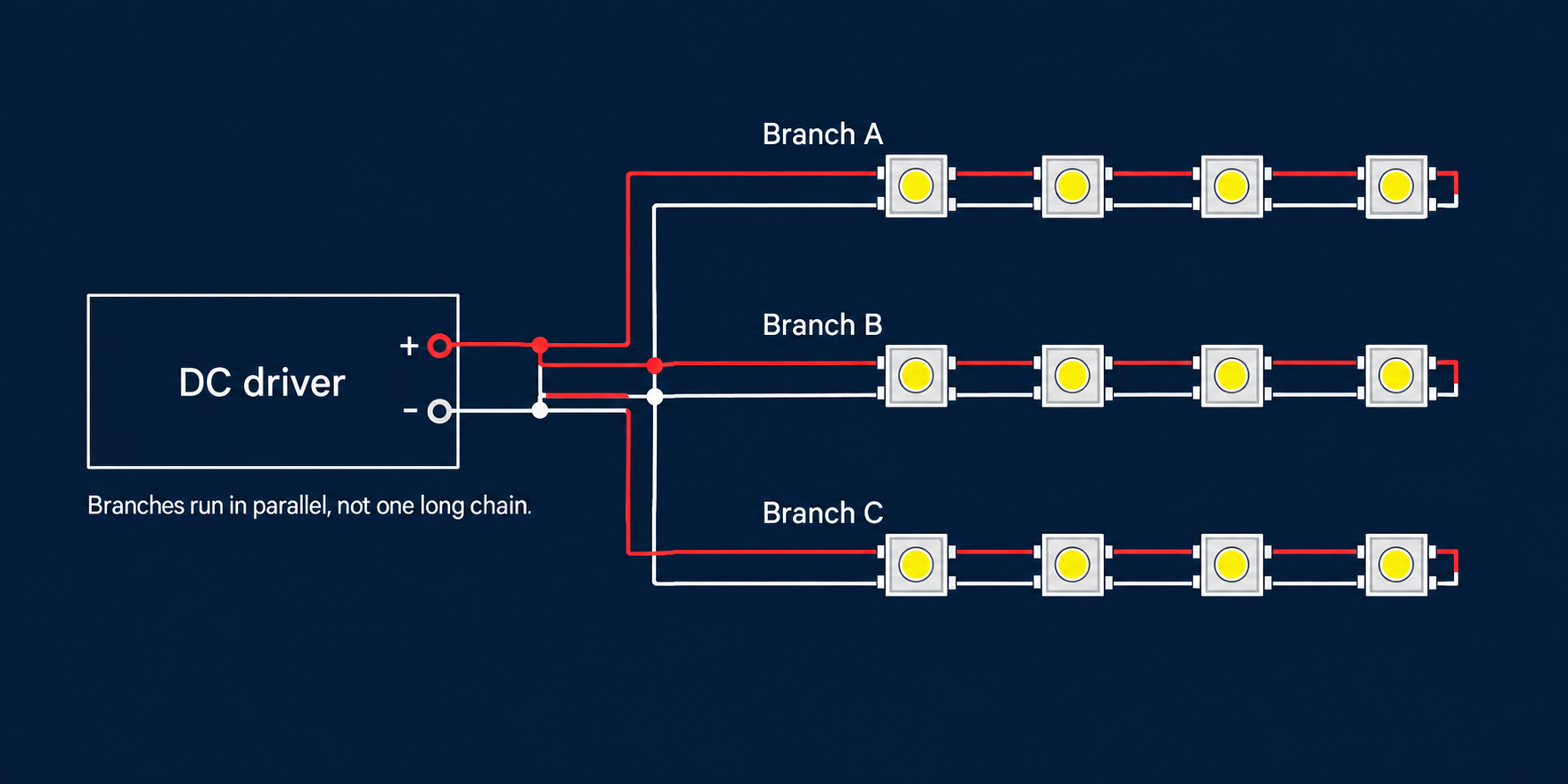
Multiply your module count by watts per module, then add headroom.
The first half is easy. The second half trips up most articles.
Connected load
Connected load = module count × rated watts per module
Use the rated wattage for your exact variant. SignliteLED modules draw 4W to 10W, depending on model. Efficiency in lumens per watt is not wattage. Add controller load where the spec requires it. DC module load is also not the same as AC input draw.
The two headroom rules are not the same rule
SignliteLED publishes both common rules. Add at least 20% capacity. Do not load a driver past about 80%.
Those land on different numbers. Here is why.
| Connected load | ข้อควรปฏิบัติ | Supply capacity | Load on the supply |
| 100W | × 1.2, the “add 20%” rule | 120W | 83.3% |
| 100W | ÷ 0.8, the “80% loading” rule | 125W | 80% |
| 24W, letter example | ÷ 0.8 | 30W | 80% |
| 240W, box example | ÷ 0.8 | 300W | 80% |
The percentage gets taken from different starting points. Multiplying by 1.2 leaves the supply at 83.3%, not 80%.
Use × 1.25 whenever your target is true 80% loading. SignliteLED asks for at least 20% above the connected load. Add more headroom in hot or enclosed locations.
Modules per run and branch limits
Spare driver wattage does not tell you branch length. Those are separate limits.
NEPCO’s install guide for one 12V module family shows the difference. It lists 100 standard modules on a 40W supply. A 60W supply takes 150. Those are supply limits, not run limits. The same guide says measure current on each output after loading. Reduce modules on any leg over its rating.
Those figures belong to that system. SignliteLED does not publish a per-run limit, so ask for yours.
| Topic | What to do |
| 12V or 24V | 24V carries current farther at the same load. SignliteLED’s sign modules run on DC24V. |
| Max modules per run | Read your module’s spec sheet. Ask if it is not published. |
| Parallel wiring | Run branches in parallel from the driver, not one long daisy chain. |
| แรงดันตก | The far end dims before it fails. Measure first and last module under load. |
| Power injection | Feed from both ends or the middle, where the product documentation allows. |
| Wire gauge | NEPCO’s guide calls for 20 AWG or larger on module extensions. |
| Driver location | NEPCO caps its mounting location at 122°F (50°C). Check yours. |
| Outdoor supplies | Waterproof rated driver, mounted so water cannot sit on it. |
| Polarity | Recheck every connection. Reversed polarity can damage modules. |
บทความของเราเกี่ยวกับ voltage drop and power injection covers the math in depth. Note its scope. Those thresholds come from COB strip testing, and strips are not modules. Use them to understand the mechanism, not as module limits.
How to Prevent Hotspots and Dark Spots
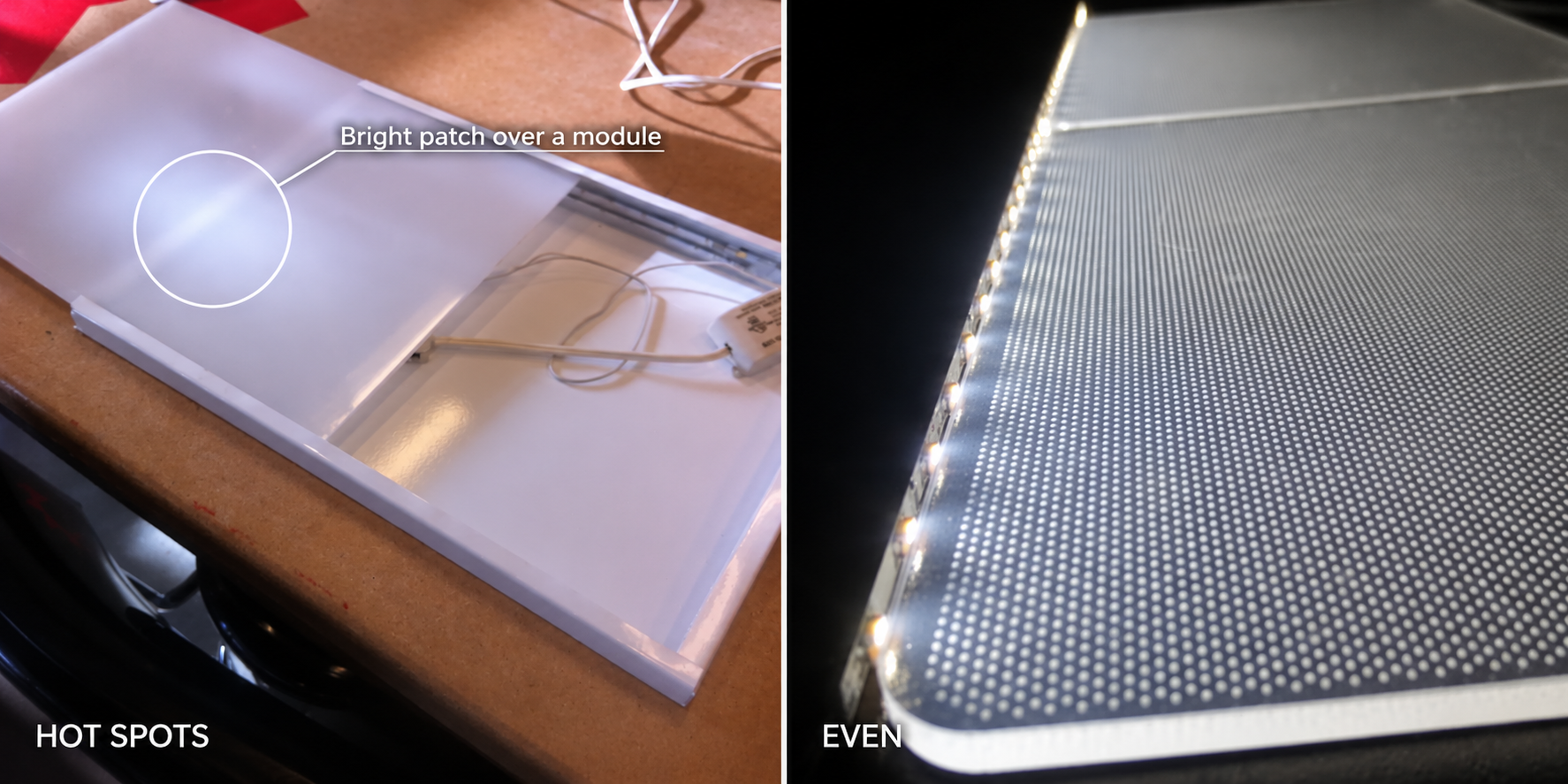
Bright dots over each module point to the gap, the face, or the optics.
Diagnose before you buy more modules. Adding modules to the wrong problem makes it worse.
A hot spot is a visibly brighter patch, usually right over a module.
It has more than one possible cause. Work through the table before changing the layout.
| What you see | Check first | Fix to test |
| Bright dots over each module | Optical gap and face diffusion | More gap, a denser opal face, or wider optics |
| Dark bands between rows | Row separation against the coverage figure | Tighten rows or change module |
| Dark corners and edges | Edge offset and first row position | Reduce the offset, add an edge row |
| Whole face dim | Face transmission against module output | More output per module, before more modules |
| Dim center on a wide stroke | Single row on an over width stroke | Add a row, then retest before adding fill |
| Far end dimmer than the feed | Terminal voltage under load | Shorter branches, heavier wire, permitted injection |
| Shadow beside an internal support | Physical blockage | Move the module or the support |
| Patchy color across one face | LED batch and color consistency | One batch per sign, specify binning |
Three of those deserve a closer look.
Gap and diffusion trade against each other. A denser opal face hides dots well. It also passes less light. SignliteLED supplies clear, opal and colored acrylic. Test the grade you plan to use.
Voltage drop looks like a lighting fault. It is a wiring fault. If one end of a run is dimmer, measure the voltage first.
Batch mixing shows up at night. Letters that match in daylight can differ once lit. Keep one LED batch across a whole sign set. Ask your supplier to reserve a single batch.
These are checks, not guaranteed diagnoses. Change one thing at a time and retest under the same viewing conditions.
Test the Layout Before Production
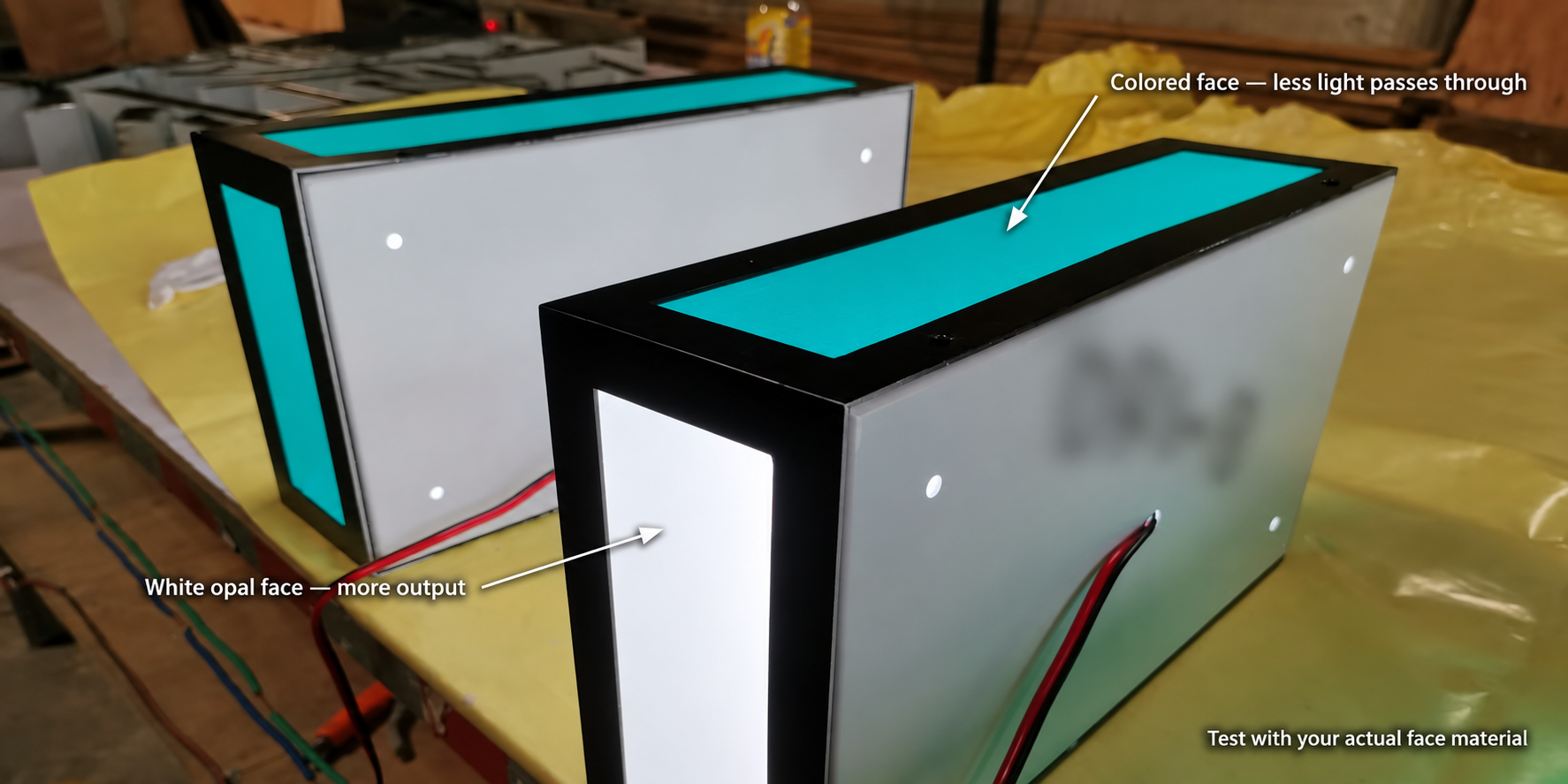
A matched sample test is what confirms a proposed layout.
The chart makers say so themselves. SloanLED recommends testing density in a sample letter. Principal Sloan recommends testing in a dark setting before installing. They publish the numbers and still say test them.
Build your test like this.
- Use the production module and operating mode.
- Match the production face grade, thickness and color.
- Match the optical gap, interior finish and mounting.
- Include the hardest part: a corner, a wide stroke, or an edge.
- Power it with the intended supply and branch layout.
- View it from the real viewing distance.
- Photograph it lit and unlit at fixed camera settings.
- Measure actual power draw against your calculation.
- Compare brightness at the first and last module on a branch.
- Record everything, then retest after any change.
What to record:
- Module identification and operating mode
- Face grade, thickness and color
- Optical gap and interior finish
- Row positions, edge offsets and module count
- Supply used and measured draw
- Camera settings and viewing position
- Result, changes made, and who approved it
SignliteLED works to a 3 to 1 target. That compares the brightest and dimmest points. Agree your measurement method before testing. A photograph is not a measurement.
Here is what SignliteLED does on every order. Engineers review your artwork. They prepare shop drawings showing dimensions, mounting methods, materials and electrical specifications. Production begins only after you confirm those drawings.
What Should You Send for a Module Layout Recommendation?
Send the artwork, the sizes, the depth and the face specification.
Missing one of these means a second round of questions.
| ส่งนี้ | Why it changes the layout |
| Vector artwork in AI, PDF, EPS or CDR | Row centerlines come from the file |
| Overall sign size | Sets row lengths and box area |
| Narrowest and widest stroke width | Decides one row or two |
| Can depth, and optical gap if known | The main spacing variable |
| Face grade, thickness and color | Transmission changes the count |
| Interior finish and any obstructions | Reflection and shadows |
| Front-lit, halo-lit, single or double sided | Changes what the layout aims at |
| ในร่มหรือกลางแจ้ง | Decides the sealing and driver type you need |
| แรงดันไฟฟ้า | 12V or 24V changes branch lengths |
| ปริมาณ | Decides batching and spares |
SignliteLED accepts artwork in AI, PDF, EPS and CDR format. Brand guidelines and reference images help too.
บทสรุป
Measure the real optical gap, not the outside depth. Read your own module’s chart instead of a generic number. Then confirm it with a lit test before production.
That sequence prevents the expensive version of this problem. Stripping a finished face costs more than testing a sample.
Ready to spec your layout? Send your artwork and sizes in AI, PDF, EPS or CDR format. SignliteLED engineers prepare shop drawings, and production starts once you approve them.
คำถามที่พบบ่อย
เขียนโดย: Richard Liang ผู้จัดการผลิตภัณฑ์และกระบวนการที่ SignliteLED
การตรวจสอบทางเทคนิค: เจสัน เฉิน ผู้นำด้าน R&D ของ SignlitEd
อีเมล: info@signliteled.com
กระทู้ที่เกี่ยวข้อง