Deutsch
  English
  简体中文
简体中文  Español
  Français
  Italiano
  日本語
日本語  한국어
한국어  Polski
  Português
  Русский
  Türkçe
  Nederlands
  Tiếng Việt
  ไทย
ไทย 
Wenn Sie LED-Leuchten für Architekturbeleuchtung, kommerzielle Beleuchtung oder Medienfassaden beschaffen oder auswählen, haben Sie sich wahrscheinlich folgende Frage gestellt: „Wie viele LED-Streifen kann man DMX-Universen steuern?“
„512 Channels“ – technisch korrekt, diese kurze Antwort ist im praktischen Engineering nahezu unbrauchbar. Die eigentliche Antwort hängt von mehreren Faktoren ab: ob Ihre LED-Streifen RGB oder RGBW sind, ob sie die Pixelsteuerung verwenden, welche Art von Decoder Sie verwenden und wie Sie Adressen zuweisen.
Ein DMX-Universum stellt 512 Steuerkanäle bereit. Ein RGB-Streifen verwendet jedoch 3 Kanäle pro Gerät, ein RGBW-Streifen verwendet 4 Kanäle und ein Pixelstreifen kann Hunderte von Kanälen in nur einem Meter verbrauchen. Der Unterschied zwischen der Steuerung von 170 RGB-Fixtures und der Steuerung von nur einem Pixelstreifen ist enorm - diese Unterscheidung zu verstehen, ist die Trennlinie zwischen einem gut geplanten Installationsprojekt und einem Debugging-Albtraum.
Dieser Leitfaden enthält vollständige Berechnungsformeln, reale Projektbeispiele und technische Empfehlungen, die Ihnen helfen, Ihre DMX-Universenanforderungen genau zu berechnen. Ob Sie Bürobeleuchtung, Hotelbeleuchtung oder eine großflächige Medienfassade planen, Sie werden mit einer klaren Methode gehen - nicht nur mit einer Zahl. Wenn Sie mehr erfahren möchten, besuchen Sie bitte unsere DMX LED-System Wissens-Hub.
Was ist ein DMX-Universum?
Ein DMX-Universum ist im Wesentlichen eine einzelne Datenleitung, die bis zu 512 unabhängige Steuerkanäle tragen kann. Jeder Kanal sendet einen Wert zwischen 0 und 255 (8-Bit-Auflösung), um ein Attribut einer Leuchte zu steuern – Helligkeit, Farbintensität oder einen bestimmten Effekt.
Stellen Sie sich das so vor:
- Universum = ein Datenkabel (eine DMX-Leitung)
- Kanal = ein einzelner Kontrollwert (z. B. rote Intensität)
- Adresse = der einer bestimmten Leuchte zugeordnete Startkanal
- Decoder = das Gerät, das DMX-Daten in PWM-Signale für LED-Streifen umwandelt
Alle Geräte, die dem DMX512-Standard entsprechen, teilen sich diese 512-Kanal-Grenze. Sobald Sie 512 Kanäle überschreiten, müssen Sie ein weiteres Universum hinzufügen - normalerweise über Art-Net- oder SACN-Protokolle über Ethernet oder durch Hinzufügen eines zweiten DMX-Ausgangsports auf Ihrem Controller.
Datenfluss: DMX-Controller -> Universe (512 Kanäle) -> Adressen (Startkanäle) -> Decoder -> LED-Streifen.
Warum hat ein DMX-Universum nur 512 Kanäle?
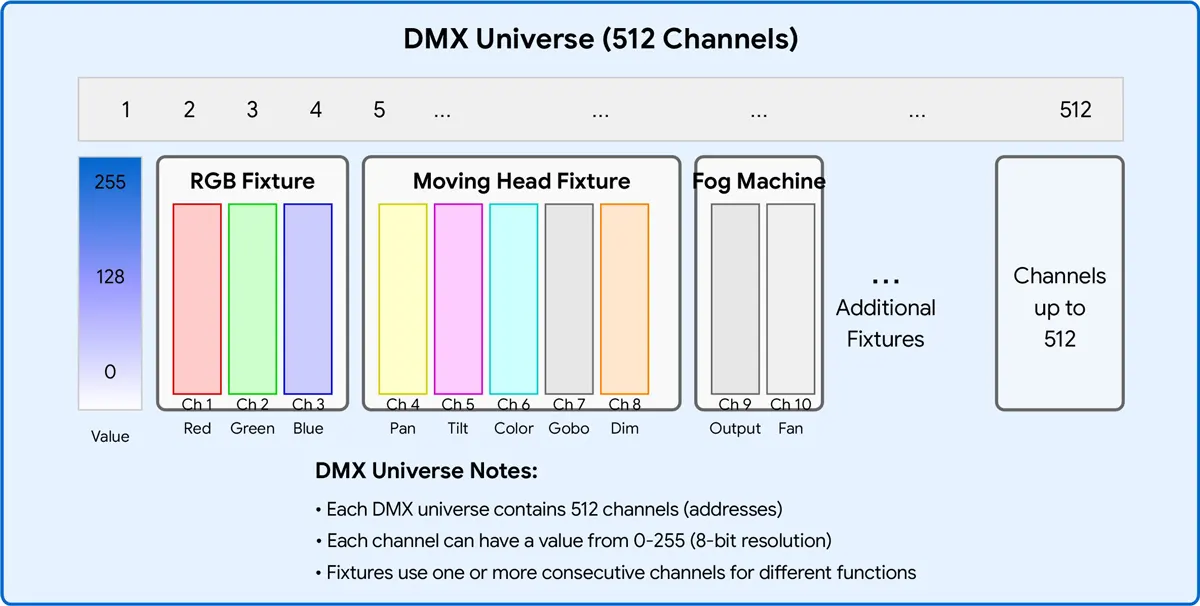
Das DMX512-Protokoll wurde 1986 von USITT (United States Institute for Theatre Technology) entwickelt, um ältere analoge 0-10-V-Steuersysteme zu ersetzen. Der „512“ im Namen stammt aus der maximalen Anzahl von Kanälen, die ein einzelnes DMX-Paket mitführen kann – 512 Datenbytes, die 44 Mal pro Sekunde übertragen werden.
Zu dieser Zeit schienen 512 Kanäle mehr als ausreichend. Dimmer-Racks, Moving Heads und Farbwechsler benötigten jeweils nur eine Handvoll Kanäle. Mit dem explosiven Wachstum von RGB-LED-Systemen und pixelgesteuerten Medienfassaden wurde die 512-Kanal-Grenze jedoch schnell zu einem Engpass. Heute kann eine einzelne pixelgemappte LED-Wand Dutzende oder sogar Hunderte von Universen verbrauchen.
Der ursprüngliche Standard wurde 2008 auf DMX512-A (ANSI E1.11) aktualisiert, aber die 512-Kanal-Grenze pro Universum bleibt unverändert. Die Lösung ist unkompliziert: Verwenden Sie mehrere Universen.
DMX-Paketstruktur: Break -> Startcode (0x00) -> bis zu 512 Datensteckplätze (Kanäle) -> jeder Steckplatz = 1 Byte (0-255).
Ein einzelnes DMX-Universum stellt 512 Steuerkanäle bereit. Wie viele LED-Streifen es steuern kann, hängt ganz davon ab, wie viele Kanäle jeder Streifen benötigt:
| Kontrolltyp | Kanäle pro Gerät | Max. Fixtures pro Universum |
| Einfarbigkeit | 1 | 512 |
| Tunable White (CCT) | 2 | 256 |
| RGB | 3 | 170 |
| RGBW | 4 | 128 |
| RGB+CCT / RGBWW | 5 | 102 |
| RGB-Pixel (50 Pixel) | 150 | 3 |
| RGB-Pixel (100 Pixel) | 300 | 1 |
| RGB-Pixel (170 Pixel) | 510 | 1 |
Bei RGB-Streifen kann jedes Universum bis zu 170 individuell adressierbare Geräte steuern (mit 510 Kanälen). Pixelgesteuerte Streifen verbrauchen deutlich mehr Kanäle, so dass die Anzahl der Fixtures pro Universum erheblich sinkt.
Wie DMX-Kanäle zugewiesen werden
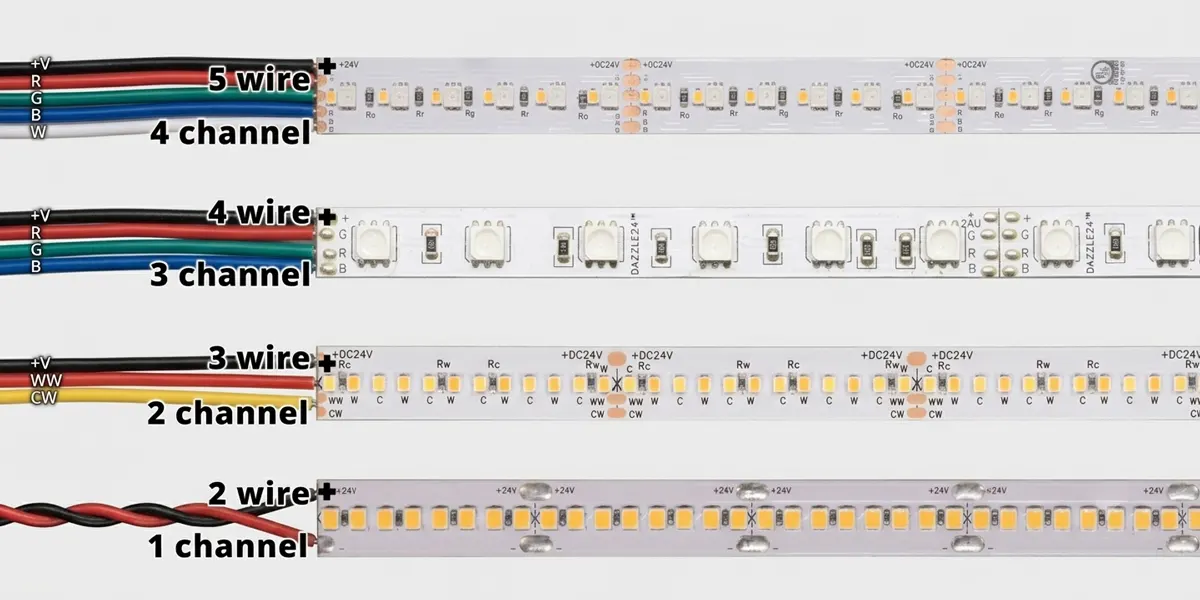
Verschiedene Arten von DMX-LED-Streifen erfordern unterschiedliche Anzahl von Kanälen. Hier die Aufschlüsselung:
Einfarbige LED-Streifen
Kanäle: 1
Kontrollmethode: Nur Dimmen
Beispiel: Ein 24-V-Einfarbiger Streifen, der an einen 1-Kanal-DMX-Decoder angeschlossen ist. Kanal 1 steuert die Helligkeit von 0% bis 100%.
Tunable White (CCT) LED-Streifen
Kanäle: 2
Kontrollmethode: Warmweiß + kühles Weißdimmen
Beispiel: Kanal 1 = Warmweiß Intensität, Kanal 2 = kühle Weißintensität. Durch das Mischen der beiden erreicht man einstimmbares Weiß von 2700K bis 6500K.
RGB-LED-Streifen
Kanäle: 3
Kontrollmethode: rot + grün + blau dimmen
Beispiel: Kanal 1 = rot, Kanal 2 = Grün, Kanal 3 = blau. Das Mischen der drei Farben erzeugt Millionen von Farben.
RGBW LED-Streifen
Kanäle: 4
Kontrollmethode: rot + grün + blau + weiß dimmen
Beispiel: Das Hinzufügen eines speziellen weißen Kanals macht das Mischen von Farbmischungen überflüssig, um reines weißes Licht zu erzielen.
RGB+CCT (RGBWW) LED-Streifen
Kanäle: 5
Kontrollmethode: Rot + Grün + Blau + Warmweiß + Kühles Weiß Dimmen
Beispiel: Vollfarbkontrolle plus Tunable White – ideal für Hotels und Einzelhandelsumgebungen, in denen sowohl leuchtende Farben als auch genaues weißes Licht benötigt werden.
Pixel-Control-DMX-LED-Streifen
Kanäle pro Pixel: 3 (RGB) oder 4 (RGBW)
Kontrollmethode: Jede LED oder Pixelgruppe ist einzeln adressierbar
Beispiel: Ein 100-Pixel-RGB-Streifen verwendet 100 x 3 = 300 Kanäle - es bleiben nur 212 verbleibende Kanäle in diesem Universum.
Wichtiger Hinweis: Einige Decoder unterstützen 16-Bit-Dimmen, wodurch die Anzahl der Kanäle pro Farbe verdoppelt wird (z. B. geht RGB von 3 auf 6 Kanäle). Dies sorgt für ein sanfteres Dimmen bei niedrigen Helligkeitsstufen, halbiert jedoch die Anzahl der Fixtures pro Universum.
Wie berechnet man die maximale Anzahl von LED-Streifen pro Universum
Berechnungsformel
Maximale Anzahl von Spielen = [ 512 ÷ Kanäle pro Gerät]
(wobei [] das "Runden auf die nächste Ganzzahl" bezeichnet).
Beispiel 1: RGB-Streifen
- 512 / 3 = 170,67 → 170 Geräte (mit 510 Kanälen, 2 unbenutzt)
Beispiel 2: RGBW-Streifen
- 512 / 4 = 128 → 128 Befestigungen (alle 512 Kanäle verwendet)
Beispiel 3: RGB+CCT-Streifen
- 512 / 5 = 102,4 → 102 Fixtures (mit 510 Kanälen, 2 unbenutzt)
Beispiel 4: Pixelstreifen (50 Pixel, RGB)
- 50 x 3 = 150 Kanäle pro Streifen
- 512 / 150 = 3,41 → 3 Streifen (mit 450 Kanälen)
Beispiel 5: Pixelstreifen (100 Pixel, RGBW)
- 100 x 4 = 400 Kanäle pro Streifen
- 512 / 400 = 1,28 → 1 Streifen (mit 400 Kanälen, 112 unbenutzt)
Faustregel: Eine einzelne Vorrichtung muss vollständig in einem Universum liegen. Sie können eine Fixture nicht auf zwei Universen aufteilen. Wenn ein Gerät 5 Kanäle benötigt und das aktuelle Universum nur noch 3 Kanäle hat, muss dieses Spiel am nächsten Universum beginnen.
Vergleichstabelle für die DMX-Universum-Kapazität
| Beleuchtungsart | Kanäle pro Gerät | Max. Fixtures pro Universum | Benutzte Kanäle |
| Einfarbigkeit | 1 | 512 | 512 |
| Tunable White (CCT) | 2 | 256 | 512 |
| RGB | 3 | 170 | 510 |
| RGBW | 4 | 128 | 512 |
| RGB+CCT / RGBWW | 5 | 102 | 510 |
| RGB-Pixel (50 Pixel) | 150 | 3 | 450 |
| RGB-Pixel (100 Pixel) | 300 | 1 | 300 |
| RGB-Pixel (128 Pixel) | 384 | 1 | 384 |
| RGB-Pixel (170 Pixel) | 510 | 1 | 510 |
| RGBW-Pixel (50 Pixel) | 200 | 2 | 400 |
| RGBW-Pixel (100 Pixel) | 400 | 1 | 400 |
| RGBW-Pixel (128 Pixel) | 512 | 1 | 512 |
Diese Tabelle dient als Kurzanleitung für jedes Projekt – wir empfehlen ein Lesezeichen.
Fallstudie 1: Bürobeleuchtung – 64 RGBW-Streifen
Pro Gerät: 4 Kanäle
Gesamtkanäle: 64 x 4 = 256
Erforderliche Universen: 256 / 512 = 0,5 → 1 Universum (Well innerhalb der Kapazität)
Fallstudie 2: Hotelbeleuchtung – 96 abstimmbare weiße Streifen
Pro Gerät: 2 Kanäle
Gesamtkanäle: 96 x 2 = 192
Erforderliche Universen: 192 / 512 = 0,375 → 1 Universum (viele Kopffreiheit für zukünftige Erweiterung)
Fallstudie 3: Gebäudefassadenbeleuchtung – 200m Pixel Neonschlauch (60 Pixel/m, RGB)
Gesamtpixel: 200 x 60 = 12.000 Pixel
Gesamtkanäle: 12.000 x 3 = 36.000 Kanäle
Erforderliche Universen: 36.000 / 512 = 70,31 → 71 Universen
Engineering-Empfehlung: Solche Projekte werden in der Regel über Art-Net oder SACN über Ethernet übertragen und nicht über eine physische DMX-Verkabelung.
Fallstudie 4: Medienfassade – 1.000 RGB-Pixel (einzeln adressierbare Pixel-Fixtures)
Gesamtkanäle: 1.000 x 3 = 3.000
Erforderliche Universen: 3.000 / 512 = 5,86 → 6 Universen
Häufige Fehler in der DMX-Universum-Planung
| ❌ Fehler | ✅ Richtiger Ansatz |
| Zählen von Fixtures statt Kanälen | Berechnen Sie immer die Gesamtkanäle und teilen Sie sie durch 512 |
| Vergessen von RGBW verwendet 4 Kanäle | RGBW ist kein RGB – Nehmen Sie keine 3 Kanäle an |
| Reservierte Kanäle ignorieren | Einige Decoder reservieren Kanäle für Funktionen oder verwenden „Startadressen“, die Kanäle überspringen |
| Verschiedene Fixture-Modi mischen | Verschiedene Geräte mit unterschiedlichen Kanalzahlen erschweren die Adressierung – Planzonen separat planen |
| Ein Universum überladen | Halten Sie die Auslastung für zukünftige Erweiterungen und Fehlerbehebungen unter 80%. |
| Vergessen, Erweiterung zu planen | Lassen Sie für Änderungen immer mindestens 10–20%-Kanalkapazität |
Wann sollten Sie ein weiteres DMX-Universum hinzufügen?
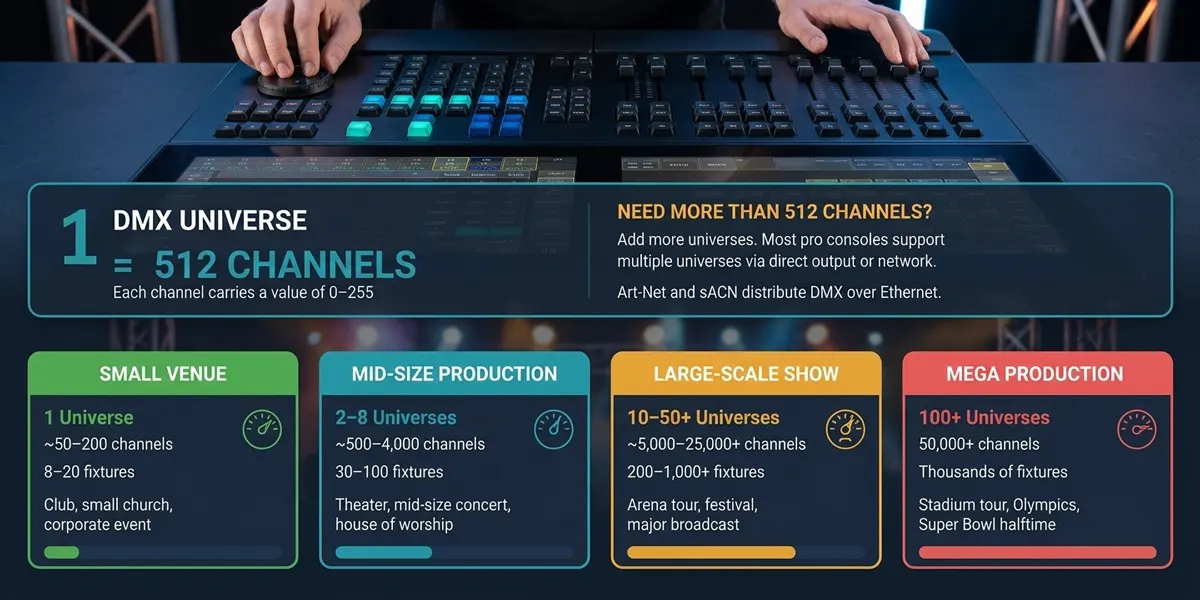
Sie sollten ein neues Universum hinzufügen, wenn Ihre Kanalnutzung ungefähr 70-80% (360-410 Kanäle) überschreitet.
Gründe:
- Sie haben Raum für die zukünftige Erweiterung, ohne Ihr gesamtes Adresszuordnungsschema neu zu gestalten.
- Die Fehlerbehebung ist einfacher, wenn die Universen nicht vollständig gepackt sind.
- Zu viele Geräte auf einer Leitung können die Stabilität des DMX-Signals beeinträchtigen (elektrische Begrenzung: maximal 32 Geräte pro Leitung).
Praktikum: Wenn Ihre Kanalanzahl 400 oder mehr erreicht, sollten Sie beginnen, ein zweites Universum zu planen. Die Verwendung von Art-Net oder SACN erleichtert das Durchlaufen der physischen DMX-Grenze.
Wie man auf mehrere Universen skaliert
Skalieren über 512 Kanäle ist eigentlich ganz einfach:
- DMX-Splitter / Signalrepeater: Verteilen Sie ein DMX-Universum-Signal über mehrere physikalische Linien (Hinweis: Dies erhöht nicht die Kanalzahl - es erhöht nur die Signalstärke).
- Art-Net-Knoten: Konvertieren Sie das Ethernet-basierte ART-NET-Protokoll in die physische DMX-Ausgabe. Jeder Art-Net-Knoten kann mehrere Universen ausgeben. Art-Net 4 unterstützt bis zu 32.768 Universen.
- SACN (E1.31): Streaming ACN – ein offener Standard für die Übertragung von DMX über IP-Netzwerke. Unterstützt bis zu 64.000 Universen und ist die bevorzugte Lösung für permanente Installationen.
- Mehrfach-DMX-Controller: Einige Controller sind mit mehreren physischen DMX-Ausgangsanschlüssen ausgestattet - jeder Port ist ein Universum.
- RDM (Remote Device Management): Ermöglicht bidirektionale Kommunikation zur Adressierung und Statusrückmeldung – hilfreich für die Verwaltung großer Multiuniversum-Systeme.
Auswahl des richtigen DMX-Decoders für Ihr Projekt
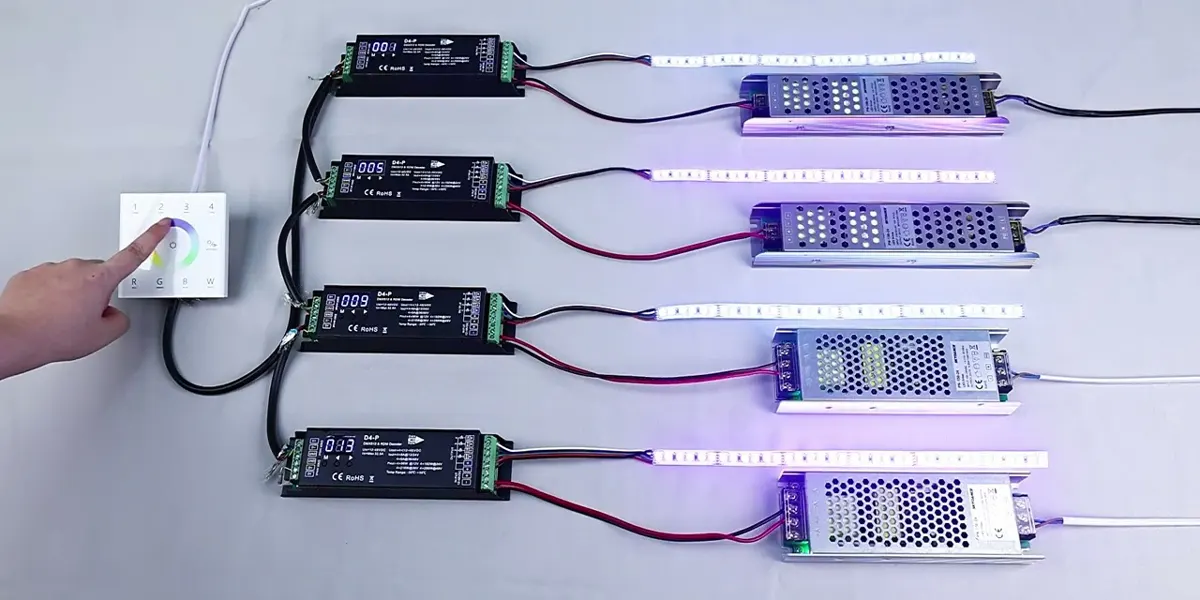
Die Wahl des richtigen Decoders ist genauso wichtig wie die korrekte Berechnung der Kanalzählungen. Zu den wichtigsten Überlegungen gehören:
| Decoder-Typ | am besten für | Kanäle |
| 1-Kanal-CV-Decoder | Einfarbiges Abblenden | 1 |
| 3-Kanal-CV-Decoder | RGB-Farbmischung | 3 |
| 4-Kanal-CV-Decoder | RGBW-Farbmischung | 4 |
| 5-Kanal-CV-Decoder | RGB+CCT / RGBWW | 5 |
| DMX-zu-SPI-Decoder | Pixelgesteuerte Streifen | Variabel (pro Pixel) |
Zusätzliche Faktoren, die bei der Auswahl eines Decoders zu beachten sind:
- Signalstabilität: Suchen Sie nach Modellen mit elektrischer Trennung und zuverlässiger DMX-Signalhandhabung – kritisch vor allem für die Fernverkabelung.
- PWM-Frequenz: Höhere Frequenzen (>=2 kHz) verhindern sichtbares Flackern, was besonders wichtig für kamerabereite Umgebungen ist.
- Dimmauflösung: 16-Bit-Dimmen ermöglicht eine sanftere Steuerung bei niedrigen Helligkeitsstufen.
- Schutzfunktionen: Überstromschutz, Kurzschlussschutz und Übertemperaturschutz sorgen für langfristige Zuverlässigkeit.
Signlited bietet eine vollständige Palette von DMX-Decodern, von 1-Kanal bis 16-Kanal, die sowohl Konstantspannungs- (CV) als auch Konstantstrom-(CC)-Optionen abdecken. Unsere Decoder unterstützen 8-Bit- und 16-Bit-Dimmen, mehrere PWM-Frequenzen und ausgewählte Modelle unterstützen die RDM-Fernadressierung. Besuchen Sie unsere DMX-Decoder Für detaillierte Spezifikationen und technische Unterstützung.
Warum sollten Sie sich für große DMX-Beleuchtungsprojekte von SignliteD entscheiden?
Signlited ist mehr als ein Lieferant – wir sind technischer Engineering-Partner für DMX-Lichtsysteme. Unsere Vorteile sind:
- Unterstützung für DMX-Systemdesign für Multi-Universen: Wir helfen Ihnen bei der Berechnung der Kanalanforderungen, planen die Adresszuweisung und geben Hardwareempfehlungen für Projekte von 1 bis 100 Universen.
- Architektur-Qualität DMX LED-Streifen: Unsere Streifen sind in den Konfigurationen einfarbig, einstellbar weiß, RGB, RGBW und RGB+CCT mit benutzerdefinierten Längen und IP-Werten erhältlich.
- DMX-Decoder und -Controller: Von 1-Kanal- bis 16-Kanal-Decodern, die CV- und CC-Optionen abdecken, mit RDM- und 16-Bit-Dimmunterstützung.
- OEM/ODM-Anpassung: Wir fertigen nach Ihren genauen Spezifikationen – kundenspezifisches Leiterplattendesign, Steckverbinder, Nennleistungen und Verpackungen.
- Kanalplanung und Adresszuordnung Technischer Support: Unser Engineering-Team unterstützt die Zuweisung von DMX-Adress, die Universumsplanung und die Systemintegration.
- Dokumentation und Verdrahtungsanleitungen: Wir bieten klare Schaltpläne, Adresszuordnungshandbücher und Inbetriebnahme-Checklisten, um eine reibungslose Installation zu gewährleisten.
Abschluss
Ein einzelnes DMX-Universum bietet 512 Kanäle – aber die genaue Anzahl der LED-Streifen, die es steuern kann, hängt ganz von Ihrem Leuchtentyp ab:
- Einfarbigkeit: 512 Geräte
- Tunable White (CCT): 256 Geräte
- RGB: 170 Leuchten
- RGBW: 128 Geräte
- RGB + CCT: 102 Geräte
- Pixelstreifen: 1-3 Streifen (abhängig von der Pixelanzahl)
Der Schlüssel zum Mitnehmen: Planen Sie nach Kanälen, nicht nach Fixture Count. Befolgen Sie die 80%-Regel (Reserve Headroom for Expansion) und überschreiten Sie niemals 512 Kanäle pro Universum. Für große Projekte sorgen Art-Net und SACN für nahtlose Multi-Universe-Skalierung.
Ob Büros, Hotels, Gebäudefassaden oder Medienwände – die Berechnungsmethode ist ebenso einfach – und jetzt haben Sie die Formel, Vergleichstabellen und Beispiele aus der Praxis, um es beim ersten Mal richtig zu machen.
FAQs
Verwandte Artikel