Italiano
  English
  简体中文
简体中文  Deutsch
  Español
  Français
  日本語
日本語  한국어
한국어  Polski
  Português
  Русский
  Türkçe
  Nederlands
  Tiếng Việt
  ไทย
ไทย 
Se stai acquistando o selezionando apparecchi a LED per l'illuminazione architettonica, l'illuminazione commerciale o i progetti di facciata multimediale, probabilmente ti sei posto questa domanda: "Esattamente quante strisce LED può controllare un universo DMX?"
“512 canali” – sebbene tecnicamente corretto, questa breve risposta è quasi inutile nell'ingegneria pratica. La risposta reale dipende da molteplici fattori: se le strisce LED sono RGB o RGBW, se utilizzano il controllo dei pixel, che tipo di decoder stai utilizzando e come assegni gli indirizzi.
Un universo DMX fornisce 512 canali di controllo. Ma una striscia RGB utilizza 3 canali per apparecchio, una striscia RGBW utilizza 4 canali e una striscia pixel può consumare centinaia di canali in un solo metro. La differenza tra il controllo di 170 apparecchi RGB e il controllo di una sola striscia di pixel è enorme: capire questa distinzione è la linea di demarcazione tra un progetto di installazione ben pianificato e un incubo di debug.
Questa guida fornisce formule di calcolo complete, esempi di progetti reali e consigli di ingegneria per aiutarti a calcolare accuratamente i requisiti dell'universo DMX. Che tu stia pianificando l'illuminazione degli uffici, l'illuminazione dell'hotel o una facciata multimediale su larga scala, te ne andrai con una metodologia chiara, non solo un numero. Se vuoi saperne di più, visita il nostro Hub di conoscenza del sistema LED DMX.
Cos'è un universo DMX?
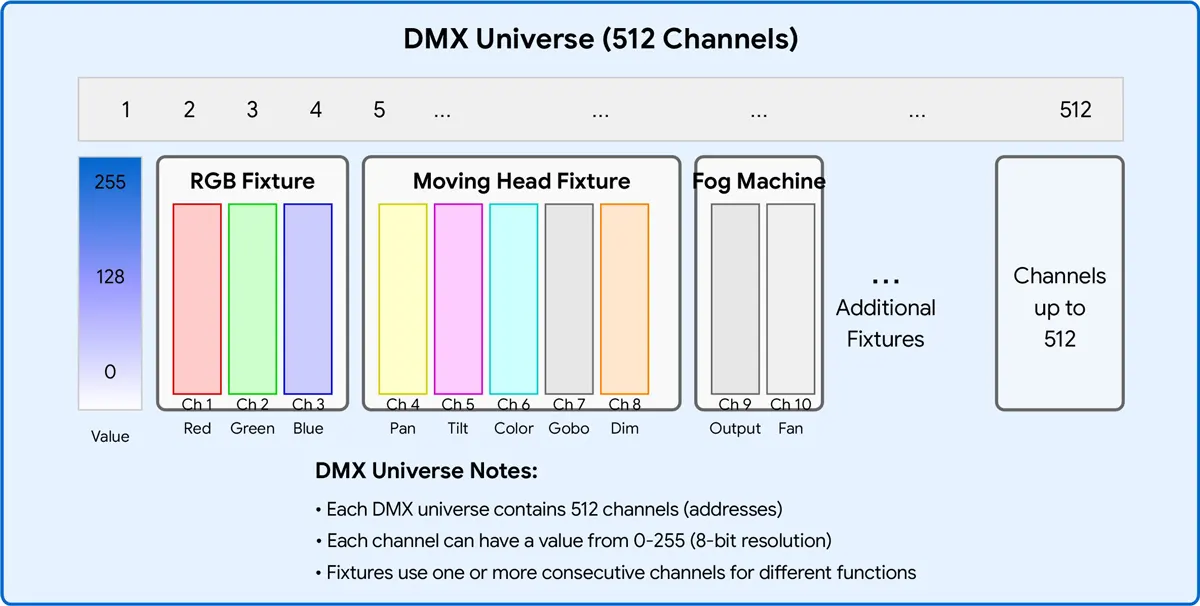
Un universo DMX è essenzialmente una singola linea di dati che può trasportare fino a 512 canali di controllo indipendenti. Ogni canale invia un valore compreso tra 0 e 255 (risoluzione a 8 bit) per controllare un attributo di un apparecchio: luminosità, intensità del colore o un effetto specifico.
Pensala in questo modo:
- universo = un cavo dati (una linea DMX)
- canale = un singolo valore di controllo (ad es. intensità rossa)
- indirizzare = il canale di partenza assegnato a un apparecchio specifico
- Decodificatore = Il dispositivo che converte i dati DMX in segnali PWM per strisce LED
Tutti i dispositivi conformi allo standard DMX512 condividono questo limite a 512 canali. Una volta superati i 512 canali, è necessario aggiungere un altro universo, in genere implementato tramite protocolli ART-NET o SACN su Ethernet o aggiungendo una seconda porta di uscita DMX sul controller.
flusso di dati: DMX Controller -> Universe (512 canali) -> Indirizzi (canali di avvio) -> Decoder -> Strisce LED.
Perché un universo DMX ha solo 512 canali?
Il protocollo DMX512 è stato sviluppato nel 1986 da USITT (United States Institute for Theatre Technology) per sostituire i vecchi sistemi di controllo analogici 0-10V. Il “512” nel nome deriva dal numero massimo di canali che un singolo pacchetto DMX può trasportare – 512 byte di dati, trasmessi 44 volte al secondo.
A quel tempo, 512 canali sembravano più che sufficienti. Rack dimmer, teste mobili e cambia colore richiedevano solo una manciata di canali. Ma con la crescita esplosiva dei sistemi LED RGB e delle facciate dei media controllate da pixel, il limite a 512 canali è diventato rapidamente un collo di bottiglia. Oggi, un singolo muro LED mappato in pixel può consumare dozzine o addirittura centinaia di universi.
Lo standard originale è stato aggiornato nel 2008 a DMX512-A (ANSI E1.11), ma il limite a 512 canali per universo rimane invariato. La soluzione è semplice: utilizzare più universi.
Struttura del pacchetto DMX: Break -> Codice di avvio (0x00) -> Fino a 512 slot dati (canali) -> ogni slot = 1 byte (0-255).
Un singolo universo DMX fornisce 512 canali di controllo. Quante strisce LED può controllare dipende interamente da quanti canali richiede ogni striscia:
| Tipo di controllo | Canali per apparecchio | Massimi infissi per universo |
| unico colore | 1 | 512 |
| Sintonizzabile bianco (CCT) | 2 | 256 |
| RGB | 3 | 170 |
| RGBW | 4 | 128 |
| RGB+CCT/RGBWW | 5 | 102 |
| Pixel RGB (50 pixel) | 150 | 3 |
| Pixel RGB (100 pixel) | 300 | 1 |
| Pixel RGB (170 pixel) | 510 | 1 |
Per le strisce RGB, ogni universo può controllare fino a 170 dispositivi indirizzabili individualmente (utilizzando 510 canali). Le strisce controllate da pixel consumano molti più canali, quindi il numero di dispositivi per universo diminuisce considerevolmente.
Come vengono assegnati i canali DMX
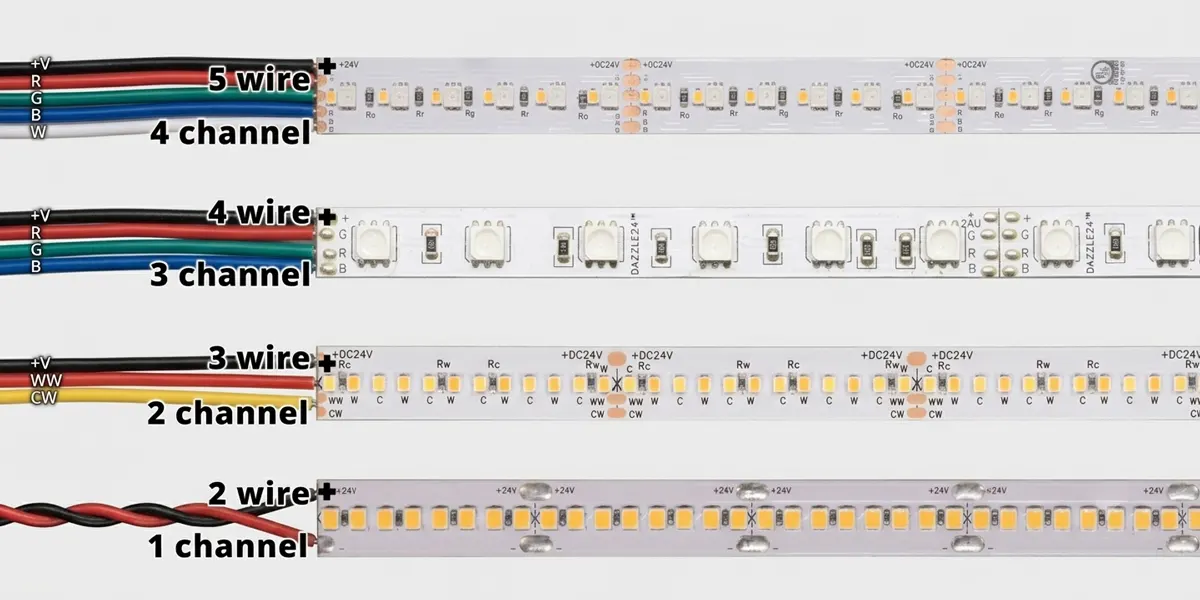
diversi tipi di Strisce LED DMX richiedono un numero diverso di canali. Ecco la ripartizione:
Strisce LED monocolore
Canali: 1
Metodo di controllo: solo oscuramento
Esempio: una striscia a 24V monocolore collegata a un decoder DMX a 1 canale. Il canale 1 controlla la luminosità da 0% a 100%.
Strisce LED sintonizzabili bianche (CCT)
Canali: 2
Metodo di controllo: bianco caldo + oscuramento bianco freddo
Esempio: Canale 1 = Intensità del bianco caldo, Canale 2 = Intensità del bianco freddo. Mescolando i due realizza il bianco sintonizzabile da 2700K a 6500K.
Strisce LED RGB
Canali: 3
Metodo di controllo: rosso + verde + blu dimmer
Esempio: Canale 1 = rosso, canale 2 = verde, canale 3 = blu. La miscelazione dei tre colori produce milioni di colori.
Strisce LED RGBW
Canali: 4
Metodo di controllo: rosso + verde + blu + bianco oscuramento
Esempio: l'aggiunta di un canale bianco dedicato elimina la necessità di miscelazione del colore per ottenere una luce bianca pura.
RGB+CCT (RGBWW) strisce LED
Canali: 5
Metodo di controllo: rosso + verde + blu + bianco caldo + attenuazione del bianco freddo
Esempio: Full Color Control Plus Tunable White – Ideale per hotel e ambienti di vendita al dettaglio in cui sono entrambi necessari colori vivaci e luce bianca precisa.
Strisce LED DMX a controllo pixel
Canali per pixel: 3 (RGB) o 4 (RGBW)
Metodo di controllo: ogni LED o gruppo di pixel è indirizzabile individualmente
Esempio: una striscia RGB da 100 pixel utilizza 100 x 3 = 300 canali, lasciando solo 212 canali rimanenti in quell'universo.
Nota importante: Alcuni decoder supportano l'oscuramento a 16 bit, che raddoppia il numero di canali per colore (ad esempio, RGB va da 3 a 6 canali). Ciò fornisce un'attenuazione più fluida a bassi livelli di luminosità, ma dimezza il numero di infissi per universo.
Come calcolare il numero massimo di strisce LED per universo
Formula di calcolo
Numero massimo di infissi = [ 512 ÷ canali per apparecchio]
(dove [ ] indica "arrotondamento per difetto al numero intero più vicino").
Esempio 1: strisce RGB
- 512 / 3 = 170.67 → 170 infissi (utilizzando 510 canali, lasciando 2 inutilizzati)
Esempio 2: strisce RGBW
- 512 / 4 = 128 → 128 apparecchi (tutti i 512 canali utilizzati)
Esempio 3: strisce RGB + CCT
- 512 / 5 = 102,4 → 102 apparecchi (utilizzando 510 canali, lasciando 2 inutilizzati)
Esempio 4: Pixel Strips (50 pixel, RGB)
- 50 x 3 = 150 canali per striscia
- 512 / 150 = 3.41 → 3 strisce (utilizzando 450 canali)
Esempio 5: strisce di pixel (100 pixel, RGBW)
- 100 x 4 = 400 canali per striscia
- 512 / 400 = 1.28 → 1 striscia (utilizzando 400 canali, lasciando 112 inutilizzati)
regola: Un unico apparecchio deve risiedere interamente all'interno di un universo. Non puoi dividere un dispositivo in due universi. Se un apparecchio richiede 5 canali e l'universo corrente ha solo 3 canali rimanenti, quell'apparecchio deve iniziare dall'universo successivo.
Tabella di confronto della capacità dell'universo DMX
| Tipo di illuminazione | Canali per apparecchio | Massimi infissi per universo | Canali utilizzati |
| unico colore | 1 | 512 | 512 |
| Sintonizzabile bianco (CCT) | 2 | 256 | 512 |
| RGB | 3 | 170 | 510 |
| RGBW | 4 | 128 | 512 |
| RGB+CCT/RGBWW | 5 | 102 | 510 |
| Pixel RGB (50 pixel) | 150 | 3 | 450 |
| Pixel RGB (100 pixel) | 300 | 1 | 300 |
| Pixel RGB (128 pixel) | 384 | 1 | 384 |
| Pixel RGB (170 pixel) | 510 | 1 | 510 |
| Pixel RGBW (50 pixel) | 200 | 2 | 400 |
| Pixel RGBW (100 pixel) | 400 | 1 | 400 |
| Pixel RGBW (128 pixel) | 512 | 1 | 512 |
Questa tabella funge da guida di riferimento rapido per qualsiasi progetto: consigliamo di aggiungerlo ai segnalibri.
Caso di studio 1: illuminazione per ufficio – 64 strisce RGBW
Per Apparecchio: 4 canali
Canali totali: 64 x 4 = 256
Universi richiesti: 256 / 512 = 0,5 → 1 Universo (ben all'interno della capacità)
Caso di studio 2: illuminazione dell'hotel – 96 strisce bianche sintonizzabili
Per apparecchio: 2 canali
Canali totali: 96 x 2 = 192
Universi richiesti: 192 / 512 = 0,375 → 1 Universo (molto spazio per la futura espansione)
Caso di studio 3: Illuminazione per facciata dell'edificio – Tubo neon da 200 m (60 pixel/m, RGB)
Pixel totali: 200 x 60 = 12.000 pixel
Canali totali: 12.000 x 3 = 36.000 canali
Universi richiesti: 36.000 / 512 = 70,31 → 71 universi
Raccomandazione ingegneristica: tali progetti in genere trasmettono tramite ART-NET o SACN su Ethernet piuttosto che con cablaggio DMX fisico.
Caso di studio 4: Facciata dei media – 1.000 pixel RGB (instaurazioni pixel indirizzabili individualmente)
Canali totali: 1.000 x 3 = 3.000
Universi richiesti: 3.000 / 512 = 5,86 → 6 universi
Errori comuni nella pianificazione dell'universo DMX
| ❌ Errore | ✅ Approccio corretto |
| Conteggio degli apparecchi al posto dei canali | Calcola sempre i canali totali, quindi dividi per 512 |
| Dimenticare RGBW utilizza 4 canali | RGBW non è RGB: non dare per scontato 3 canali |
| ignorando i canali riservati | Alcuni decoder riservano i canali per funzioni o usano "indirizzi di partenza" che saltano i canali |
| Mescolare diverse modalità di attrezzatura | Dispositivi diversi con conteggi di canali diversi complicano l'indirizzamento: pianificare le zone separatamente |
| Sovraccarico di un universo | Mantieni l'utilizzo al di sotto di 80% per future espansioni e risoluzione dei problemi |
| dimenticando di pianificare l'espansione | Lasciare sempre almeno la capacità del canale 10–20% per le modifiche |
Quando dovresti aggiungere un altro universo DMX?

Dovresti aggiungere un nuovo universo quando l'utilizzo del tuo canale supera circa 70-80% (360-410 canali).
movente:
- Avrai spazio per un'espansione futura senza riprogettare l'intero schema di allocazione degli indirizzi.
- La risoluzione dei problemi è più semplice quando gli universi non sono completamente imballati.
- Troppi dispositivi su una singola linea possono degradare la stabilità del segnale DMX (limitazione elettrica: massimo 32 dispositivi per linea).
Regola pratica: Se il conteggio del tuo canale raggiunge 400 o superiore, dovresti iniziare a pianificare un secondo universo. L'uso di ART-NET o SACN rende facile superare il limite fisico DMX.
Come ridimensionare a più universi
Il ridimensionamento oltre i 512 canali è in realtà abbastanza semplice:
- Splitter DMX / Ripetitori di segnale: Distribuisci un segnale DMX Universe su più linee fisiche (Nota: questo non aumenta il numero di canali, ma aumenta solo la potenza del segnale).
- Nodi Art-Net: Converti protocollo Art-Net basato su Ethernet in output fisico DMX. Ogni nodo Art-Net può emettere più universi. Art-Net 4 supporta fino a 32.768 universi.
- SACN (E1.31): Streaming ACN – uno standard aperto per la trasmissione di reti DMX su IP. Supporta fino a 64.000 universi ed è la soluzione preferita per installazioni permanenti.
- Controller DMX multiporta: Alcuni controller sono dotati di più porte di uscita DMX fisiche: ogni porta è un universo.
- RDM (gestione remota dei dispositivi): Abilita la comunicazione bidirezionale per indirizzare e feedback di stato – utile per la gestione di grandi sistemi multiuniversi.
Scegliere il giusto decoder DMX per il tuo progetto
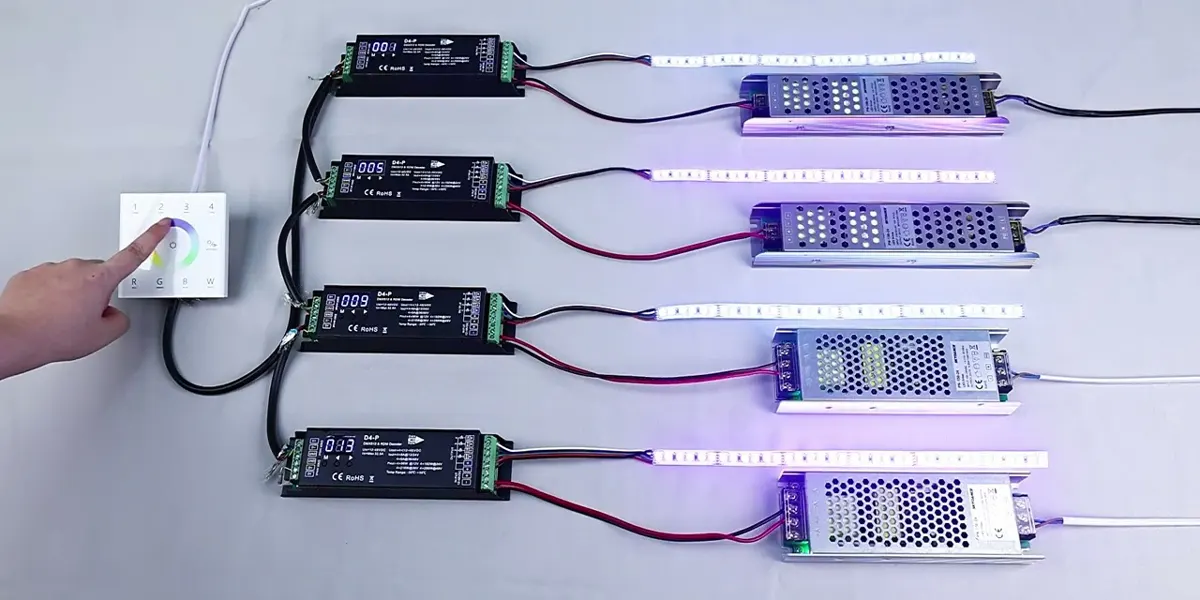
La scelta del giusto decoder è importante tanto quanto il calcolo del conteggio dei canali correttamente. Le considerazioni chiave includono:
| tipo di decodificatore | Meglio per | canali |
| Decoder CV a 1 canale | oscuramento monocolore | 1 |
| Decoder CV a 3 canali | Mixaggio di colori RGB | 3 |
| Decoder CV a 4 canali | Miscelazione del colore RGBW | 4 |
| Decoder CV a 5 canali | RGB+CCT/RGBWW | 5 |
| Decoder da DMX a SPI | Strisce a controllo pixel | Variabile (per pixel) |
Ulteriori fattori da considerare quando si sceglie un decoder:
- Segnala stabilità: Cerca modelli con isolamento elettrico e gestione affidabile del segnale DMX, fondamentale soprattutto per il cablaggio a lunga distanza.
- Frequenza PWM: Le frequenze più alte (>=2 kHz) impediscono lo sfarfallio visibile, che è particolarmente importante per gli ambienti pronti per la fotocamera.
- Risoluzione oscurante: Il dimming a 16 bit consente un controllo più fluido a bassi livelli di luminosità.
- Caratteristiche di protezione: La protezione da sovracorrente, la protezione da cortocircuito e la protezione da sovratemperatura garantiscono un'affidabilità a lungo termine.
SignLiteled offre una gamma completa di decoder DMX, da 1 canale a 16 canali, coprendo sia le opzioni di tensione costante (CV) che di corrente costante (CC). I nostri decoder supportano l'attenuazione a 8 e 16 bit, le frequenze multiple PWM e i modelli selezionati supportano l'indirizzamento remoto RDM. Visita il nostro Decoder DMX Per specifiche dettagliate e supporto tecnico.
Perché scegliere SignLiteled per grandi progetti di illuminazione DMX
SignLiteled è più di un fornitore: siamo un partner di ingegneria tecnica per i sistemi di illuminazione DMX. I nostri vantaggi includono:
- Supporto per la progettazione di sistemi DMX multiuniversi: Ti aiutiamo a calcolare i requisiti del canale, a pianificare l'allocazione degli indirizzi e fornire consigli hardware per progetti che vanno da 1 a 100+ universi.
- Strisce LED DMX di grado architettonico: Le nostre strisce sono disponibili in configurazioni monocolore, sintonizzabili, RGB, RGBW e RGB+CCT, con lunghezze personalizzate e classificazioni IP.
- Decoder e controller DMX: da decoder da 1 canale a 16 canali, che coprono le opzioni CV e CC, con supporto RDM e dimmer a 16 bit.
- Personalizzazione OEM/ODM: Produciamo secondo le vostre specifiche esatte: design PCB personalizzato, connettori, potenze e packaging.
- Pianificazione del canale e allocazione degli indirizzi Supporto tecnico: Il nostro team di ingegneri assiste con l'allocazione degli indirizzi DMX, la pianificazione dell'universo e l'integrazione del sistema.
- Documentazione e guide di cablaggio: Forniamo schemi elettrici chiari, guide all'allocazione degli indirizzi e liste di controllo per la messa in servizio per garantire installazioni lisce.
Conclusione
Un singolo universo DMX fornisce 512 canali, ma il numero esatto di strisce LED che può controllare dipende interamente dal tipo di apparecchio:
- unico colore: 512 infissi
- Sintonizzabile bianco (CCT): 256 infissi
- RGB: 170 infissi
- RGBW: 128 infissi
- RGB+CCT: 102 infissi
- Strisce di pixel: 1-3 strisce (a seconda del conteggio dei pixel)
Il punto chiave: pianificare per canali, non per conteggio degli infissi. Segui la regola 80% (riserva di espansione per l'espansione) e non supera mai i 512 canali per universo. Per progetti di grandi dimensioni, Art-Net e SACN forniscono un ridimensionamento multiuniverso senza interruzioni.
Che tu stia progettando uffici, hotel, facciate di edifici o muri multimediali – il metodo di calcolo è altrettanto semplice – e ora hai la formula, le tabelle di confronto e gli esempi del mondo reale per farlo bene la prima volta.
Domande frequenti
Post correlati