한국어
한국어  English
  简体中文
简体中文  Deutsch
  Español
  Français
  Italiano
  日本語
日本語  Polski
  Português
  Русский
  Türkçe
  Nederlands
  Tiếng Việt
  ไทย
ไทย 
건축 조명, 상업용 조명 또는 미디어 외관 프로젝트를 위해 LED 조명기구를 소싱하거나 선택하는 경우, "DMX 유니버스를 제어할 수 있는 정확히 몇 개의 LED 스트립이 있습니까?"라는 질문을 스스로에게 던졌을 것입니다.
"512 채널" – 기술적으로 정확하지만 이 짧은 대답은 실제 엔지니어링에서 거의 쓸모가 없습니다. 실제 답은 여러 요인에 따라 달라집니다. LED 스트립이 RGB인지 RGBW인지, 픽셀 제어 사용 여부, 사용 중인 디코더 유형, 주소 지정 방법 등입니다.
DMX 유니버스 하나는 512개의 제어 채널을 제공합니다. 그러나 RGB 스트립은 고정 장치당 3채널을 사용하고 RGBW 스트립은 4채널을 사용하며 픽셀 스트립은 1미터로 수백 개의 채널을 소비할 수 있습니다. 170개의 RGB 고정 장치를 제어하는 것과 하나의 픽셀 스트립만 제어하는 것의 차이는 엄청납니다. 이 차이를 이해하는 것은 잘 계획된 설치 프로젝트와 디버깅 악몽을 구분하는 것입니다.
이 가이드는 DMX 유니버스 요구 사항을 정확하게 계산하는 데 도움이 되는 완전한 계산 공식, 실제 프로젝트 예제 및 엔지니어링 권장 사항을 제공합니다. 사무실 조명, 호텔 조명 또는 대규모 미디어 외관을 계획하든, 숫자뿐만 아니라 명확한 방법론을 가지고 떠나게 될 것입니다. 더 자세히 알고 싶으시면 저희를 방문하십시오 DMX LED 시스템 지식 허브.
DMX 유니버스란?
DMX 유니버스는 기본적으로 최대 512개의 독립적인 제어 채널을 전송할 수 있는 단일 데이터 라인입니다. 각 채널은 조명기의 한 속성인 밝기, 색상 강도 또는 특정 효과를 제어하기 위해 0에서 255(8비트 해상도) 사이의 값을 전송합니다.
다음과 같이 생각하십시오.
- 우주 = 데이터 케이블(DMX 라인 1개)
- 수로 = 단일 제어 값(예: 적색 강도)
- 주소를 쓰다 = 특정 조명기구에 할당된 시작 채널
- 디코더 = DMX 데이터를 LED 스트립의 PWM 신호로 변환하는 장치
DMX512 표준을 준수하는 모든 장치는 이 512채널 제한을 공유합니다. 512 채널을 초과하면 다른 유니버스를 추가해야 합니다. 일반적으로 이더넷을 통해 Art-Net 또는 SACN 프로토콜을 통해 구현하거나 컨트롤러에 두 번째 DMX 출력 포트를 추가하여 구현해야 합니다.
데이터 흐름: DMX 컨트롤러 -> 유니버스(512개 채널) -> 주소(시작 채널) -> 디코더 -> LED 스트립.
DMX 유니버스에 512개의 채널만 있는 이유는 무엇입니까?
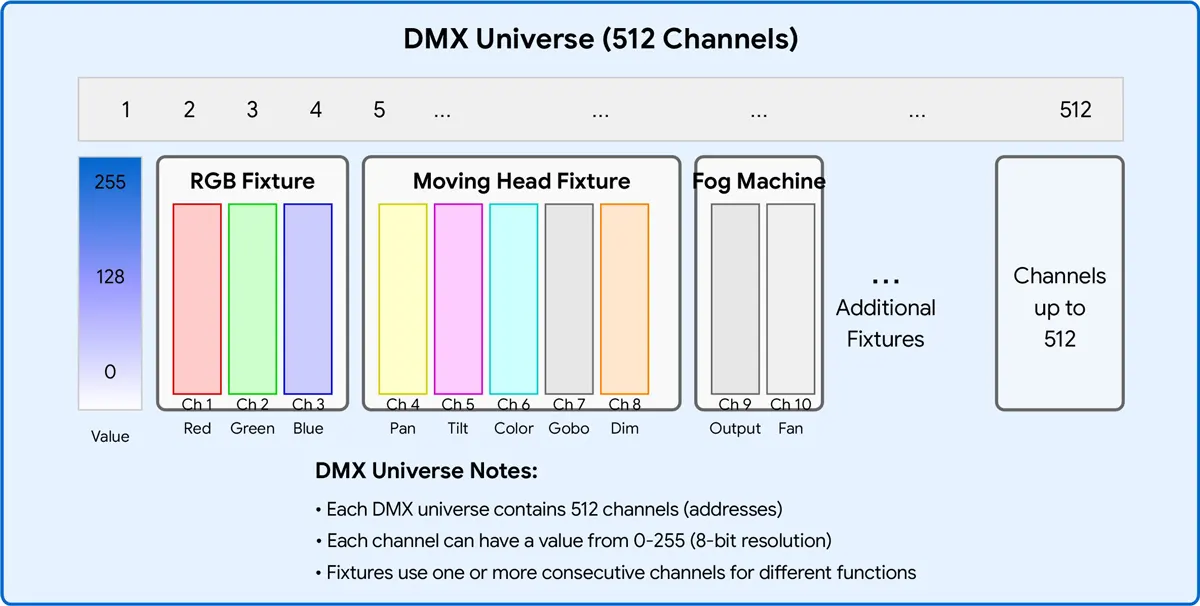
DMX512 프로토콜은 1986년 USITT(United States Institute for Theatre Technology)에서 구형 0-10V 아날로그 제어 시스템을 대체하기 위해 개발했습니다. 이름의 "512"는 단일 DMX 패킷이 전달할 수 있는 최대 채널 수(초당 44회 전송되는 512바이트의 데이터)에서 나옵니다.
당시에는 512채널이 충분해 보였다. 조광기 랙, 움직이는 헤드, 색상 체인저는 각각 소수의 채널만 필요했습니다. 그러나 RGB LED 시스템과 픽셀 제어 미디어 외관의 폭발적인 성장으로 512채널 제한은 빠르게 병목 현상이 되었습니다. 오늘날, 단일 픽셀 매핑 LED 벽은 수십 또는 수백 개의 우주를 소비할 수 있습니다.
원래 표준은 2008년에 DMX512-A(ANSI E1.11)로 업데이트되었지만 유니버스당 512채널 제한은 변경되지 않았습니다. 솔루션은 간단합니다. 여러 우주를 사용하십시오.
DMX 패킷 구조: BREAK -> 시작 코드(0x00) -> 최대 512개의 데이터 슬롯(채널) -> 각 슬롯 = 1바이트(0-255).
단일 DMX 유니버스는 512개의 제어 채널을 제공합니다. 제어할 수 있는 LED 스트립 수는 각 스트립에 필요한 채널 수에 따라 다릅니다.
| 제어 유형 | 고정 장치당 채널 | 우주당 최대 고정 장치 |
| 단일 색상 | 1 | 512 |
| 튜닝 가능한 흰색(CCT) | 2 | 256 |
| RGB | 3 | 170 |
| RGBW | 4 | 128 |
| RGB+CCT/RGBWW | 5 | 102 |
| RGB 픽셀(50픽셀) | 150 | 3 |
| RGB 픽셀(100픽셀) | 300 | 1 |
| RGB 픽셀(170픽셀) | 510 | 1 |
RGB 스트립의 경우 각 유니버스는 최대 170개의 개별 주소 지정이 가능한 조명기(510개 채널 사용)를 제어할 수 있습니다. 픽셀 제어 스트립은 훨씬 더 많은 채널을 소비하므로 유니버스당 고정 장치 수가 상당히 감소합니다.
DMX 채널 할당 방법
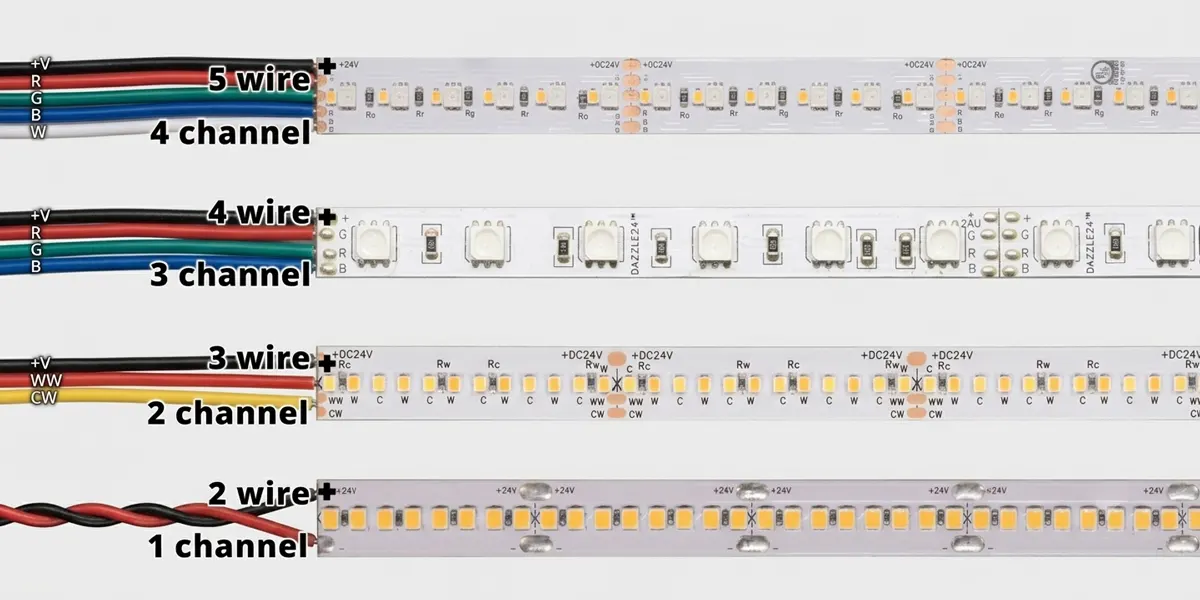
이종류의 DMX LED 스트립 다른 수의 채널이 필요합니다. 다음은 분석입니다.
단색 LED 스트립
채널: 1
제어 방법: 디밍만
예: 1채널 DMX 디코더에 연결된 24V 단색 스트립. 채널 1은 0%에서 100%까지의 밝기를 제어합니다.
조정 가능한 흰색(CCT) LED 스트립
채널: 2
제어 방법: 따뜻한 백색 + 차가운 백색 디밍
예: 채널 1 = 따뜻한 백색 강도, 채널 2 = 차가운 백색 강도. 이 두 가지를 혼합하면 2700K에서 6500K 사이의 조정 가능한 흰색을 얻을 수 있습니다.
RGB LED 스트립
채널: 3
제어 방법: 빨강 + 녹색 + 파랑 디밍
예: 채널 1 = 빨간색, 채널 2 = 녹색, 채널 3 = 파란색. 세 가지 색상을 혼합하면 수백만 가지 색상이 생성됩니다.
RGBW LED 스트립
채널: 4
제어 방법: 빨강 + 녹색 + 파랑 + 백색 디밍
예: 전용 흰색 채널을 추가하면 순수한 백색광을 얻기 위해 색상 혼합이 필요하지 않습니다.
RGB+CCCT(RGBWW) LED 스트립
채널: 5
제어 방법: 레드 + 그린 + 블루 + 웜 화이트 + 쿨 화이트 디밍
예: 풀 컬러 컨트롤 플러스 튜닝 화이트 – 생생한 색상과 정확한 백색광이 모두 필요한 호텔 및 소매 환경에 이상적입니다.
픽셀 제어 DMX LED 스트립
픽셀당 채널: 3(RGB) 또는 4(RGBW)
제어 방법: 각 LED 또는 픽셀 그룹은 개별적으로 주소 지정이 가능합니다.
예: 100픽셀 RGB 스트립은 100 x 3 = 300 채널을 사용하므로 해당 유니버스에 남은 채널은 212개뿐입니다.
주: 일부 디코더는 16비트 디밍을 지원하며, 이는 색상당 채널 수를 두 배로 늘립니다(예: RGB는 3에서 6 채널로 이동). 이는 낮은 밝기 수준에서 더 부드러운 디밍을 제공하지만 우주당 고정 장치 수를 절반으로 줄입니다.
우주당 LED 스트립의 최대 수를 계산하는 방법
계산식
최대 고정 장치 수 = [ 512 ÷ 고정 장치당 채널]
(여기서 [ ]는 "가장 가까운 정수로 반올림"을 나타냅니다.)
예 1: RGB 스트립
- 512 / 3 = 170.67 → 170개의 고정 장치(510개 채널 사용, 2개 사용하지 않음)
예 2: RGBW 스트립
- 512 / 4 = 128 → 128개의 고정 장치(모두 512개 채널 사용)
예 3: RGB+CCCT 스트립
- 512 / 5 = 102.4 → 102개의 고정 장치(510개 채널 사용, 2개 사용하지 않음)
예 4: 픽셀 스트립(50픽셀, RGB)
- 50 x 3 = 스트립 당 150 채널
- 512 / 150 = 3.41 → 3개의 스트립(450개 채널 사용)
예 5: 픽셀 스트립(100픽셀, RGBW)
- 100 x 4 = 스트립 당 400 채널
- 512 / 400 = 1.28 → 1 스트립(400개 채널 사용, 112개 사용하지 않음)
경험 법칙: 단일 고정 장치는 완전히 하나의 우주 내에 있어야 합니다. 두 우주로 고정 장치를 나눌 수 없습니다. 고정 장치에 5개의 채널이 필요하고 현재 우주에 3개의 채널만 남아 있는 경우 해당 고정 장치는 다음 우주에서 시작되어야 합니다.
DMX 유니버스 용량 비교 표
| 조명 유형 | 고정 장치당 채널 | 우주당 최대 고정 장치 | 사용되는 채널 |
| 단일 색상 | 1 | 512 | 512 |
| 튜닝 가능한 흰색(CCT) | 2 | 256 | 512 |
| RGB | 3 | 170 | 510 |
| RGBW | 4 | 128 | 512 |
| RGB+CCT/RGBWW | 5 | 102 | 510 |
| RGB 픽셀(50픽셀) | 150 | 3 | 450 |
| RGB 픽셀(100픽셀) | 300 | 1 | 300 |
| RGB 픽셀(128픽셀) | 384 | 1 | 384 |
| RGB 픽셀(170픽셀) | 510 | 1 | 510 |
| RGBW 픽셀(50픽셀) | 200 | 2 | 400 |
| RGBW 픽셀(100픽셀) | 400 | 1 | 400 |
| RGBW 픽셀(128픽셀) | 512 | 1 | 512 |
이 표는 모든 프로젝트에 대한 빠른 참조 가이드 역할을 합니다. 북마크를 하는 것이 좋습니다.
사례 연구 1: 사무실 조명 – 64 RGBW 스트립
고정 장치당: 4채널
총 채널: 64 x 4 = 256
필요한 유니버스: 256 / 512 = 0.5 → 1 유니버스(Cam 내에서)
사례 연구 2: 호텔 조명 – 96개의 조정 가능한 흰색 스트립
고정 장치당: 2개 채널
총 채널: 96 x 2 = 192
필요한 우주: 192 / 512 = 0.375 → 1 우주(향후 확장을 위한 충분한 헤드룸)
사례 연구 3: 건물 정면 조명 – 200m 픽셀 네온 호스(60픽셀/m, RGB)
총 픽셀 수: 200 x 60 = 12,000픽셀
총 채널: 12,000 x 3 = 36,000 채널
필요한 우주: 36,000 / 512 = 70.31 → 71개의 우주
엔지니어링 권장 사항: 이러한 프로젝트는 일반적으로 물리적 DMX 케이블링이 아닌 ART-NET 또는 SACN을 통해 이더넷을 통해 전송됩니다.
사례 연구 4: 미디어 외관 – 1,000 RGB 픽셀(개별 주소 지정 가능 픽셀 고정 장치)
총 채널: 1,000 x 3 = 3,000
필요한 우주: 3,000 / 512 = 5.86 → 6개의 우주
DMX 유니버스 계획의 일반적인 실수
| ❌ 실수 | ✅ 올바른 접근 방식 |
| 채널 대신 일정 계산 | 항상 총 채널을 계산한 다음 512로 나눕니다. |
| RGBW를 잊어버리면 4개의 채널이 사용됩니다. | RGBW는 RGB가 아닙니다. 3개의 채널을 가정하지 마십시오. |
| 예약된 채널 무시 | 일부 디코더는 채널을 건너뛰는 기능을 위해 채널을 예약하거나 "시작 주소"를 사용합니다. |
| 다양한 픽스처 모드 혼합 | 채널 수가 다른 여러 고정 장치는 주소 지정을 복잡하게 합니다. |
| 하나의 우주에 과부하 | 향후 확장 및 문제 해결을 위해 80% 미만의 활용도 유지 |
| 확장 계획을 잊다 | 변경 사항에 대해 항상 최소 10–20% 채널 용량을 남겨 두십시오. |
다른 DMX 유니버스를 언제 추가해야 합니까?
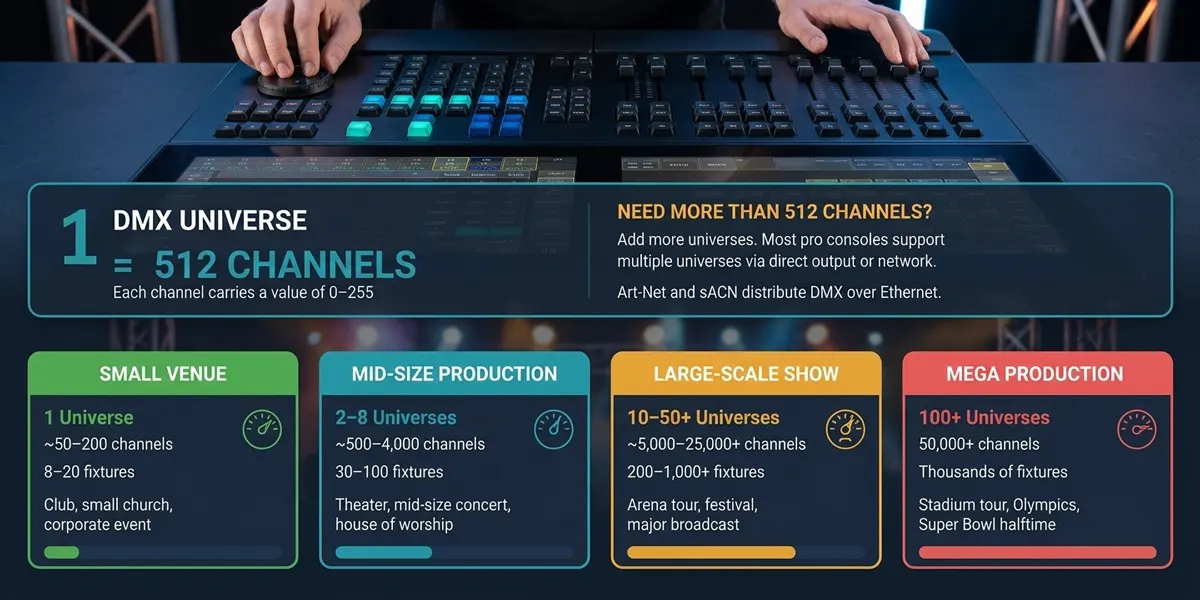
채널 사용량이 약 70-80%(360-410 채널)를 초과하면 새 유니버스를 추가해야 합니다.
이유:
- 전체 주소 할당 체계를 재설계하지 않고 향후 확장을 위한 여지가 있습니다.
- 유니버스가 완전히 채워지지 않으면 문제 해결이 더 쉽습니다.
- 한 줄에 너무 많은 장치가 있으면 DMX 신호 안정성이 저하될 수 있습니다(전기 제한: 한 줄당 최대 32개의 장치).
실제 규칙: 채널 수가 400 이상이면 두 번째 유니버스 계획을 시작해야 합니다. Art-Net 또는 SACN을 사용하면 물리적 DMX 제한을 쉽게 돌파할 수 있습니다.
여러 우주로 확장하는 방법
512 채널을 넘어서 확장하는 것은 매우 간단합니다.
- DMX 스플리터 / 신호 리피터: 하나의 DMX 유니버스 신호를 여러 물리적 라인에 분산시킵니다(참고: 채널 수를 늘리지 않고 신호 강도만 높입니다).
- 아트넷 노드: 이더넷 기반 Art-Net 프로토콜을 물리적 DMX 출력으로 변환합니다. 각 Art-Net 노드는 여러 개의 유니버스를 출력할 수 있습니다. Art-Net 4는 최대 32,768개의 유니버스를 지원합니다.
- SACN(E1.31): 스트리밍 ACN – IP 네트워크를 통해 DMX를 전송하기 위한 개방형 표준입니다. 최대 64,000개의 유니버스를 지원하며 영구 설치에 선호되는 솔루션입니다.
- 다중 포트 DMX 컨트롤러: 일부 컨트롤러에는 여러 물리적 DMX 출력 포트가 장착되어 있습니다. 각 포트는 하나의 유니버스입니다.
- RDM(원격 장치 관리): 주소 지정 및 상태 피드백을 위한 양방향 통신을 가능하게 하여 대규모 다중 우주 시스템을 관리하는 데 도움이 됩니다.
프로젝트에 적합한 DMX 디코더 선택
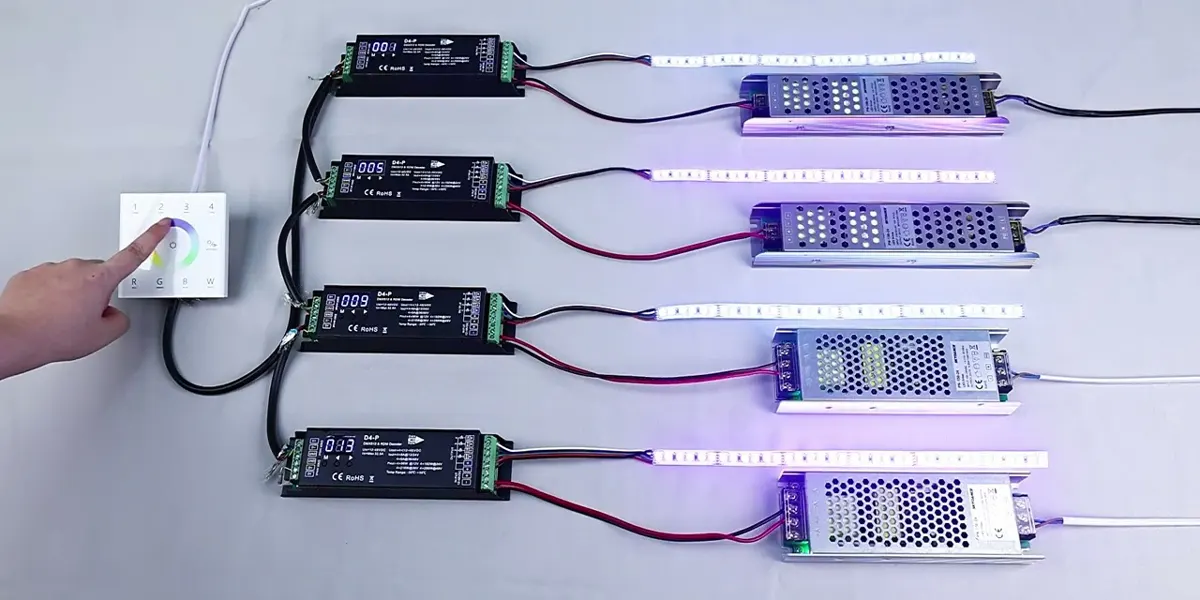
올바른 디코더를 선택하는 것은 채널 수를 올바르게 계산하는 것만큼 중요합니다. 주요 고려 사항은 다음과 같습니다.
| 디코더 유형 | ...에 최선을 다하다 | 채널 |
| 1채널 CV 디코더 | 단색 디밍 | 1 |
| 3채널 CV 디코더 | RGB 색상 혼합 | 3 |
| 4채널 CV 디코더 | RGBW 색상 혼합 | 4 |
| 5채널 CV 디코더 | RGB+CCT/RGBWW | 5 |
| DMX-SPI 디코더 | 픽셀 제어 스트립 | 변수(픽셀당) |
디코더를 선택할 때 고려해야 할 추가 요소:
- 신호 안정성: 전기 절연 및 신뢰할 수 있는 DMX 신호 처리 기능이 있는 모델을 찾으십시오. 특히 장거리 케이블 연결에 중요합니다.
- PWM 주파수: 더 높은 주파수(>=2kHz)는 눈에 보이는 깜박임을 방지하며, 이는 카메라 지원 환경에 특히 중요합니다.
- 디밍 해상도: 16비트 디밍으로 낮은 밝기 수준에서 더 부드러운 제어가 가능합니다.
- 보호 기능: 과전류 보호, 단락 보호 및 과열 보호 기능으로 장기적인 신뢰성을 보장합니다.
SignLiteD는 1채널에서 16채널까지 DMX 디코더의 전체 범위를 제공하며 정전압(CV)과 정전류(CC) 옵션을 모두 포함합니다. 당사의 디코더는 8비트 및 16비트 디밍, 다중 PWM 주파수를 지원하며 일부 모델은 RDM 원격 주소 지정을 지원합니다. 우리를 방문 DMX 디코더 자세한 사양 및 엔지니어링 지원.
대규모 DMX 조명 프로젝트에 서명된 선택을 선택해야 하는 이유
SignLiteD는 공급업체 그 이상입니다. 우리는 DMX 조명 시스템의 기술 엔지니어링 파트너입니다. 우리의 장점은 다음과 같습니다.
- 다중 우주 DMX 시스템 설계 지원: 채널 요구 사항을 계산하고 주소 할당을 계획하며 1~100개 이상의 유니버스에 이르는 프로젝트에 대한 하드웨어 권장 사항을 제공합니다.
- 건축용 DMX LED 스트립: 당사의 스트립은 사용자 정의 길이와 IP 등급이 있는 단색, 조정 가능한 흰색, RGB, RGBW 및 RGB+CCT 구성으로 제공됩니다.
- DMX 디코더 및 컨트롤러: RDM 및 16비트 디밍 지원을 통해 CV 및 CC 옵션을 포함하는 1채널에서 16채널 디코더까지.
- OEM/ODM 사용자 지정: 우리는 사용자 정의 PCB 디자인, 커넥터, 전력 등급 및 포장과 같은 정확한 사양에 맞게 제조합니다.
- 채널 계획 및 주소 할당 기술 지원: 당사의 엔지니어링 팀은 DMX 주소 할당, 유니버스 계획 및 시스템 통합을 지원합니다.
- 문서 및 배선 가이드: 원활한 설치를 위해 명확한 배선도, 주소 할당 가이드 및 시운전 체크리스트를 제공합니다.
결론
단일 DMX 유니버스는 512개의 채널을 제공하지만 제어할 수 있는 정확한 LED 스트립 수는 전적으로 사용자의 고정 장치 유형에 따라 다릅니다.
- 단일 색상: 512개 고정구
- 튜닝 가능한 흰색(CCT): 256개의 고정 장치
- RGB: 170개의 고정 장치
- RGBW: 128개의 고정 장치
- RGB+CCCT: 102개의 고정 장치
- 픽셀 스트립: 1-3개의 스트립(픽셀 수에 따라 다름)
주요 내용: 고정 장치 수가 아닌 채널별 계획. 80% 규칙(확장을 위한 예비 헤드룸)을 따르고 유니버스당 512채널을 초과하지 마십시오. 대규모 프로젝트의 경우 Art-Net 및 SACN은 원활한 다중 우주 확장을 제공합니다.
사무실, 호텔, 건물 정면 또는 미디어 벽을 설계하든, 계산 방법도 똑같이 간단합니다. 이제 처음부터 올바르게 사용할 수 있는 공식, 비교 표 및 실제 예제가 있습니다.
자주 묻는 질문
관련 게시물