日本語
日本語  English
  简体中文
简体中文  Deutsch
  Español
  Français
  Italiano
  한국어
한국어  Polski
  Português
  Русский
  Türkçe
  Nederlands
  Tiếng Việt
  ไทย
ไทย 
建築照明、商業用照明、またはメディア ファサード プロジェクト用に LED 照明器具を調達または選択している場合、次の質問を自問自答している可能性があります。「1 つの DMX ユニバースは、1 つだけの LED ストリップで何個の LED ストリップを制御できますか?」
「512 チャネル」 – 技術的には正しいですが、この短い答えは、実用的なエンジニアリングではほとんど役に立ちません。 真の答えは、複数の要因に依存します。LED ストリップが RGB か RGBW か、ピクセル制御を使用するかどうか、使用しているデコーダの種類、アドレスの割り当て方法などです。
1 つの DMX ユニバースは、512 の制御チャネルを提供します。 ただし、RGB ストリップはフィクスチャごとに 3 チャンネルを使用し、RGBW ストリップは 4 チャンネルを使用し、ピクセル ストリップはわずか 1 メートルで数百のチャンネルを消費します。 170 個の RGB フィクスチャを制御することと、1 つのピクセル ストリップだけを制御することとの違いは非常に大きいです。この違いを理解することは、よく計画されたインストール プロジェクトとデバッグの悪夢との間の境界線です。
このガイドでは、完全な計算式、実際のプロジェクト例、およびエンジニアリングに関する推奨事項を提供し、DMX ユニバースの要件を正確に計算することができます。 オフィスの照明、ホテルの照明、大規模なメディアのファサードを計画している場合でも、数字だけでなく、明確な方法論を持って立ち去ることができます。 もっと知りたい方は、ぜひ私たちの訪問者にアクセスしてください DMX LED システム ナレッジ ハブ.
DMX ユニバースとは何ですか?
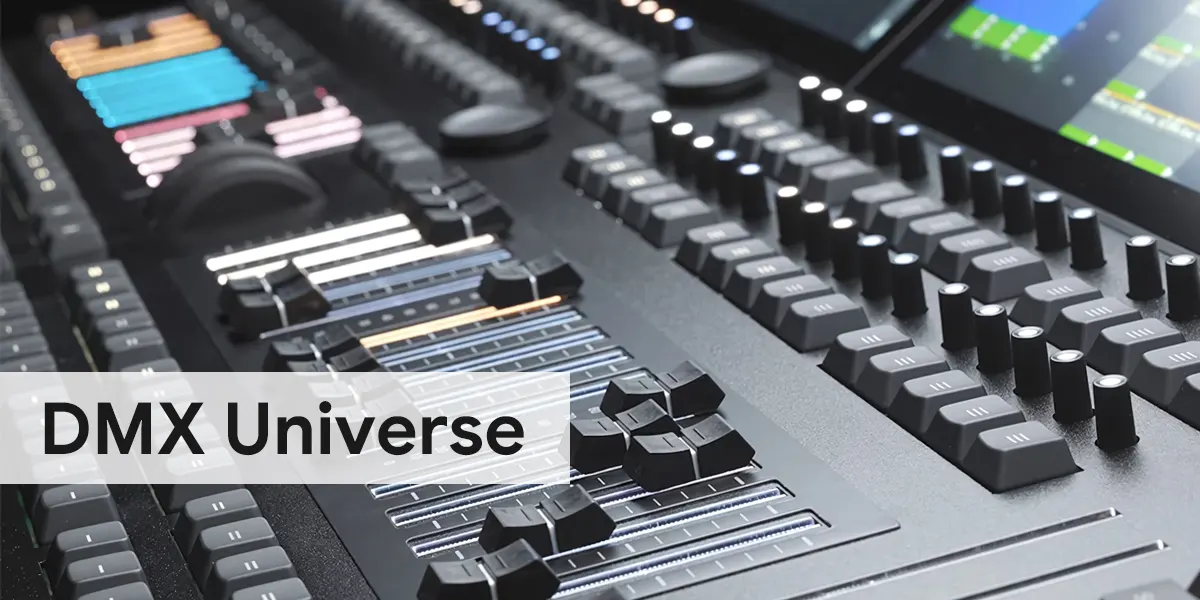
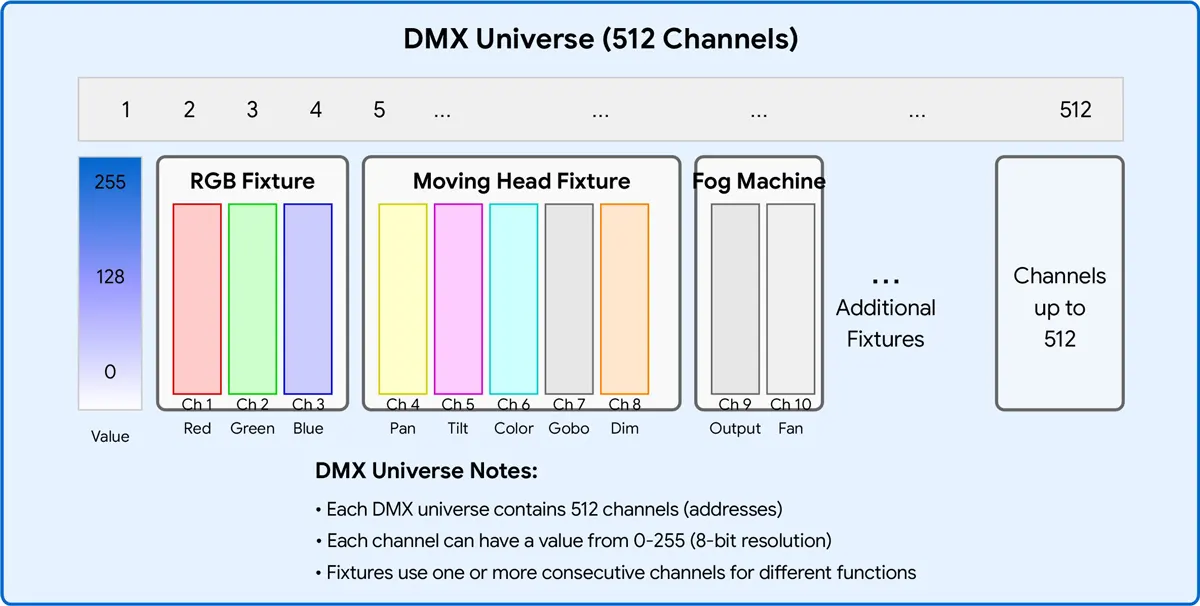
DMX ユニバースは、基本的に、最大 512 個の独立制御チャネルを伝送できる単一のデータ ラインです。 各チャネルは、明るさ、色の強度、または特定の効果など、照明器具の属性を制御するために、0 から 255 (8 ビットの解像度) の間の値を送信します。
このように考えてください。
- 宇宙 = データ ケーブル (1 つの DMX ライン)
- チャンネル = 単一の制御値 (例: 赤の強度)
- 住所 = 特定の照明器具に割り当てられた開始チャネル
- デコーダ = DMX データを LED ストリップの PWM 信号に変換するデバイス
DMX512 規格に準拠するすべてのデバイスは、この 512 チャネルの制限を共有します。 512 チャネルを超えると、別のユニバースを追加する必要があります。通常は、イーサネット経由で Art-Net または SACN プロトコルを介して実装するか、コントローラーに 2 つ目の DMX 出力ポートを追加して実装します。
データの流れ: DMX コントローラー -> ユニバース (512 チャンネル) -> アドレス (開始チャネル) -> デコーダ -> LED ストリップ。
1 つの DMX ユニバースに 512 チャンネルしかないのはなぜですか?
DMX512 プロトコルは、1986 年に USITT (United States Institute for Theatre Technology) によって開発され、古い 0-10V アナログ制御システムに取って代わりました。 名前の「512」は、1 つの DMX パケットが伝送できる最大チャネル数 (1 秒あたり 44 回送信される 512 バイトのデータ) に由来します。
当時、512 チャンネルは十分すぎるように見えました。 調光器、ムービング ヘッド、カラーチェンジャーは、それぞれほんの一握りのチャンネルしか必要としませんでした。 しかし、RGB LED システムとピクセル制御メディア ファサードの爆発的な成長により、512 チャネルの制限はすぐにボトルネックになりました。 今日、1 つのピクセル マップ LED ウォールは、数十、さらには数百の宇宙を消費する可能性があります。
元の規格は 2008 年に DMX512-A (ANSI E1.11) に更新されましたが、ユニバースあたり 512 チャネルの制限は変更されていません。 解決策は簡単です。複数のユニバースを使用します。
DMX パケット構造: ブレーク -> 開始コード (0x00) -> 最大 512 データ スロット (チャネル) -> 各スロット = 1 バイト (0-255) まで。
単一の DMX ユニバースで 512 の制御チャネルが提供されます。 どの LED ストリップを制御できるかは、各ストリップに必要なチャネル数に完全に依存します。
| 制御タイプ | フィクスチャごとのチャネル | ユニバースあたりの最大備品 |
| 単色 | 1 | 512 |
| 調整可能な白 (CCT) | 2 | 256 |
| RGB | 3 | 170 |
| RGBW | 4 | 128 |
| RGB+CCT / RGBWW | 5 | 102 |
| RGB ピクセル (50 ピクセル) | 150 | 3 |
| RGB ピクセル (100 ピクセル) | 300 | 1 |
| RGB ピクセル (170 ピクセル) | 510 | 1 |
RGB ストリップの場合、各ユニバースは、最大 170 の個別にアドレス指定可能なフィクスチャ (510 チャネルを使用) を制御できます。 ピクセル制御のストリップは、かなり多くのチャネルを消費するため、ユニバースあたりのフィクスチャ数は大幅に減少します。
DMX チャネルの割り当て方法
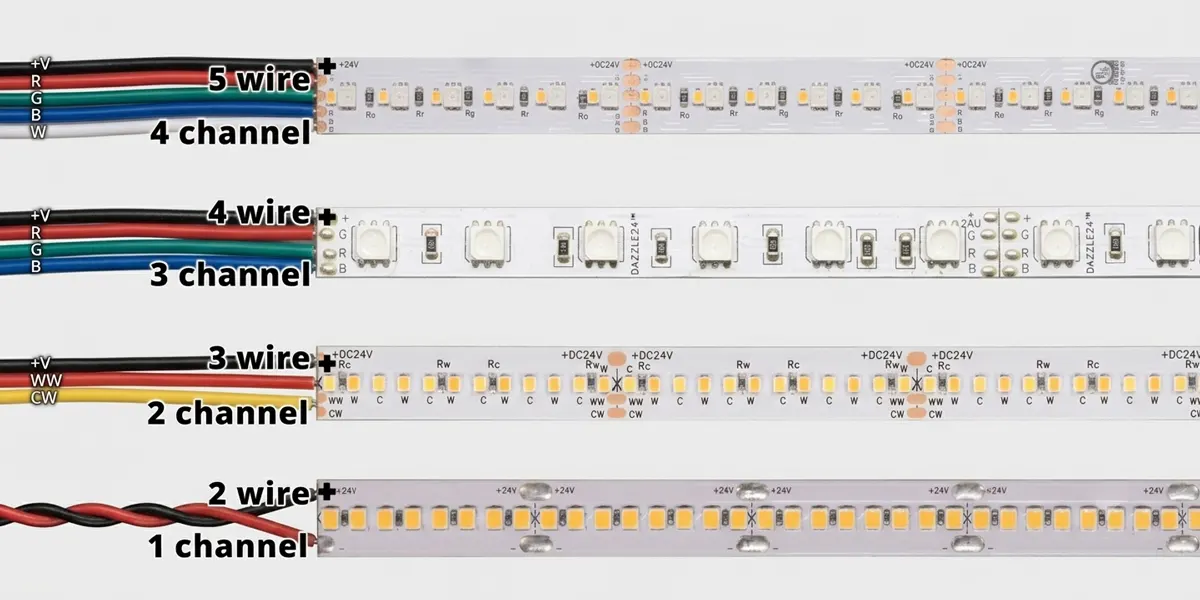
さまざまな種類の DMX LEDストリップ 異なる数のチャネルが必要です。 ここに内訳があります。
単色 LED ストリップ
チャンネル:1
制御方法: 調光のみ
例: 1 チャンネルの DMX デコーダに接続された 24V の単色ストリップ。 チャンネル 1 は、0% から 100% までの明るさを制御します。
調整可能な白色 (CCT) LED ストリップ
チャンネル:2
制御方法: ウォーム ホワイト + クール ホワイト 調光
例: チャネル 1 = 白色の強度、チャネル 2 = クール ホワイトの強度。 2 つの混合により、2700K から 6500K までの調整可能な白が実現します。
RGB LEDストリップ
チャンネル:3
制御方法: 赤 + 緑 + 青 調光
例: チャネル 1 = 赤、チャネル 2 = 緑、チャネル 3 = 青。 3 色を混ぜ合わせると、何百万色が生成されます。
RGBW LED ストリップ
チャンネル:4
制御方法: 赤 + 緑 + 青 + 白調光
例: 専用の白色チャンネルを追加すると、純粋な白色光を得るために色混合が不要になります。
RGB+CCT (RGBWW) LEDストリップ
チャンネル:5
制御方法: 赤 + 緑 + 青 + 暖かい白 + クールな白調光
例: フルカラー コントロールと調整可能な白 – 鮮やかな色と正確な白色光の両方が必要なホテルや小売り環境に最適です。
ピクセル制御 DMX LED ストリップ
ピクセルあたりのチャネル: 3 (RGB) または 4 (RGBW)
制御方法: LED またはピクセル グループは、個別にアドレス指定可能です
例: 100 ピクセルの RGB ストリップは 100 x 3 = 300 チャネルを使用します。このユニバースには 212 の残りのチャネルしか残っていません。
重要な注意: 一部のデコーダは、16 ビット調光をサポートしており、カラーあたりのチャンネル数が 2 倍になります (たとえば、RGB は 3 チャネルから 6 チャネルになります)。 これにより、低輝度レベルでよりスムーズな調光が可能になりますが、ユニバースあたりのフィクスチャ数は半分になります。
ユニバースあたりの LED ストリップの最大数を計算する方法
計算式
フィクスチャの最大数 = [ 512 ÷ チャンネル 1 フィクスチャー]
(ここで、 [ ] は「最も近い整数に丸めること」を示します)。
例 1: RGB ストリップ
- 512 / 3 = 170.67 → 170 フィクスチャ (510 チャンネルを使用し、2 つを使用しないままにする)
例 2: RGBW ストリップ
- 512 / 4 = 128 → 128 フィクスチャ (すべて 512 チャンネル使用)
例 3: RGB+CCT ストリップ
- 512 / 5 = 102.4 → 102 フィクスチャ (510 チャンネルを使用、2 つを未使用のままにする)
例 4: ピクセル ストリップ (50 ピクセル、RGB)
- 50 x 3 = ストリップあたり 150 チャンネル
- 512 / 150 = 3.41 → 3 ストリップ (450 チャンネルを使用)
例 5: ピクセル ストリップ (100 ピクセル、RGBW)
- 100 x 4 = ストリップあたり 400 チャンネル
- 512 / 400 = 1.28 → 1 ストリップ (400 チャンネルを使用し、112 個は使用しないままにします)
経験則: 1 つのフィクスチャが 1 つのユニバース内に完全に存在する必要があります。 フィクスチャを 2 つのユニバースに分割することはできません。 フィクスチャに 5 チャンネルが必要で、現在のユニバースが残り 3 チャンネルしかない場合、そのフィクスチャは次のユニバースで開始する必要があります。
DMX ユニバースの容量比較表
| 照明の種類 | フィクスチャごとのチャネル | ユニバースあたりの最大備品 | 使用されるチャネル |
| 単色 | 1 | 512 | 512 |
| 調整可能な白 (CCT) | 2 | 256 | 512 |
| RGB | 3 | 170 | 510 |
| RGBW | 4 | 128 | 512 |
| RGB+CCT / RGBWW | 5 | 102 | 510 |
| RGB ピクセル (50 ピクセル) | 150 | 3 | 450 |
| RGB ピクセル (100 ピクセル) | 300 | 1 | 300 |
| RGB ピクセル (128 ピクセル) | 384 | 1 | 384 |
| RGB ピクセル (170 ピクセル) | 510 | 1 | 510 |
| RGBW ピクセル (50 ピクセル) | 200 | 2 | 400 |
| RGBW ピクセル (100 ピクセル) | 400 | 1 | 400 |
| RGBW ピクセル (128 ピクセル) | 512 | 1 | 512 |
この表は、どのプロジェクトでも簡単に参照できるガイドとして機能します。ブックマークすることをお勧めします。
ケース スタディ 1: オフィス ライティング – 64 RGBW ストリップ
フィクスチャーごと: 4 チャンネル
総チャンネル: 64 x 4 = 256
必要な宇宙: 256 / 512 = 0.5 → 1 ユニバース (十分に容量以内)
ケース スタディ 2: ホテルの照明 – 96 の調整可能な白いストリップ
フィクスチャごと: 2 チャンネル
総チャンネル: 96 x 2 = 192
必要なユニバース: 192 / 512 = 0.375 → 1 ユニバース (将来の拡張のための十分なスペース)
ケース スタディ 3: ファサード照明の構築 – 200m ピクセルのネオン ホース (60 ピクセル/m、RGB)
総ピクセル数: 200 x 60 = 12,000 ピクセル
総チャンネル: 12,000 x 3 = 36,000 チャンネル
必要な宇宙: 36,000 / 512 = 70.31 → 71 ユニバース
エンジニアリングの推奨事項: 通常、このようなプロジェクトは、物理的な DMX ケーブルではなく、ART-Net または SACN 経由でイーサネット経由で送信されます。
ケース スタディ 4: メディア ファサード – 1,000 RGB ピクセル (個別にアドレス指定可能なピクセル フィクスチャ)
総チャンネル: 1,000 x 3 = 3,000
必要な宇宙: 3,000 / 512 = 5.86 → 6 ユニバース
DMX ユニバースの計画でよくある間違い
| ❌ミス | ✅ 正しいアプローチ |
| チャンネルの代わりにフィクスチャを数える | 常に合計チャネルを計算し、512 で割ります。 |
| RGBW を忘れて 4 チャンネルを使用 | RGBW は RGB ではありません。3 つのチャネルを想定しないでください。 |
| 予約済みチャネルを無視する | 一部のデコーダは、機能用のチャネルを予約するか、チャネルをスキップする「開始アドレス」を使用します。 |
| さまざまなフィクスチャ モードをミックス | 異なるフィクスチャが異なるチャネル数で、アドレス指定が複雑になる — ゾーンを個別に計画する |
| 1 つの宇宙を過負荷にする | 将来の拡張とトラブルシューティングのために、使用率を 80% 未満に保つ |
| 拡張の計画を忘れている | 変更のために少なくとも 10 ~ 20% チャネルの容量を残す |
いつ DMX ユニバースを追加する必要がありますか?
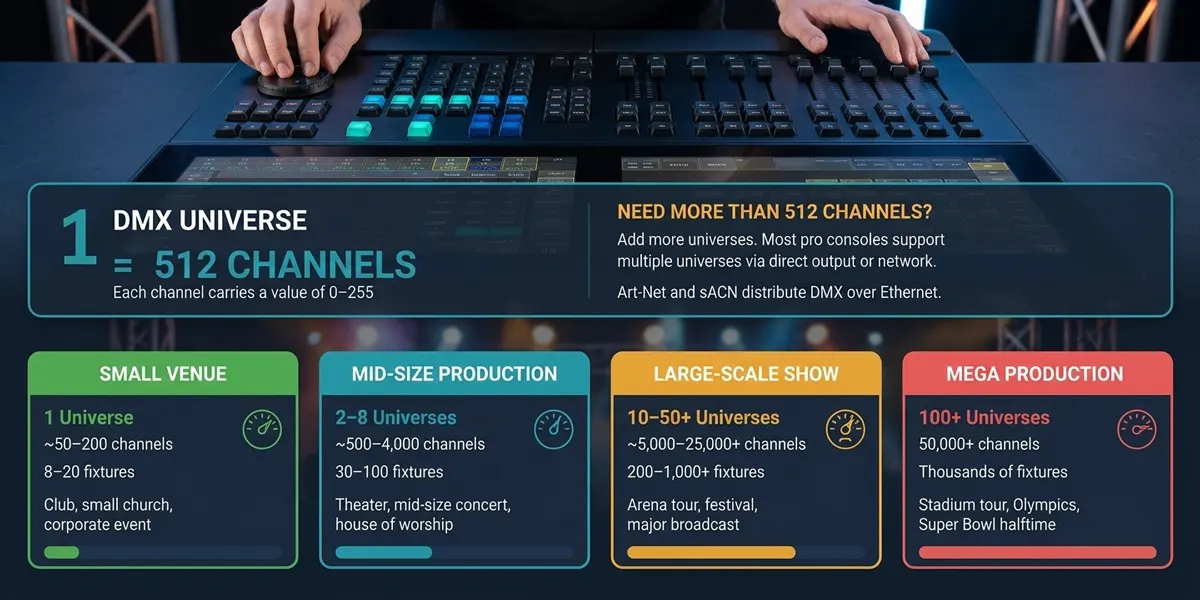
チャネルの使用量が約 70-80% (360-410 チャネル) を超える場合は、新しいユニバースを追加する必要があります。
理由:
- アドレス割り当てスキーム全体を再設計することなく、将来の拡張の余地があります。
- ユニバースが完全に詰め込まれていない場合、トラブルシューティングが容易になります。
- 1 ラインに多くのデバイスが多すぎると、DMX 信号の安定性が低下する可能性があります (電気的制限: 1 ラインあたり最大 32 デバイス)。
実用的なルール: チャネル数が 400 以上に達した場合は、2 つ目のユニバースの計画を開始する必要があります。 Art-Net または SACN を使用すると、物理的な DMX 制限を簡単に破ることができます。
複数のユニバースにスケールする方法
512 チャネルを超えるスケーリングは、実際には非常に簡単です。
- DMX スプリッター / 信号リピーター: 1 つの DMX ユニバース信号を複数の物理回線に分散します (注: これはチャネル数を増やすわけではなく、信号強度を高めるだけです)。
- アートネット ノード: イーサネット ベースの Art-Net プロトコルを物理 DMX 出力に変換します。 各 Art-Net ノードは複数のユニバースを出力できます。 Art-Net 4 は、最大 32,768 ユニバースをサポートします。
- SACN (E1.31): ストリーミング ACN – IP ネットワーク経由で DMX を送信するためのオープン スタンダード。 最大 64,000 ユニバースをサポートし、恒久的なインストールに推奨されるソリューションです。
- マルチポート DMX コントローラ: 一部のコントローラには、複数の物理 DMX 出力ポートが装備されています。各ポートは 1 つのユニバースです。
- RDM (リモート デバイス管理): アドレス指定とステータス フィードバックのための双方向通信を有効にします – 大規模な多宇宙システムの管理に役立ちます。
プロジェクトに適した DMX デコーダーの選択
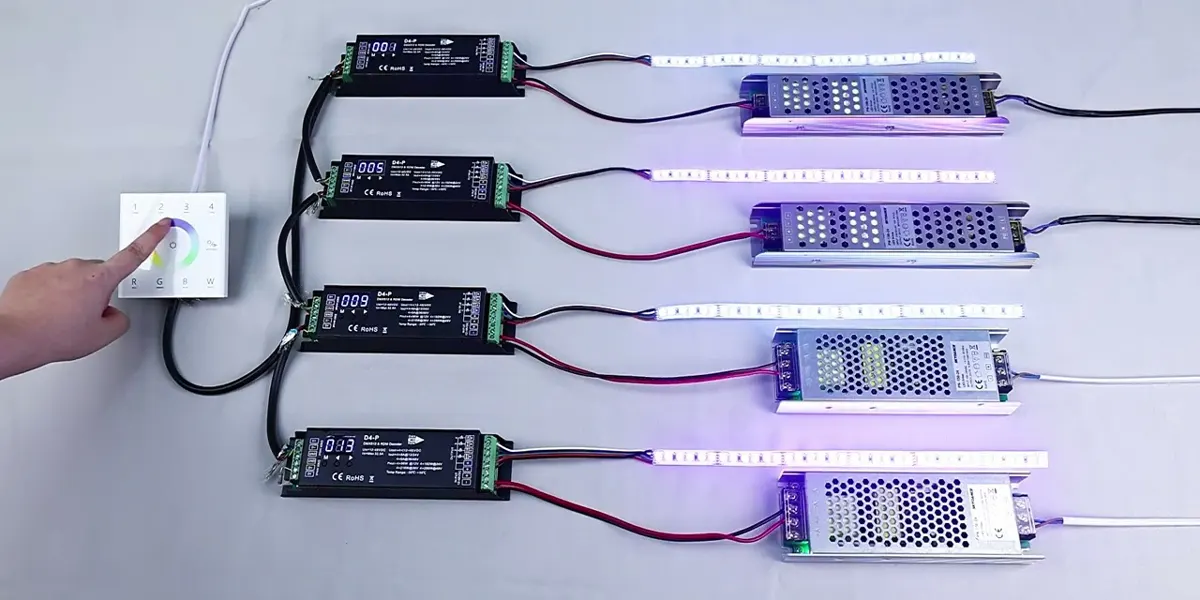
適切なデコーダを選択することは、チャネル数を正しく計算することと同じくらい重要です。 主な考慮事項は次のとおりです。
| デコーダタイプ | に最適 | チャンネル |
| 1 チャンネルの CV デコーダ | 単色調光 | 1 |
| 3 チャンネル CV デコーダ | RGB カラーミキシング | 3 |
| 4 チャンネル CV デコーダ | RGBW カラーミキシング | 4 |
| 5 チャンネル CV デコーダ | RGB+CCT / RGBWW | 5 |
| DMX-to-SPI デコーダ | ピクセル制御ストリップ | 可変 (ピクセルあたり) |
デコーダを選択する際に考慮すべきその他の要素:
- 信号の安定性: 電気絶縁性と信頼性の高い DMX 信号処理を備えたモデルを探します。特に長距離ケーブルでは重要です。
- PWM 周波数: より高い周波数 (>=2 kHz) で、カメラ対応環境で特に重要な、目に見えるちらつきを防ぎます。
- 調光解像度: 16 ビット調光により、低輝度レベルでよりスムーズな制御が可能になります。
- 保護機能: 過電流保護、短絡保護、および過熱保護により、長期的な信頼性が保証されます。
SignLiteLED は、1 チャンネルから 16 チャンネルまで、あらゆる種類の DMX デコーダを提供し、定電圧 (CV) と定電流 (CC) の両方のオプションをカバーします。 当社のデコーダは、8 ビットおよび 16 ビットの調光、複数の PWM 周波数をサポートし、一部のモデルは RDM リモート アドレッシングをサポートします。 私たちを訪問 DMX デコーダ 詳細な仕様とエンジニアリング サポートについて。
大規模な DMX 照明プロジェクトに SignLiteLED を選ぶ理由
SignLiteLED は単なるサプライヤーではありません。当社は DMX Lighting Systems の技術エンジニアリング パートナーです。 当社の利点は次のとおりです。
- マルチユニバース DMX システム設計のサポート: チャネル要件の計算、アドレス割り当ての計画、および 1 ~ 100 以上のユニバースの範囲のプロジェクトに対するハードウェアの推奨事項を提供するお手伝いをします。
- 建築グレードの DMX LED ストリップ: ストリップは、単色、調整可能な白、RGB、RGBW、および RGB+CCT 構成で、カスタムの長さと IP 定格を備えています。
- DMX デコーダとコントローラー: 1 チャンネルから 16 チャンネルのデコーダまで、RDM と 16 ビットの調光をサポートする CV および CC オプションをカバーします。
- OEM/ODMカスタマイズ: お客様の仕様に合わせて製造します – カスタム PCB 設計、コネクタ、定格電力、およびパッケージング。
- チャネル計画とアドレス割り当て技術サポート: 当社のエンジニアリング チームが、DMX アドレスの割り当て、ユニバース プランニング、およびシステム統合を支援します。
- ドキュメンテーションと配線ガイド: 明確な配線図、アドレス割り当てガイド、試運転チェックリストを提供して、スムーズな設置を確保します。
結論
単一の DMX ユニバースで 512 チャンネルを提供しますが、制御できる LED ストリップの正確な数は、フィクスチャのタイプによって完全に異なります。
- 単色: 512 フィクスチャ
- 調整可能な白 (CCT): 256 フィクスチャ
- RGB: 170 のフィクスチャ
- RGBW: 128 フィクスチャ
- RGB+CCT: 102 フィクスチャ
- ピクセルストリップ: 1 ~ 3 ストリップ (ピクセル数によって異なります)
重要なポイント: フィクスチャ数ではなく、チャネルごとに計画する。 80% ルール (拡張のためヘッドルームを確保) に従い、ユニバースあたり 512 チャネルを超えないようにします。 大規模なプロジェクトの場合、Art-Net と SACN はシームレスな多宇宙スケーリングを提供します。
オフィス、ホテル、ファサードの建物、またはメディア ウォールの設計のいずれであっても、計算方法は同じように簡単です。そして、最初から正しく理解するための公式、比較表、および実際の例が得られます。
よくある質問
関連記事