Türkçe
  English
  简体中文
简体中文  Deutsch
  Español
  Français
  Italiano
  日本語
日本語  한국어
한국어  Polski
  Português
  Русский
  Nederlands
  Tiếng Việt
  ไทย
ไทย 
Mimari aydınlatma, ticari aydınlatma veya medya cephe projeleri için LED armatürler tedarik ediyor veya seçiyorsanız, muhtemelen kendinize şu soruyu sormuşsunuzdur: “Bir DMX Universe kontrol edebilir mi?”
“512 Kanallar” – Teknik olarak doğru olsa da, bu kısa cevap pratik mühendislikte neredeyse işe yaramaz. Gerçek cevap birden çok faktöre bağlıdır: LED şeritleriniz RGB veya RGBW olup, piksel kontrolü kullanıp kullanmadıkları, ne tür bir kod çözücü kullandığınız ve adresleri nasıl atadığınız.
Bir DMX evreni 512 kontrol kanalı sağlar. Ancak bir RGB şeridi, fikstür başına 3 kanal kullanır, bir RGBW şeridi 4 kanal kullanır ve bir piksel şeridi sadece bir metrede yüzlerce kanalı tüketebilir. 170 RGB armatürünü kontrol etmek ve yalnızca bir piksel şeridini kontrol etmek arasındaki fark çok büyüktür - bu ayrımı anlamak, iyi planlanmış bir kurulum projesi ile hata ayıklama kabusu arasındaki ayrım çizgisidir.
Bu kılavuz, DMX evren gereksinimlerinizi doğru bir şekilde hesaplamanıza yardımcı olacak eksiksiz hesaplama formülleri, gerçek dünya proje örnekleri ve mühendislik önerileri sağlar. İster ofis aydınlatması, ister otel aydınlatması, ister büyük ölçekli bir medya cephesi planlıyor olun, sadece bir sayı değil, net bir metodoloji ile çekip gideceksiniz. Daha fazla bilgi edinmek istiyorsanız, lütfen ziyaretimizi ziyaret edin. DMX LED Sistem Bilgi Merkezi.
DMX evreni nedir?
Bir DMX evreni, esasen 512 bağımsız kontrol kanalı taşıyabilen tek bir veri hattıdır. Her kanal, bir armatürün bir özelliğini kontrol etmek için 0 ile 255 (8 bit çözünürlük) arasında bir değer gönderir - parlaklık, renk yoğunluğu veya belirli bir etki.
Bunu şu şekilde düşünün:
- evren = bir veri kablosu (bir DMX hattı)
- kanal = tek bir kontrol değeri (ör. kırmızı yoğunluk)
- hitabe = Belirli bir armatüre atanan başlangıç kanalı
- şifreli yayını çözen aygıt = LED şeritler için DMX verilerini PWM sinyallerine dönüştüren cihaz
DMX512 standardına uyan tüm cihazlar bu 512 kanallı limiti paylaşır. 512 kanalı aştığınızda, genellikle Ethernet üzerinden ART-Net veya SACN protokolleri aracılığıyla veya denetleyicinize ikinci bir DMX çıkış portu ekleyerek başka bir evren eklemeniz gerekir.
bilgi akışı: DMX Controller -> Universe (512 kanal) -> Adresler (başlangıç kanalları) -> Dekoderler -> LED şeritler.
Bir DMX evreninin neden sadece 512 kanalı var?
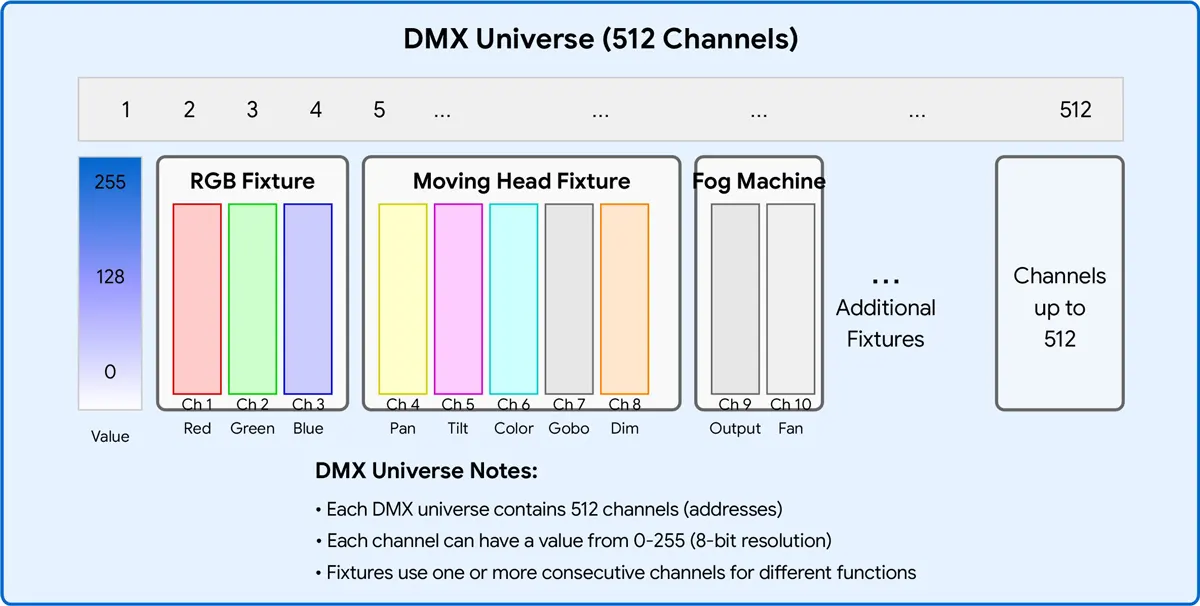
DMX512 protokolü, 1986 yılında eski 0-10V analog kontrol sistemlerinin yerini almak üzere USITT (Amerika Birleşik Devletleri Tiyatro Teknolojisi Enstitüsü) tarafından geliştirilmiştir. Addaki “512”, tek bir DMX paketinin taşıyabileceği maksimum kanal sayısından gelir – saniyede 44 kez iletilen 512 bayt veri.
O zamanlar 512 kanal fazlasıyla yeterli görünüyordu. Dimmer raflar, hareketli kafalar ve renk değiştiricilerin her biri yalnızca bir avuç kanal gerektiriyordu. Ancak RGB LED sistemlerinin ve piksel kontrollü ortam cephelerinin patlayıcı büyümesiyle, 512 kanallı limit hızla bir darboğaz haline geldi. Bugün, tek bir piksel haritalı LED duvar, düzinelerce hatta yüzlerce evreni tüketebilir.
Orijinal standart 2008'de DMX512-A'ya (ANSI E1.11) güncellendi, ancak evren başına 512 kanallı limit değişmeden kaldı. Çözüm basit: birden fazla evren kullanın.
DMX Paket Yapısı: Break -> Start Code (0x00) -> En fazla 512 veri yuvası (kanallar) -> Her biri yuva = 1 bayt (0-255).
Tek bir DMX evreni 512 kontrol kanalı sağlar. Kaç tane LED şeridi kontrol edebileceği tamamen her bir şeridin kaç kanal gerektirdiğine bağlıdır:
| Kontrol Türü | fikstür başına kanal | Evren başına maksimum fikstür |
| tek renk | 1 | 512 |
| Ayarlanabilir Beyaz (CCT) | 2 | 256 |
| RGB | 3 | 170 |
| RGBW | 4 | 128 |
| RGB+CCT / RGBWW | 5 | 102 |
| RGB piksel (50 piksel) | 150 | 3 |
| RGB piksel (100 piksel) | 300 | 1 |
| RGB piksel (170 piksel) | 510 | 1 |
RGB şeritler için, her bir evren 170 adede kadar ayrı ayrı adreslenebilir armatürleri kontrol edebilir (510 kanal kullanarak). Piksel kontrollü şeritler önemli ölçüde daha fazla kanal tüketir, bu nedenle evren başına fikstür sayısı önemli ölçüde düşer.
DMX kanalları nasıl atanır?
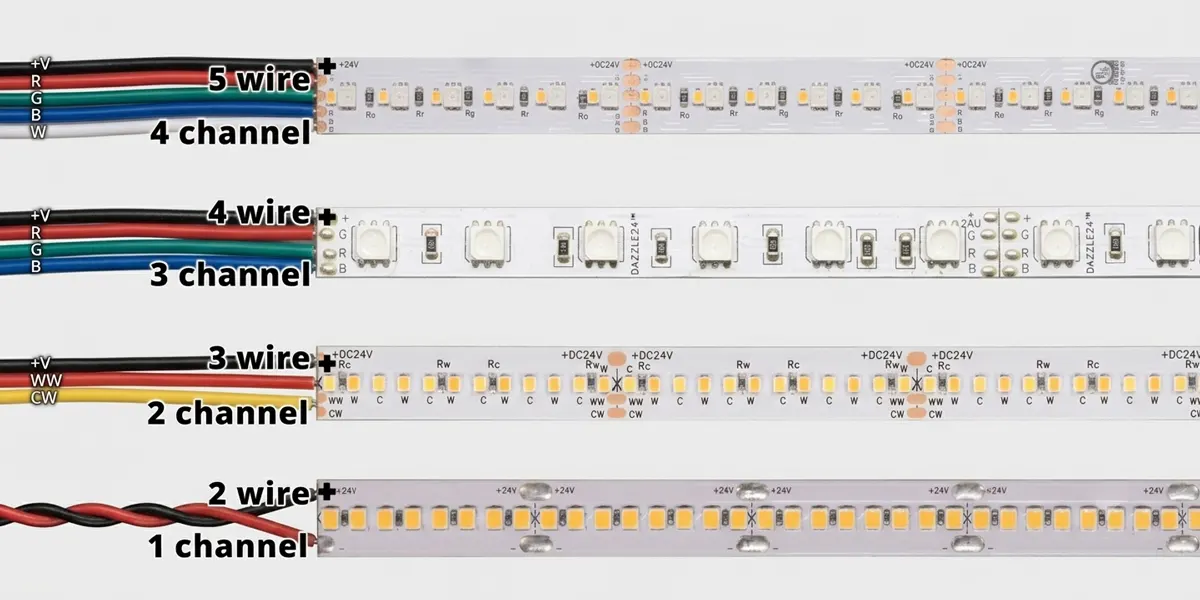
farklı türde DMX LED şeritler farklı sayıda kanal gerektirir. İşte dökümü:
Tek renkli LED şeritler
Kanallar: 1
Kontrol yöntemi: sadece karartma
Örnek: 1 kanallı DMX kod çözücüye bağlı 24V tek renkli şerit. Kanal 1, 0%'den 100%'ye kadar parlaklığı kontrol eder.
Ayarlanabilir Beyaz (CCT) LED Şeritler
Kanallar: 2
Kontrol yöntemi: sıcak beyaz + soğuk beyaz karartma
Örnek: Kanal 1 = Sıcak beyaz yoğunluğu, Kanal 2 = Soğuk beyaz yoğunluğu. İkisini karıştırmak, 2700K'dan 6500K'ya ayarlanabilir beyaza ulaşır.
RGB LED Şeritler
Kanallar: 3
Kontrol yöntemi: kırmızı + yeşil + mavi karartma
Örnek: Kanal 1 = Kırmızı, Kanal 2 = Yeşil, Kanal 3 = Mavi. Üç rengi karıştırmak milyonlarca renk üretir.
RGBW LED Şeritler
Kanallar: 4
Kontrol yöntemi: kırmızı + yeşil + mavi + beyaz karartma
Örnek: Özel bir beyaz kanal eklemek, saf beyaz ışık elde etmek için renk karıştırma ihtiyacını ortadan kaldırır.
RGB+CCT (RGBWW) LED Şeritler
Kanallar: 5
Kontrol yöntemi: kırmızı + yeşil + mavi + sıcak beyaz + soğuk beyaz karartma
Örnek: Tam Renk Kontrolü ve Ayarlanabilir Beyaz – Canlı renklerin ve doğru beyaz ışığın gerekli olduğu oteller ve perakende ortamları için idealdir.
Piksel Kontrollü DMX LED Şeritler
Piksel başına kanallar: 3 (RGB) veya 4 (RGBW)
Kontrol yöntemi: Her LED veya piksel grubu ayrı ayrı adreslenebilir
Örnek: 100 piksellik bir RGB şeridi, 100 x 3 = 300 kanal kullanır ve bu evrende yalnızca 212 kanal kalır.
not: Bazı kod çözücüler, renk başına kanal sayısını iki katına çıkaran 16 bitlik kararmayı destekler (örneğin, RGB 3'ten 6'ya kadar gider). Bu, düşük parlaklık seviyelerinde daha yumuşak karartma sağlar, ancak evren başına armatür sayısını yarıya indirir.
Evren başına maksimum LED şerit sayısı nasıl hesaplanır
Hesap formülü
Maksimum fikstür sayısı = [ 512 ÷ fikstür başına kanal]
(burada [ ] “en yakın tamsayıya yuvarlama” anlamına gelir).
Örnek 1: RGB Şeritler
- 512 / 3 = 170.67 → 170 armatür (510 kanal kullanarak, 2 kullanılmamış bırakarak)
Örnek 2: RGBW Şeritleri
- 512 / 4 = 128 → 128 fikstür (tüm 512 kanal kullanılır)
Örnek 3: RGB + CCT şeritleri
- 512 / 5 = 102.4 → 102 fikstür (510 kanal kullanarak, 2 kullanılmamış bırakarak)
Örnek 4: Piksel Şeritleri (50 Piksel, RGB)
- 50 x 3 = şerit başına 150 kanal
- 512 / 150 = 3,41 → 3 şerit (450 kanal kullanarak)
Örnek 5: Piksel Şeritleri (100 Piksel, RGBW)
- 100 x 4 = şerit başına 400 kanal
- 512 / 400 = 1.28 → 1 şerit (400 kanal kullanarak, 112 kullanılmamış bırakarak)
el değirmenin: Tek bir fikstür tamamen tek bir evrende bulunmalıdır. Bir fikstürü iki evrene bölemezsiniz. Bir fikstür 5 kanal gerektiriyorsa ve mevcut evrenin sadece 3 kanalı kaldıysa, bu fikstür bir sonraki evrende başlamalıdır.
DMX Evren Kapasite Karşılaştırma Tablosu
| aydınlatma tipi | fikstür başına kanal | Evren başına maksimum fikstür | Kullanılan kanallar |
| tek renk | 1 | 512 | 512 |
| Ayarlanabilir Beyaz (CCT) | 2 | 256 | 512 |
| RGB | 3 | 170 | 510 |
| RGBW | 4 | 128 | 512 |
| RGB+CCT / RGBWW | 5 | 102 | 510 |
| RGB piksel (50 piksel) | 150 | 3 | 450 |
| RGB piksel (100 piksel) | 300 | 1 | 300 |
| RGB piksel (128 piksel) | 384 | 1 | 384 |
| RGB piksel (170 piksel) | 510 | 1 | 510 |
| RGBW Piksel (50 Piksel) | 200 | 2 | 400 |
| RGBW piksel (100 piksel) | 400 | 1 | 400 |
| RGBW piksel (128 piksel) | 512 | 1 | 512 |
Bu tablo, herhangi bir proje için hızlı başvuru kılavuzu olarak hizmet eder - yer imlerine eklemenizi öneririz.
Vaka Çalışması 1: Ofis Aydınlatması – 64 RGBW Şerit
Fikstür başına: 4 kanal
Toplam kanallar: 64 x 4 = 256
Gerekli Evrenler: 256 / 512 = 0,5 → 1 Evren (kapasite dahilinde)
Vaka Çalışması 2: Otel Aydınlatması – 96 Ayarlanabilir Beyaz Şerit
Fikstür başına: 2 kanal
Toplam kanallar: 96 x 2 = 192
Gerekli Evrenler: 192 / 512 = 0,375 → 1 Evren (gelecekteki genişleme için bol miktarda boşluk)
Vaka Çalışması 3: Bina Cephe Aydınlatması – 200m Piksel Neon Hortum (60 Piksel/m, RGB)
Toplam piksel: 200 x 60 = 12.000 piksel
Toplam kanallar: 12.000 x 3 = 36.000 kanal
Gerekli evrenler: 36.000 / 512 = 70.31 → 71 evren
Mühendislik Önerisi: Bu tür projeler tipik olarak fiziksel DMX kablolama yerine ART-Net veya SACN üzerinden Ethernet üzerinden iletilir.
Vaka Çalışması 4: Medya Cephe - 1.000 RGB Piksel (bireysel olarak adreslenebilir piksel armatürleri)
Toplam kanallar: 1.000 x 3 = 3.000
Gerekli evrenler: 3.000 / 512 = 5.86 → 6 evren
DMX evren planlamasında yaygın hatalar
| ❌ Hata | ✅ Doğru yaklaşım |
| Kanallar yerine armatürleri sayma | Her zaman toplam kanalları hesaplayın, sonra 512'ye bölün |
| RGBW'yi unutmak 4 kanal kullanır | RGBW RGB değildir - 3 kanal varsaymayın |
| Ayrılmış kanalları yoksaymak | Bazı dekoderler, kanalları atlayan "Başlangıç Adresleri"ni işlevler için ayırır veya |
| Farklı fikstür modlarını karıştırma | Farklı kanal sayımlarına sahip farklı armatürler adreslemeyi karmaşıklaştırır—Bölgeleri ayrı ayrı planlayın |
| Bir evreni aşırı yüklemek | Gelecekteki genişletme ve sorun giderme için kullanımı 80%'nin altında tutun |
| Genişleme için plan yapmayı unutmak | Değişiklikler için her zaman en az 10–20% kanal kapasitesi bırakın |
Başka bir DMX evrenini ne zaman eklemelisiniz?

Kanal kullanımınız yaklaşık 70-80%'yi (360-410 kanal) aştığında yeni bir evren eklemelisiniz.
sebep:
- Tüm adres tahsis şemanızı yeniden tasarlamadan gelecekteki genişleme için yeriniz olacak.
- Evrenler tam olarak paketlenmediğinde sorun giderme daha kolaydır.
- Tek bir hattaki çok fazla cihaz DMX sinyal kararlılığını bozabilir (elektrik sınırlaması: hat başına maksimum 32 cihaz).
cetvel: Kanal sayınız 400 veya daha üstüne ulaşırsa, ikinci bir evren planlamaya başlamalısınız. Art-net veya SACN kullanmak, fiziksel DMX sınırını aşmayı kolaylaştırır.
Birden fazla evrene nasıl ölçeklenir
512 kanalın ötesine ölçeklendirme aslında oldukça basittir:
- DMX Bölücüler / Sinyal Tekrarlayıcılar: Bir DMX evren sinyalini birden çok fiziksel hat üzerinden dağıtın (Not: Bu, kanal sayısını artırmaz, yalnızca sinyal gücünü artırır).
- Art-Net düğümleri: Ethernet tabanlı Art-Net protokolünü fiziksel DMX çıkışına dönüştürün. Her Art-Net düğümü birden fazla evrenin çıktısını alabilir. Art-Net 4, 32.768 evreni destekler.
- SACN (E1.31): Akış ACN – IP ağları üzerinden DMX iletmek için açık bir standart. 64.000 evreni destekler ve kalıcı kurulumlar için tercih edilen çözümdür.
- Çoklu Bağlantı Noktalı DMX Denetleyicileri: Bazı kontrolörler birden fazla fiziksel DMX çıkış portu ile donatılmış olarak gelir - her bağlantı noktası bir evrendir.
- RDM (Uzaktan Cihaz Yönetimi): Adresleme ve durum geri bildirimi için çift yönlü iletişimi etkinleştirir – büyük çoklu evren sistemlerinin yönetimi için yararlıdır.
Projeniz için doğru DMX kod çözücüyü seçme
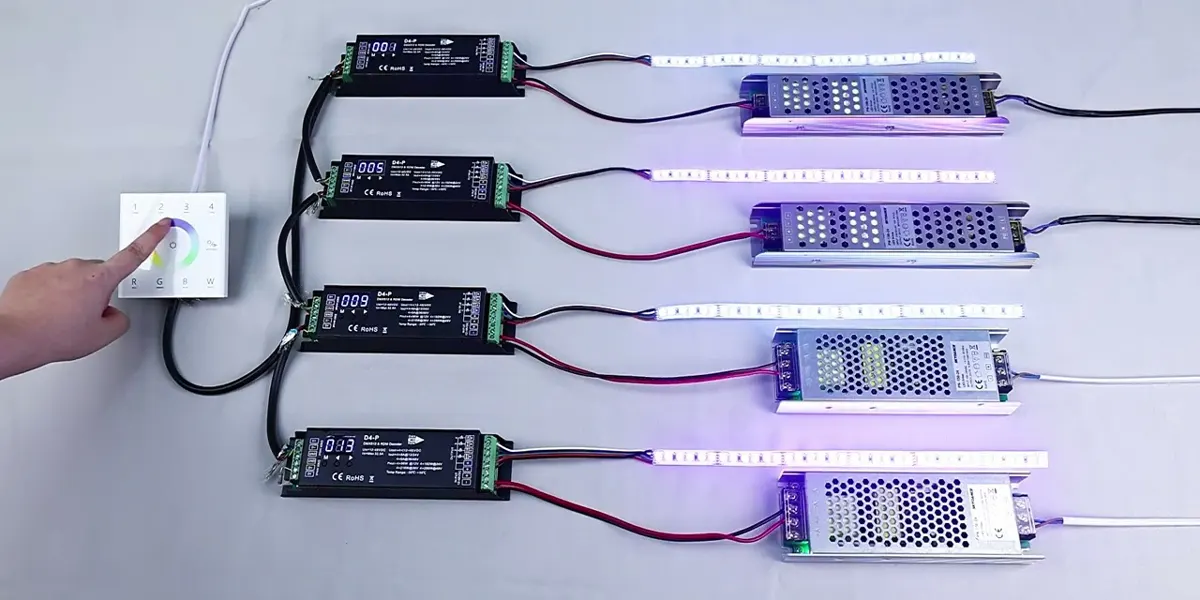
Doğru kod çözücüyü seçmek, kanal sayılarını doğru hesaplamak kadar önemlidir. Önemli hususlar şunları içerir:
| kod çözücü türü | en uygun şekilde | kanallar |
| 1 kanallı CV dekoderi | Tek renkli karartma | 1 |
| 3 kanallı CV dekoder | RGB renk karıştırma | 3 |
| 4 kanallı CV dekoderi | RGBW renk karıştırma | 4 |
| 5 kanallı CV dekoder | RGB+CCT / RGBWW | 5 |
| DMX-to-SPI dekoder | Piksel kontrollü şeritler | Değişken (Piksel başına) |
Bir kod çözücü seçerken göz önünde bulundurulması gereken ek faktörler:
- sinyal istikrarı: Elektriksel izolasyon ve güvenilir DMX sinyal işleme özelliğine sahip modeller arayın – özellikle uzun mesafeli kablolama için kritik öneme sahiptir.
- PWM frekansı: Daha yüksek frekanslar (>=2 kHz), özellikle kameraya hazır ortamlar için önemli olan görünür titremeyi önler.
- karartma çözünürlüğü: 16-bit karartma, düşük parlaklık seviyelerinde daha yumuşak kontrol sağlar.
- Koruma özellikleri: Aşırı akım koruması, kısa devre koruması ve aşırı sıcaklık koruması, uzun süreli güvenilirlik sağlar.
SignliteLed, hem sabit voltaj (CV) hem de sabit akım (CC) seçeneklerini kapsayan 1 kanaldan 16 kanala kadar eksiksiz bir DMX kod çözücü yelpazesi sunar. Kod çözücülerimiz 8 bit ve 16 bit karartma, çoklu PWM frekanslarını destekler ve belirli modeller RDM uzaktan adreslemeyi destekler. bizimkileri ziyaret et DMX kod çözücü Ayrıntılı teknik özellikler ve mühendislik desteği için.
Büyük DMX aydınlatma projeleri için neden SignLited'i seçmelisiniz?
Signliteled bir tedarikçiden daha fazlasıdır – DMX aydınlatma sistemleri için teknik mühendislik ortağıyız. Avantajlarımız şunları içerir:
- Çoklu evren DMX sistem tasarımı desteği: Kanal gereksinimlerini hesaplamanıza, adres tahsisini planlamanıza ve 1 ila 100'den fazla evrene kadar değişen projeler için donanım önerileri sağlamanıza yardımcı oluyoruz.
- Mimari dereceli DMX LED şeritler: Şeritlerimiz, özel uzunluklar ve IP derecelendirmeleri ile tek renkli, ayarlanabilir beyaz, RGB, RGB, RGB+CCT konfigürasyonlarında mevcuttur.
- DMX kod çözücüler ve denetleyiciler: RDM ve 16 bit karartma desteği ile CV ve CC seçeneklerini kapsayan 1 kanaldan 16 kanallı dekodere.
- OEM/ODM Özelleştirme: Sizin tam özelliklerine göre üretiyoruz - özel PCB tasarımı, konektörler, güç derecelendirmeleri ve ambalajlama.
- Kanal planlama ve adres tahsisi teknik destek: Mühendislik ekibimiz DMX adres tahsisi, evren planlaması ve sistem entegrasyonu konusunda yardımcı olur.
- Belgeler ve kablolama kılavuzları: Sorunsuz kurulumlar sağlamak için net bağlantı şemaları, adres tahsisi kılavuzları ve devreye alma kontrol listeleri sağlıyoruz.
Çözüm
Tek bir DMX evreni 512 kanal sağlar - ancak kontrol edebileceği tam olarak LED şerit sayısı tamamen sizin armatür tipinize bağlıdır:
- tek renk: 512 fikstür
- Ayarlanabilir Beyaz (CCT): 256 fikstür
- RGB: 170 fikstür
- RGBW: 128 fikstür
- RGB+CCT: 102 fikstür
- Piksel Şeritleri: 1-3 şerit (piksel sayısına bağlı olarak)
Anahtar paket: fikstür sayısına göre değil, kanallara göre plan yapın. 80% kuralını izleyin (genişleme için boşluk payı ayırın) ve evren başına asla 512 kanalı aşmayın. Büyük projeler için Art-Net ve SACN, sorunsuz çoklu evren ölçeklemesi sağlar.
İster ofisler, oteller, bina cepheleri veya medya duvarları tasarlıyor olun - hesaplama yöntemi eşit derecede basittir - ve şimdi ilk seferde doğru yapmak için formüle, karşılaştırma tablolarına ve gerçek dünya örneklerine sahipsiniz.
SSS
İlgili Yazılar